Category: week11y

Accessibility themed newsletter released every week.

  • week11y issue 27

    Your weekly frequent11y newsletter, brought to you by @ChrisBAshton:

    Celebrate Global Accessibility Awareness Day with GDS

    • GDS is running a conference this Thursday 21st May, with registration closing at 5pm on the 20th. Agenda: 9:30am “An introduction to digital accessibility regulations”, 11am “How to avoid common accessibility statement fails”, 12:30pm “How to carry out basic accessibility checks”, 3pm “Making accessibility accessible: the secret to engaging your workforce”, 4pm “What would Marie Kondo do? How to clear your website of inaccessible PDFs”.

    A modified image of Kim Kardashian: her left eye has been switched with her lips.
    Source: https://hackernoon.com/capsule-networks-are-shaking-up-ai-heres-how-to-use-them-c233a0971952

    AI Is Not Similar To Human Intelligence. Thinking So Could Be Dangerous

    • Dr Elizabeth Fernandez gives three reasons why AI is not the same as human thought. 1) they’re easy to fool: a neural network might correctly classify an image as a banana, but introduce a slight amount of noise and it might re-classify it as a toaster. 2) they need an enormous amount of data to learn: thousands of pictures, versus just a few for a toddler. 3) they’re “myopic”: powerful enough to correctly identify Kim Kardashian, yet seeing nothing wrong if her eye and lips swap places. I found this article via Marco Zehe’s blog, who references it to suggest that AI will never be able to write reliable alt text.

    Supporting users who change colours on GOV.UK

    • A post from 2018 that resurfaced recently and still has lots of great tips. GOV.UK uses the CSS triangle method to create a back link component whose triangle arrow icon renders even when the user has overridden their colours. The site logo was once a PNG, but under these conditions would disappear, so was replaced with inline SVG. Focus states and panels that ought to stand out would also get lost when colours are overridden, so a transparent border was added.

    WCAG 2.1 and PDF Accessibility

    • Lots of useful reminders. Something that conforms to WCAG 2.1 AA will also conform to WCAG 2.0 AA. Line height should be at least 1.5 times font size; spacing following paragraphs should be at least 2 times; letter spacing at least 0.12 times; word spacing at least 0.16 times. JavaScript inside PDF forms that sets a timer must warn what data will be lost if not completed in time, and/or should allow time extensions.
    • EDIT 21/05/2020: I had misread the article – WCAG does not stipulate that line height should be 1.5 times the font size (nor any of the other rules quoted). Instead it says that if a user sets their own custom style override such that line height is 1.5 times the font size, there should be no loss to content or functionality. Apologies for the confusion – I have now struck out the offending lines above. Thanks to Anika Henke for pointing this out.

    Proper VoiceOver support coming soon to Firefox on MacOS

    • Mozilla announces that by the end of June, Firefox should have basic support for MacOS VoiceOver. By the end of the year, the experience should be improved for visually impaired VoiceOver users, including live region support and rotor item support. The post goes into detail about what was achieved in each Firefox version from v75 onwards.

    Did you know that you can subscribe to dai11y, week11y, fortnight11y or month11y updates! Every newsletter gets the same content; it is your choice to have short, regular emails or longer, less frequent ones. Curated with ♥ by developer @ChrisBAshton.
  • week11y issue 26

    Your weekly frequent11y newsletter, brought to you by @ChrisBAshton:

    Avoid aria-roledescription

    • Adrian Roselli writes about this attribute that describes the role of an element. It overrides what is announced to the screen reader, e.g. <input type="text" aria-roledescription="Only numbers allowed"> will read as “Only numbers allowed” instead of “input type text”. This hides meaning and the control type – a confusing experience for the user. It also doesn’t translate. There’s an open issue about the global nature of this attribute. Don’t use it!

    When (not) to use the <br> element

    • Šime Vidas shares a helpful reminder that the <br> line break element is useful in some cases. Whilst web developers have generally moved away from <br> use – seeing line breaks as presentation, not content, and therefore using CSS instead – it should still be used when line breaks are part of the content. For example: poems or addresses.

    The Complete Guide to Accessibility for WordPress Websites

    Did you know that you can subscribe to dai11y, week11y, fortnight11y or month11y updates! Every newsletter gets the same content; it is your choice to have short, regular emails or longer, less frequent ones. Curated with ♥ by developer @ChrisBAshton.

  • week11y issue 25

    Your weekly frequent11y newsletter, brought to you by @ChrisBAshton:

    Why to Avoid Accessibility Overlay Toolbars, Pugins & Widgets

    • Accessibility Works article warning against the installation of third-party overlays/widgets that promise to make your site accessible. These tools provide options for customising text size, providing magnifiers, and in some cases a built-in screen reader or alt-text generator. However, they cannot address the 70% of accessibility issues that can only be manually addressed – and they require the user to have to find and learn how to use a whole new accessibility tool.

    Track Which Element Has Focus

    Using a Chrome “Live Expression” to show the current focused element
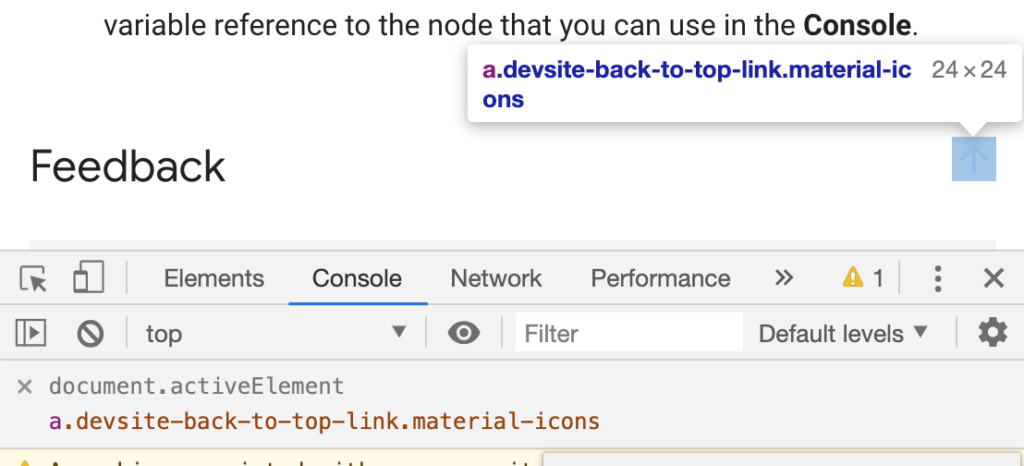
    • Kayce Basques, technical writer at Google, shares a Chrome tip for developers/testers. By creating a “Live Expression” with the value document.activeElement, you can tab around the web page and always know where the focus state is, even if there aren’t any associated focus styles.

    Treating cataracts in the 21st century

    • Brief but interesting article highlighting that one billion people in the world have preventable or treatable visual impairments; 300 million of these are cataracts, which accounts for 50% of blindness worldwide. A cataract is an opacity in the lens of the eye, often caused by ageing, and can be fixed with surgery: a small incision, fragmenting the lense, emitting ultrasound to aspirate the cataract.

    Facing coronavirus while deaf and blind: ‘Everything relies on touch’

    • Article by ABC News, highlighting the plight of the 40,000 deaf-blind Americans who rely on touch but have to maintain social distancing. They use hand-over-hand signing to communicate, and finger-scan braille public signs for mobility, now prone to contagion. The community uses computers and internet to try to counter isolation and loneliness. There are fears that states have considered putting people with disabilities at the back of the line for treatment.

    Semantic sidenotes for the web

    • Article (or video) by UI designer Koos Looijesteijn, describing ‘sidenotes’ that have been in print media for centuries, and the difficulty in representing them in HTML. His solution is a <span> containing a <label> that can be clicked to expand a corresponding <small> on mobile, or that highlights the text at the side on desktop. At publish time it required JS but now appears to have been refactored to be CSS-only, using clever checkbox logic. By the author’s admission, it’s ugly, and we should campaign for a native solution instead.

    Did you know that you can subscribe to dai11y, week11y, fortnight11y or month11y updates! Every newsletter gets the same content; it is your choice to have short, regular emails or longer, less frequent ones. Curated with ♥ by developer @ChrisBAshton.

  • week11y issue 24

    Your weekly frequent11y newsletter, brought to you by @ChrisBAshton:

    Just a short one this week – life has got ahead of me! ~ Chris

    This Is What Happened at a Captioned Virtual Reality Webinar

    • Meryl K. Evans describes their experience of attending A11yVR meetup, which you can watch. Meryl is deaf and relies on the captions, but being in a VR environment raised several issues, such as other avatars standing in front of the captions. Technical issues such as captions disappearing or being delayed didn’t help.

    Accessible page title in a single-page React application

    • Post by Hugo Giraudel, describing how following a link on a ‘normal’ web page loads a new page and causes a screen reader to read out the page title – this behaviour might be missing from your React SPA. He creates a <TitleAnnouncer> component, which listens for a change in Helmet state to update the contents of a screen-reader hidden <p> element, and apply focus to it. Hugo acknowledges this element could be avoided altogether if you can guarantee there is always a relevant <h1> in the page.

    How home working leaves deaf people out of the loop during coronavirus

    • Three quarters of people who live with deafness fear they will be less productive working from home. People who lip-read or use British Sign Language are especially at risk of being excluded from phone and video interactions. We can all help by speaking one at a time, using a well lit camera, and providing textual or visual presentations.

    Did you know that you can subscribe to dai11y, week11y, fortnight11y or month11y updates! Every newsletter gets the same content; it is your choice to have short, regular emails or longer, less frequent ones. Curated with ♥ by developer @ChrisBAshton.

  • week11y issue 23

    Your weekly frequent11y newsletter, brought to you by @ChrisBAshton:

    Braille keyboard for Android

    Google develops virtual braille keyboard for Android, rolling out now

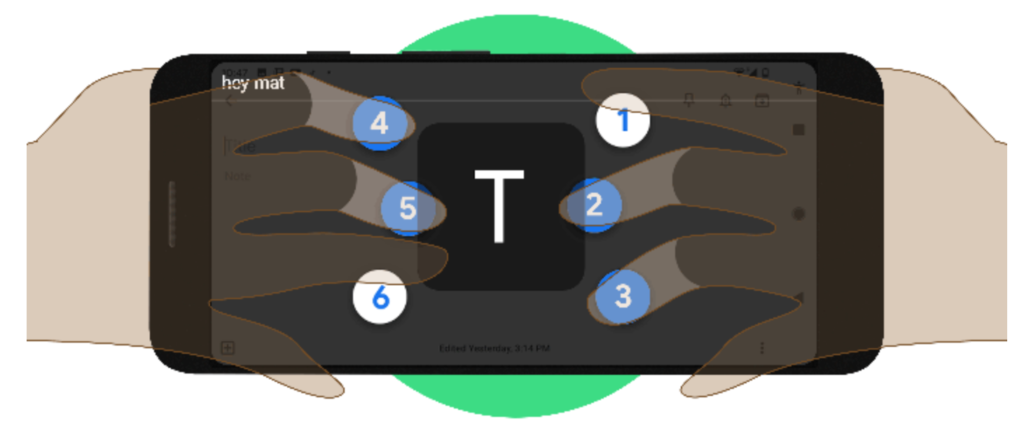
    • Currently, people plug in physical braille keyboards when they want to type, which can be inconvenient on mobile. Google have developed a virtual TalkBack keyboard integrated into Android, which you hold in landscape orientation, supporting both grade 1 and grade 2 braille.

    Styling yourself when you are blind

    • Nas Campanella, who is blind, describes how she used a designer to create her wedding dress, feeling dozens of fabrics before arriving at one with flowers, lace and beads. Journalist Catherine Mahony uses stylists, maintaining a written book of tactile things so she can identify what’s in her wardrobe. She says she used to think she couldn’t have a fashion style when blind, but now thinks about other areas of life where she has a style – music, food, books – and talks to stylists about getting these into what she wears. Online shopping is difficult due to lack of descriptions, and Nas always asks a sighted friend to double-check items before she purchases.

    Models of Disability: Types and Definitions

    • A useful reference to bookmark. The medical model of disability is “a problem of the person… [requiring ‘fixing’ with] a cure or an adjustment/behavioural change”. The social model sees disability as a socially created problem, requiring individual, community and large-scale change for full integration in society. Whilst there are the main two, other distinct models include the minority, expert, tragedy, religious and economic models. There are a number of others too which are subtle variations of the distinct ones.

    XR Accessibility User Requirements

    • W3 have released a working draft for accessibility user requirements for XR (virtual/augmented reality). XR currently requires that the user be in a physical position, with high degree of precision, timing and simultaneous action. The draft suggests users should be allowed to navigate an XR environment and interact with objects in it using just their voice, keyboard, Switch, gesture or eye tracking. They should be able to switch between input devices without any tracking issues. Screen magnification users need to be aware of critical messaging in their environments, and should be able to route these to ‘second screens’. Blind users should be able to get detail about items closest to them, and must be allowed to query items and make selections.

    Squarespace, Wix, & Weebly: Accessibility Review

    • Terrill Thompson tries out three website builders and examines the accessibility of their output. All three produce unsemantic headings in their default templates, such as Wix’s main heading being a <h3>. Alt text is generated from filenames, and is editable, but it’s not always clear that you’re editing alt text, especially to the novice user. Terrill recommends Wix above the others, but just barely – especially as it allows you to upload videos, but doesn’t allow you to provide captions or subtitles. Website builders still have a long way to go.

    Did you know that you can subscribe to dai11y, week11y, fortnight11y or month11y updates! Every newsletter gets the same content; it is your choice to have short, regular emails or longer, less frequent ones. Curated with ♥ by developer @ChrisBAshton.

  • week11y issue 22

    Your weekly frequent11y newsletter, brought to you by @ChrisBAshton:

    CSS Can Influence Screenreaders

    • Ben Myers explains that some CSS may have unintended side-effects on assistive technologies. <button style="text-transform: uppercase">Add</button>, for example, is read out as the acronym “A.D.D.” on VoiceOver. The line between presentation and content is increasingly blurred with ::before/::after pseudo elements, the output of which is compiled into the same accessibility tree consumed by screen readers. It’s a confusing world.

    As a disabled person, it’s hard to watch accessibility only improve now that able-bodied are affected

    How accessible is the HTML video player?

    • Scott Vinkle concludes that the native HTML video player is not particularly accessible, citing a number of issues in certain browser / AT combinations. For example, content ‘behind’ full screen video can still be navigable when it shouldn’t be; controls aren’t always announced when using the tab key; continuous announcements about the current lapsed value distract from the video content. Scott uses Plyr instead, and acknowledges that native YouTube/Vimeo players aren’t suitable for him as he needs to support multiple platforms.

    The WebAIM Million – An annual accessibility analysis of the top 1,000,000 home pages

    • A discouraging report on the accessibility of the top 1 million homepages. 98.1% failed at least one WCAG 2 criterion. Most commonly, this was low contrast text (86.3% of all homepages), missing alt text (66% – over half of these were linked images), empty links (59.9%), or missing form input labels (53.8%). All of these (with the exception of alt text) are worse than they were last year. It’s also interesting to note that accessibility varies by site category, language and TLD (law/politics-based English sites on .gov domains tend to be better, news & adult based sites in Russian/Chinese tend to be worse).

    Did you know that you can subscribe to dai11y, week11y, fortnight11y or month11y updates! Every newsletter gets the same content; it is your choice to have short, regular emails or longer, less frequent ones. Curated with ♥ by developer @ChrisBAshton.

  • week11y issue 21

    Your weekly frequent11y newsletter, brought to you by @ChrisBAshton:

    Accessibility Maze

    • A game developed by The Chang School, Ryerson University (Ontario). It simulates various challenges which are only overcome by good accessible design, providing good metaphors that encourage things like alt text. I don’t want to give too much away as it would ruin the game – it’s extremely well made and only takes around ten minutes to complete, and there’s a handy accessibility booklet to download as a ‘prize’ at the end. Give it a play!

    Cleaning our way to accessibility

    • A post from the good folks at leeds.gov.uk, describing how they’ve been working through the 9,800 inaccessible PDFs on their site. Making them all compliant would cost huge amounts of time and money. Instead, they’re assessing each document on its own merit and asking if it serves a user need. They’re gradually bringing the content into web pages, or removing it altogether: they’ve now removed over 3,000 documents. They have a dedicated maintenance team tasked with chipping away at the remaining documents. Like all good technological ceremonies, they’ve taken inspiration from Sweden and practice ‘death cleaning’.

    Quick Tip: How to Convert Image Text to Text

    • If you have an image with text and want to retrieve the text from it without typing it all out by hand, you can upload the image to Google Drive. Once uploaded, “Open with Google Docs” (by right-clicking and selecting the option from the contextual menu). A new Google Docs file will be created, with the image at the top and the converted text underneath.

    Unexpected accessibility tips

    • An article in broken English, but don’t let that put you off. Chris Cid shares tips for testing your app: use it on your train commute to work (one-handed usage, motion sickness, etc). Test it on people who are in a hurry (grab someone outside a WC!) to simulate lots of distractions, ADHD. Hold your mobile with straight arms, use keyboard only, and wear thick gloves when using a mouse, to test various motor a11y issues. Test your UI colour contrast with a cheap projector in a bright room. Finally, take off your glasses and see how well you can scan for information.

    Did you know that you can subscribe to dai11y, week11y, fortnight11y or month11y updates! Every newsletter gets the same content; it is your choice to have short, regular emails or longer, less frequent ones. Curated with ♥ by developer @ChrisBAshton.

  • week11y issue 20

    Your weekly frequent11y newsletter, brought to you by @ChrisBAshton:

    How I disclose my disability during a job search

    • Haley Moss describes the experience of applying for jobs and wondering when and whether to disclose her autism, for fear of being treated differently. Haley suggests disclosure should generally happen only when you realise you can’t perform an essential function of your job because of your disability and need an accommodation. Most accommodations require little to no financial investment, such as allowing you to wear headphones to drown out office noise. How much to disclose, and how you do it, depends on why you’re disclosing it and who you are talking to.

    On Voice Coding

    • Dusty Phillips shares his experience of using his voice to code, triggered by a carpal tunnel syndrome diagnosis a few months ago. He invested around a thousand dollars in his setup, which includes Dragon Naturallyspeaking, a Windows machine and a high-end microphone. Dusty uses Caster, which is built on top of Dragon, for coding-oriented voice commands. The article describes his configuration in great detail, and there’s a video of voice coding in the comments if you want to see something similar in action.

    The First U.S. Web Accessibility Agreement was Signed Twenty Years Ago

    • On March 14th, 2000, Bank of America was the first US company to sign an agreement to make its website accessible, referencing WCAG 1.0 (only a few months old at the time). It was the output of a ‘structured negotiation’ between the bank and five blind customers. The bank hired a mutually agreed accessibility consultant, Shawn Henry, to oversee the work. It’s interesting to note that no lawsuit was required, and that digital accessibility in law is now two decades old.

    Video game accessibility aided by consultants who say it’s not about compromising game design

    • Article about how accessibility consultants are working behind the scenes to create a more inclusive video game industry. A common argument against accessibility adjustments is that they’ll ruin the ‘creative vision’ of the game. In reality, lowering difficulty settings is a cheap and unsatisfying way of ‘achieving accessibility’. It is far better to provide custom control mapping, add subtitles, enable camera snapping, etc. Another myth is that these features are rarely used, however: one third of Uncharted 4 players used the ‘one handed control’ option, and 60% of Assassins Creed: Origins players turned subtitles on.

    Did you know that you can subscribe to dai11y, week11y, fortnight11y or month11y updates! Every newsletter gets the same content; it is your choice to have short, regular emails or longer, less frequent ones. Curated with ♥ by developer @ChrisBAshton.

  • week11y issue 19

    Your weekly frequent11y newsletter, brought to you by @ChrisBAshton:

    Why videos on GOV.UK use the YouTube video player

    • Anika Henke explains how GDS investigated 20 different video players for their usability, performance and accessibility, by using keyboard only, increasing font sizes and trying it with screen readers. Their conclusion was that the native YouTube player was the best (and more sensible than building their own), though it’s interesting to note that no player was perfect, and they all had issues when changing system colours.

    New media queries you need to know

    • Article by Kristofer Selbekk, suggesting several up-and-coming media queries you can use to cater for all users. There are some useful boolean ones: prefers-reduced-motion, prefers-reduced-data, prefers-reduced-transparency, prefers-contrast. But there are also some variable ones: light-level to accommodate people in bright sunlight or in bed at night, for example. Finally, a @custom-media keyword is coming, which could be used to script your own media queries, such as @media(--logged-in) or @media(--no-connection).

    16 Things to Improve Your Website Accessibility

    • Bruce Lawson describes the most common errors sites make & how to remedy them. The main one: too much content, which should be broken up into sections with headings and bulleted lists, and should be in plain English and a legible font. Avoid reCAPTCHA (or use reCAPTCHA v3; a pure JavaScript API that returns a ‘score’) and autoplaying videos/graphics. Use unique text for your links (never just “here”), and make them look like links (don’t remove focus style). Label your form fields, and don’t disable autofill. There are several more tips, so it’s worth a read.

    That Time I Tried Browsing the Web Without CSS

    • Jon Kantner describes his experience of disabling CSS, for checking accessibility standards like like headings, form controls, visual hierarchies, content order and images existing as <img> rather than background images that get lost. It’s not just theoretical: 12.5% of users who rely on assistive tech use custom stylesheets. The results are predictable: sprites that no longer make sense, unsemantic form inputs, images with no specified widths, and duplicate elements (e.g. both mobile and desktop equivalents existing in the same DOM).

    Did you know that you can subscribe to dai11y, week11y, fortnight11y or month11y updates! Every newsletter gets the same content; it is your choice to have short, regular emails or longer, less frequent ones. Curated with ♥ by developer @ChrisBAshton.

  • week11y issue 18

    Your weekly frequent11y newsletter, brought to you by @ChrisBAshton:

    Stop Using ‘Drop-down’

    • Article by Adrian Roselli, asking people to stop using ‘dropdown’ in their vocabulary, as it is ambiguous. Do you actually mean a ‘select’ element, or an ARIA listbox, datalist, ARIA combobox, or autocomplete (or several other possibilities)? Adrian describes the subtle differences in each, and doesn’t preach about the use of ‘select’ (which you may have expected from the title).

    Thisten

    • An interesting site/app: “we transcribe conferences, to make them accessible.” It is an audio-to-text platform that transcribes speaker sessions at conferences, in real-time. Designed to be used whether at small gatherings or at large conferences.

    Online Altruists Are Making Reddit More Accessible

    • Fascinating article about the r/TranscribersOfReddit community that has over 3,000 volunteers who have transcribed almost 100,000 pieces of content on Reddit. A bot links to all image/video related content that gets posted to any partnered subreddits, and transcribers then ‘claim’ the post by commenting underneath, before manually providing a detailed transcription for that content. Everyone has a different motivation for doing it; it’s worth a read to find out more. You may remember a similar story about Facebook groups dedicated to transcribing.

    HTML: The Inaccessible Parts

    • Article by Dave Rupert, sharing his frustration and highlighting some cases where native HTML is not as accessible as it ought to be. Inputs of types number, date and search are considered problematic, as are native HTML <video>, role="tablist" for tabs and various HTML5 tags. Dave links off to articles explaining the issues with each in more detail. This is kind of a glossary and is worth a bookmark for referencing.

    Did you know that you can subscribe to dai11y, week11y, fortnight11y or month11y updates! Every newsletter gets the same content; it is your choice to have short, regular emails or longer, less frequent ones. Curated with ♥ by developer @ChrisBAshton.