Category: week11y

Accessibility themed newsletter released every week.

  • week11y issue 47

    Your weekly frequent11y newsletter, brought to you by @ChrisBAshton:

    How studying fruit flies might help us prevent age-related hearing loss in humans

    • Fruit flies are prone to age-related hearing loss – just like humans, whose molecular pathways of hearing are very similar – maintaining their sensitive hearing for about 85% of their 58 day lives. The article goes into more scientific detail than I’m able to summarise here, but the TLDR is that gene therapies have been applied to fruit flies such that older flies had hearing capabilities similar to younger flies. The same approach could in theory be applied to humans.

    Virusdogs

    • On BBC Radio 4 this morning, they were talking about how dogs can be trained to detect coronavirus in humans, and could be used for mass screenings at places like airports and train stations. Each dog takes around 8 weeks to train, and can process 250 people per hour. This initiative is still at the early feasibility study stage, and is asking for volunteers who have recently tested positive for coronavirus to apply for a training pack. The pack contains a mask and a T-shirt to wear for a few hours, and a prepaid envelope to return the worn contents to ARCTEC for training. A successful program could re-enable global travel.

    Here are a couple of interesting articles focused on accessibility law suits in the USA, but well worth a read wherever you live: Expert witnesses in web accessibility cases (Part 1) and Expert witnesses in web accessibility cases (Part 2).

    • In Part 1, Ken Nakata describes the Daubert standard of expert witness testimony, which requires that a scientific methodology is followed (peer-review, standards followed, widespread acceptance within the community, etc). Testimonies fail because they’re too high level, describing a general audit, which is “not a sufficient replacement for a proper explanation of overall methodology and process” [pertaining to this specific case].
    • In part 2, Ken gets more specific. Many testimonies fail because they’re too broad, describing all the WCAG issues encountered, as that’s what accessibility specialists are used to doing in their reports. They should instead concentrate solely on issues that caused the plaintiff to “suffer injury”, where the “injury can be traced to the defendant’s illegal conduct”. So a blind person can sue a site where they were unable to purchase a product (the injury) if the site has not been built to be accessible to a screen reader (the illegal conduct). On the other hand, a blind person couldn’t sue a site for having a video missing captions because lack of captioning alone should not injure the blind plaintiff; a deaf plaintiff would have more grounds.

    Accessible HTML toggle buttons

    • Erik Kroes describes his accessible toggle switch, which makes use of a <button> with role="switch" and aria-checked="true" attributes. He chose <button> because “I want something to change instantly which a checkbox really should not be doing. In my experience, checkboxes that change things often clash with WCAG Criterion 3.2.1: On Focus. A aligns better with the goal of instant change”. It’s always interesting to see how different devs approach this problem.

    webhint.io

    • Webhint is an OpenJS Foundation project backed by Microsoft, that lints your website for accessibility, speed and cross-browser compatibility. It can be installed as a CLI tool, a browser extension, or run directly from the webhint scanner page. I tried it on one of my sites and though it didn’t find any accessibility issues, it found a lot of redundant meta tags which I should consider removing. A talk by Rachel Weil includes a live demonstration of the usage.

    Did you know that you can subscribe to dai11y, week11y, fortnight11y or month11y updates! Every newsletter gets the same content; it is your choice to have short, regular emails or longer, less frequent ones. Curated with ♥ by developer @ChrisBAshton.
  • week11y issue 46

    Your weekly frequent11y newsletter, brought to you by @ChrisBAshton:

    a11yresources

    • A curated list of a11y resources by Hannah Milan. Browse browser extensions, bookmarklets, checklists, colour picker tools, articles, and even other accessibility focused newsletters (I won’t be offended 😉).

    Tech volunteers develop new online tool to help visually impaired access COVID-19 data

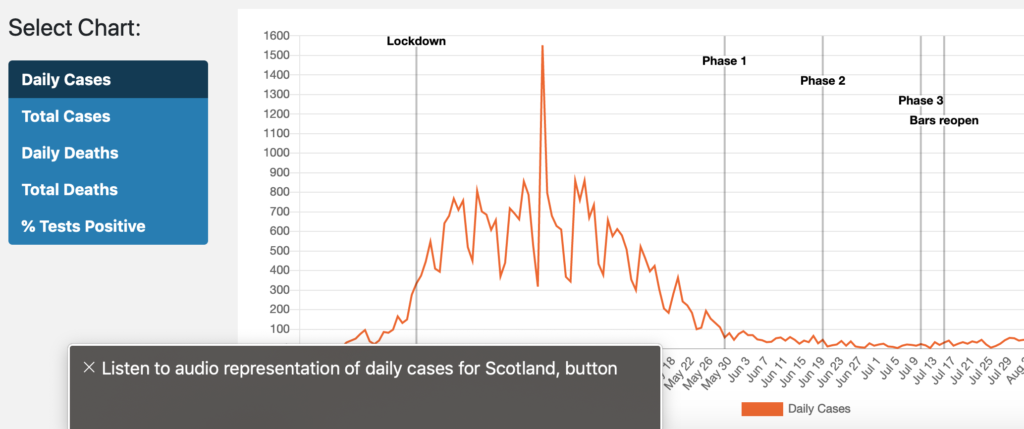
    Screenshot of line graph with VoiceOver overlay
    • The ‘Scottish Tech Army’ have created a dashboard of COVID-19 statistics in Scotland, which, in a ‘world first’ uses ‘sonification’ to interpret visual data as sound. This enables screen reader users to get an idea of the general trend of a chart, without having to keep track of every data point like they would in a table. I’m not a screen reader user myself, so don’t know how useful this is, but it is certainly an interesting experiment. To try, turn on your screen reader and navigate to the visually hidden “Listen to audio representation of daily cases for Scotland” button.

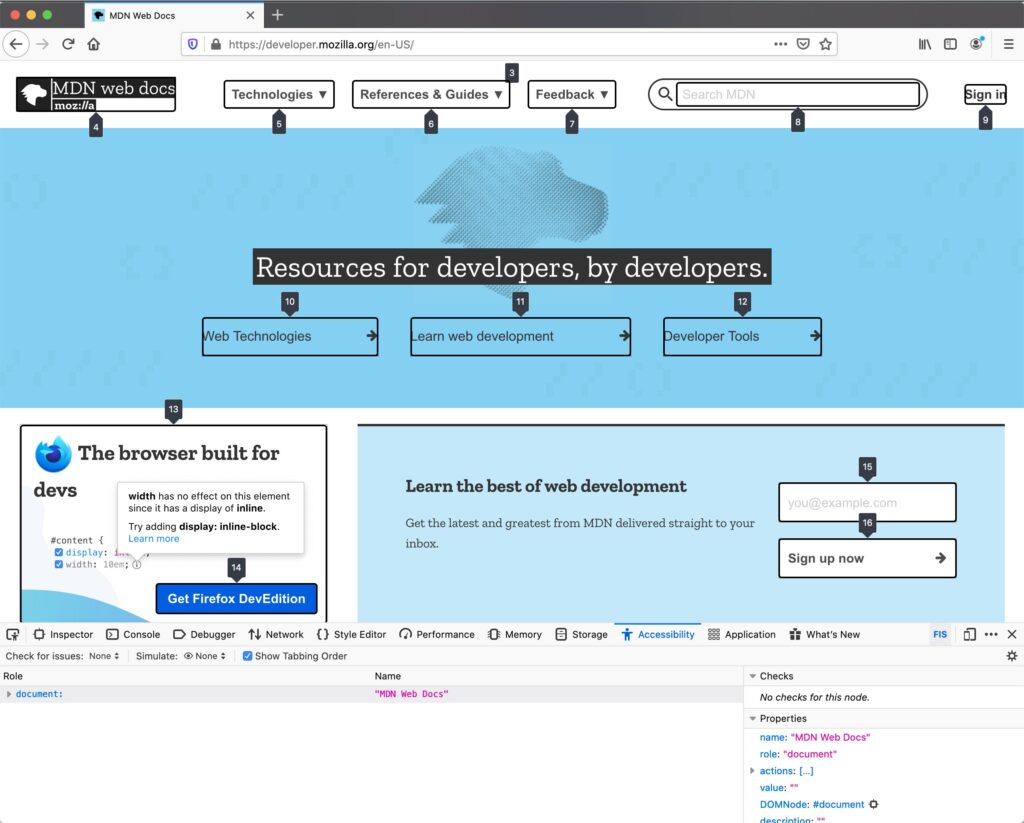
    Work In Progress: Tabbing Order in the Accessibility Panel

    • Firefox are adding a devtools feature which highlights all focusable elements and the order in which they will be tabbed. To view, download the Nightly version of Firefox, open the devtools, switch to the Accessibility panel, and check the “Show Tabbing Order” option. It’s not yet clear when or if it will make it into the mainstream browser.

    VoiceOver on iOS 14 Supports Description Lists

    • This isn’t the first time I’ve talked about iOS 14, but Adrian Roselli highlights a lesser known improvement the update brings: support for <dl> description lists. Now, in some contexts, terms and definitions are read sensibly, e.g. “louche, term. ‘not reputable or decent’, definition”. In other contexts, such as in VoiceOver’s ‘read-all’ mode, it still fails to parse properly, garbling the entire list as one sentence.

    Did you know that you can subscribe to dai11y, week11y, fortnight11y or month11y updates! Every newsletter gets the same content; it is your choice to have short, regular emails or longer, less frequent ones. Curated with ♥ by developer @ChrisBAshton.
  • week11y issue 45

    Your weekly frequent11y newsletter, brought to you by @ChrisBAshton:

    How do the new iOS 14 accessibility features stack up?

    • Deque reviews the new a11y features in iOS 14. It supports widgets on the home screen, e.g. for at-a-glance weather reports, which makes it easier for everybody to find out pertinent information quickly. Back Tap (tapping 2-3 times on the back of the phone) can be mapped to do things such as take screenshots, and seems beneficial as another ‘shortcut’ alongside the existing triple-click-home button. VoiceControl can in theory be used with VoiceOver, but it’s hard to make a voice command when so much content is being read out on screen; Deque recommends delaying supporting the VoiceControl/VoiceOver combination in your applications until Apple has ironed out a few issues.

    WAVE 3.1 Release

    • Version 3.1 of the accessibility evaluation tools has been released, with improvements including: YouTube videos are identified as an Alert (prompts users to verify it has captions), better ARIA and title support, reduced false errors for contrast testing, and identifying structures that could be lists (but are not marked up as such).

    As diabetes increases in sub-Saharan Africa, so will blindness

    • A large number of people arriving at a health organisation in Tanzania have developed diabetic retinopathy – a complication of diabetes that can cause permanent blindness and is the leading cause of blindness in working age adults globally. Many patients are unaware they’re diabetic and are arriving too late for early stage treatment (lasers and injections) and so up to 20 patients per week are being referred for eye surgery at a private hospital, where surgery costs $2,500-$4,000. Many patients cannot afford this. A 143% increase in diabetes is expected in Africa by 2045. It is also on the rise globally, particularly in low and middle income countries. The article suggests that AI could be used to make screenings for diabetic retinopathy more affordable.

    Gutenberg Accessibility Costs WordPress the W3C Work

    This is a story that has taken up a lot of headlines, and many articles assume a fair bit of background knowledge, so I’ll be giving a longer TLDR than normal (though still largely based on Adrian Roselli‘s article above):

    Sound thinking: BBC helps audience to hear the details

    • Article about how the BBC used ‘object-based media’ when recording Casualty (Series 34, Episode 36), which features a character with a hearing impairment. Object-based media samples sounds from different parts of the scene – the main dialogue, a heart rate monitor, background noise – and allows the viewer to adjust the levels (or stick to the default ‘broadcast mix’) so that they can hear the most important things clearly.
    • The article claims viewers watching on “an internet-connected device” should see a “slider… which enables them to adjust the level of the audio to suit their own particular needs”. Regrettably, I could not see a slider on BBC iPlayer at time of writing.

    Did you know that you can subscribe to dai11y, week11y, fortnight11y or month11y updates! Every newsletter gets the same content; it is your choice to have short, regular emails or longer, less frequent ones. Curated with ♥ by developer @ChrisBAshton.
  • week11y issue 44

    Your weekly frequent11y newsletter, brought to you by @ChrisBAshton:

    GDS updates its Government Service Standard requirements for assistive technology (AT) testing

    • Other than updating version numbers of AT and browser combinations, the main changes are: adding TalkBack (Android screen reader); reducing magnification level to test in from 10x to 4x; swapping ZoomText with Windows Magnifier or Apple Zoom; and specifying VoiceOver should be tested in iOS (testing in macOS is in a new ‘optional’ list for further testing).
    • There’s also a helpful note about it being good to test with any screen reader, speech recognition tool or screen magnifier in your development environment, but that you should test against the full list prior to launch.

    alt attributes like paragraphs

    • Developer and accessibility expert Dave Rupert came to a realisation recently: “alt text is like a paragraph”. To clarify, Dave isn’t talking about the length of the alt text here, but the order in which it appears, and its contextual relevance. A lot of designs have images appearing before headings, but screen reader users who navigate by headings would miss the image (and alt) entirely. If the image is important (e.g. “Sale” or “New”), it should probably be moved below the heading in the source order, but then perhaps rendered above the heading using something like the CSS order property.
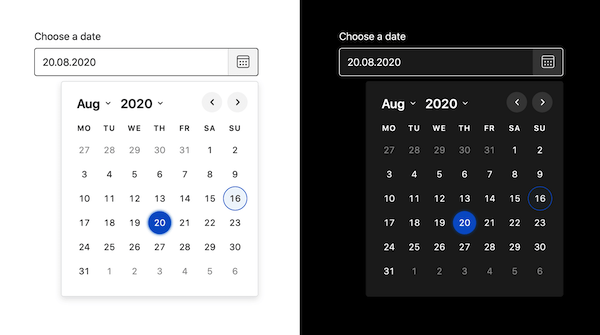
    Screenshot of the Duet Date Picker output.

    Duet Date Picker

    • This is a WCAG 2.1 compliant date picker, from the Duet Design System, that also allows you set a minimum and maximum allowed date. It can be used standalone or incorporated into any JavaScript framework, and weighs 10kb minified and Gzip’ed. It supports modern browsers and screen readers, and has limited support for IE11.

    10 Things to Know About Twitter’s Alternative Text for Images

    • Article by Deborah Edwards-Oñoro, summarising a few things you may not know about alt text for images in tweets. Alt text is now enabled by default on the web and apps (no need to turn on image descriptions in settings). Alt text cannot be added to already published tweets. It can be added to animated GIFs. You can use up to 1000 characters for alt text. If you leave it blank, Twitter will add “Image” as the alt text.
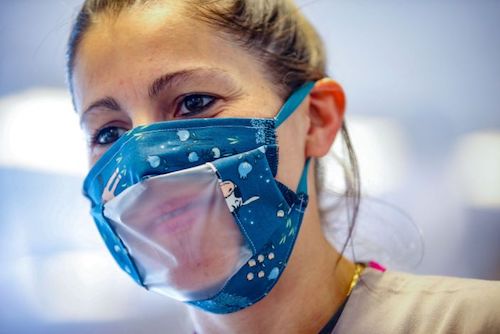
    Woman wearing face mask with clear plastic window cut through it, so that you can see her mouth.

    Are clear masks the way to clearer communication? The deaf community isn’t so sure.

    • Yahoo! article by Abby Haglage, explaining that clear face masks may not be the panacea we think it is for the deaf community. The masks can fog up, reducing visibility – and even if that is put aside, lip reading is only about 30% effective. Many advocates are encouraging people to learn some BSL (British Sign Language) instead. However, Abby acknowledges that clear masks are a step in the right direction.

    Did you know that you can subscribe to dai11y, week11y, fortnight11y or month11y updates! Every newsletter gets the same content; it is your choice to have short, regular emails or longer, less frequent ones. Curated with ♥ by developer @ChrisBAshton.
  • week11y issue 43

    Your weekly frequent11y newsletter, brought to you by @ChrisBAshton:

    6 webinars from GDS to improve accessibility within your organisation

    Typing With One Hand on Your iPhone Just Got a Little Easier

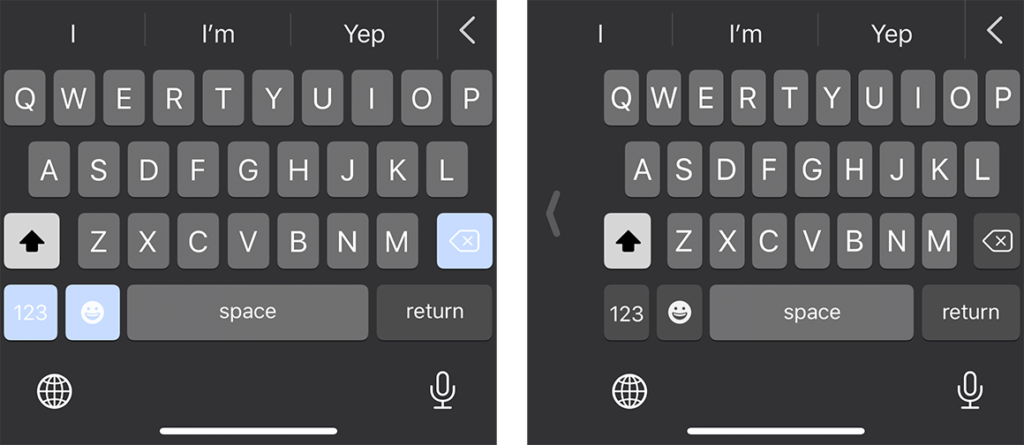
    Screenshot of full size iPhone keyboard next to one-handed keyboard
    On the iPhone 11 Pro, the right-handed keyboard (shown on the right) is roughly 5/16″ narrower than its full-sized companion on the left.
    • As iPhones get bigger, it can be harder to reach certain keys on your keyboard when using just one hand. Apple have built a “One-Handed Keyboard” mode, which squashes the keys together and makes it easier to reach any given key with your thumb. To enable: when using the keyboard in any app, press and hold the globe icon in the bottom left corner and choose “Keyboard settings”, then switch to right-handed or left-handed keyboard.

    What to look for in an accessibility audit

    • A blog post by Glenda Sims, describing Deque’s different audit offerings. Clients need to choose the browsers and assistive technologies included in the audit, though this needs to be balanced against the cost of testing. Pragmatically, Glenda claims that using Chrome with NVDA will catch >90% of accessibility issues. Clients also need to choose which pages to test, which should include the site’s entry points, core paths and highest traffic pages. Lastly, they must choose what standard to test against: usually WCAG 2.1 Level A (lowest level of conformance) or AA.

    Five Things I Use My Phone For On A Daily Basis

    • Luke Sam Sowden, who is “Severely Partially Sighted”, describes how he uses the accessibility features of his iPhone XR, and apps. He uses Microsoft Seeing AI, Tap Tap See and Digit-Eyes to use his phone’s camera to recognise objects, people and text in his surroundings. Google Maps gives good directions. The built-in Camera App is VoiceOver-compatible and tells him where his face is on the screen if he’s trying to take a selfie. Finally, he finds Twitter and Instagram quite accessible – the latter is improving with “Photo descriptions” and Instagram Stories.

    AudioEye Sues AccessiBe for Patent Infringement

    • AudioEye is suing accessiBe for allegedly using tech that AudioEye has a U.S. patent on (patent no. 10,762,280). Both companies are involved with accessibility. accessiBe announced 12 million dollars of funding in May 2020. The article laments the fact that one a11y-focussed company is suing another, and wishes the money was spent improving the lives of disabled people instead. You can read the legal filing by AudioEye, but I’m inclined to agree that it’s a waste.

    Did you know that you can subscribe to dai11y, week11y, fortnight11y or month11y updates! Every newsletter gets the same content; it is your choice to have short, regular emails or longer, less frequent ones. Curated with ♥ by developer @ChrisBAshton.
  • week11y issue 42

    Your weekly frequent11y newsletter, brought to you by @ChrisBAshton:

    Operating System and Browser Accessibility Display Modes

    • Eric Bailey summarises several global settings users might use to change their display, the reason for their existence and the effect they can have on your website. The modes are Dark, Increased Contrast, Inverted Colors, Reduced Motion, and High Contrast. He also describes how to target them in code, so that you can better tailor your site to your users. A very useful resource.

    When there is no content between headings

    • This is a question that often comes up: are you allowed to have a heading immediately followed by another heading, with no content in between? Hidde de Vries gives us a useful rule: “Always have content between headings of the same level.” I.e. a <h2> immediately followed by a <h3> is fine, but a <h2> followed by a <h2> is not.

    upyoura11y.com

    Decoding Label and Name for Accessibility

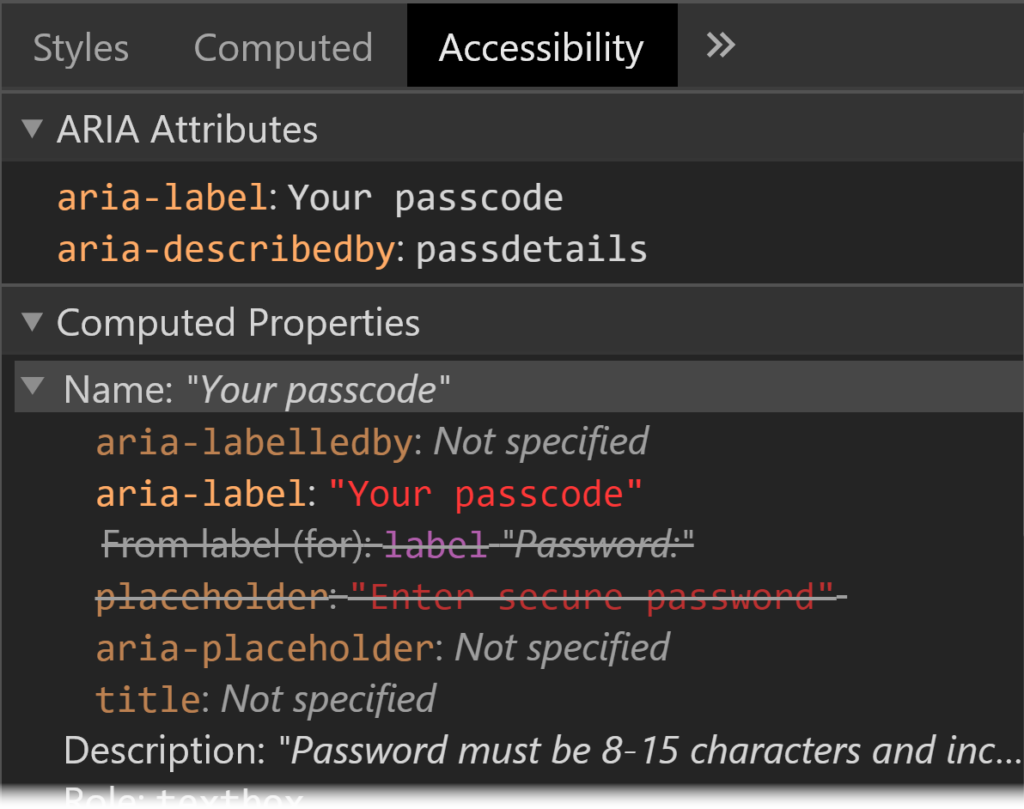
    • Consider the following HTML: <label>Name: <input aria-label="First name" placeholder="e.g. Chris" title="Enter a name"></label>. What gets read out by screen readers?
    • Answer: the aria-label always takes priority. In its absence, it would be the label, and in the absence of that, the title, or if nothing else, the placeholder. These rules are defined in the HTML Accessibility API Mappings’ Accessible Name and Description Computation. Browsers have built-in tools to allow you to inspect an element’s accessibility properties.
    Screenshot of Chrome DevTools showing Accessibility tab with ARIA Attributes section and Computed Properties section. They show that the element has aria-label, aria-describedby, label and placeholder properties, and that the aria properties are the ones that are being applied.
    Chrome DevTools show the hierarchy of the accessible name computation for a specific element.

    Did you know that you can subscribe to dai11y, week11y, fortnight11y or month11y updates! Every newsletter gets the same content; it is your choice to have short, regular emails or longer, less frequent ones. Curated with ♥ by developer @ChrisBAshton.
  • week11y issue 41

    Your weekly frequent11y newsletter, brought to you by @ChrisBAshton:

    How to Create Accessible Cooking Videos

    • Article describing what to do as a content creator to make your videos accessible. It pertains to cooking, but could equally be applied to most videos. 1: provide captions, either via sidecar caption file or embedding directly into video. 2: describe visual elements via a separate audio description track, which is difficult because many players don’t natively support it. For cooking videos, describing while you go should be sufficient. Here’s a good example.

    These volunteers are making Black Lives Matter videos accessible to deaf activists

    • A group of volunteers on Twitter noticed that many Black Lives Matter videos were missing captions, so they set up @ProtestAccess. Users can tag this account to ask for transcriptions of a video, which over 250 people are on hand to transcribe. Since starting in June, they’ve posted over 500 captioned videos, whilst encouraging the original uploaders (especially large organisations) to provide captions from now on.

    44×44 Pixel Cursor Bookmarklet

    How Animal Crossing: New Horizons Players Use The Game’s Customization To Make It More Accessible

    • Blind athlete Ross Minor navigates the Animal Crossing world by hearing; the sound of your character’s footsteps stops if you walk into an obstacle, and you can use noisy waterfalls and tiki torches to signpost areas of your village. Shannon Natale set up a sign for her aunt, asking players to come close to her aunt’s character before attempting to chat, so that messages are centered in the most visible part of the screen. Some features are still inaccessible, such as insects making no noise: there is a petition to get these fixed.

    Autonomous vehicles should benefit those with disabilities, but progress remains slow

    • An MIT report estimates that autonomous vehicles might not hit the streets for another decade. The benefits when they arrive, however, will be massive for the disabled community. In the USA alone, it would enable employment for 2 million people with disabilities, while saving $19 billion annually in missed medical appointments. It could also have resulted in 3 million more people voting in the 2012 US election. Anthropologist Megan Strickfaden is advocating for a standard, universally designed autonomous vehicle with side entry ramp so that everybody can access it regardless of ability.
    • “This is a unique opportunity in history to vastly improve the lives of millions of people with disabilities. All of us will grow old, if we are fortunate to live long lives, and many of us will need, either permanently or temporarily, the assistance that [autonomous vehicles] afford” ~ Sheryl Gross-Glaser, director of the nonprofit Community Transportation Association of America.

    Did you know that you can subscribe to dai11y, week11y, fortnight11y or month11y updates! Every newsletter gets the same content; it is your choice to have short, regular emails or longer, less frequent ones. Curated with ♥ by developer @ChrisBAshton.

  • week11y issue 40

    Your weekly frequent11y newsletter, brought to you by @ChrisBAshton:

    New TfL app to help Londoners travel safely round capital

    • The TfL Go app for iPhone (with an Android version landing this autumn) shows real-time train times for the London Underground, with information aimed to enable travel at quieter times to help customers maintain social distancing. It includes ‘step-free mode’ which shows all the stations with street-to-platform wheelchair access. It also has dynamic text sizes and is VoiceOver-compatible – read more on tfl.gov.uk.

    Amazon Expands Accessibility Features With New Text Banner for Fire TV

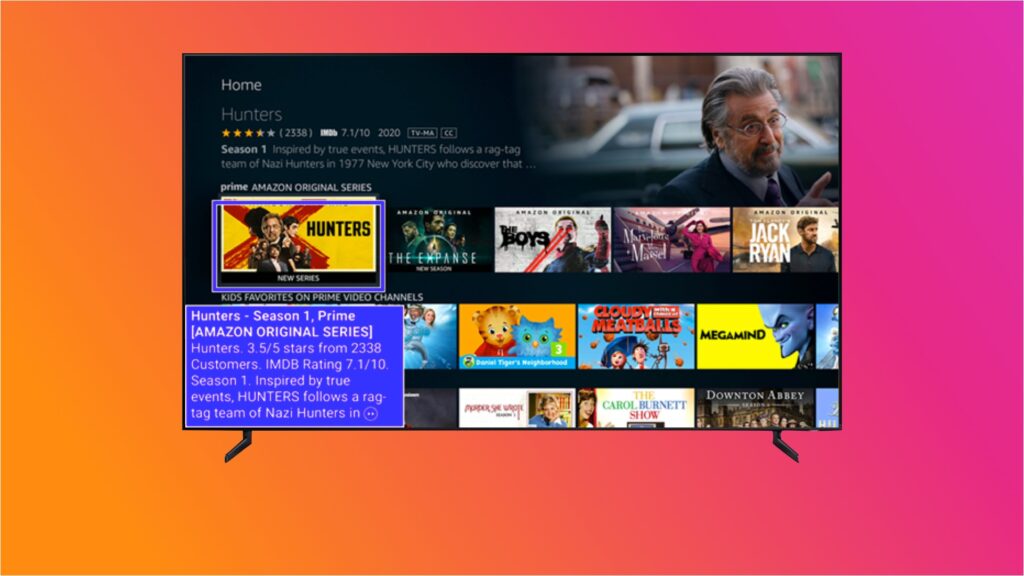
    • Amazon has launched ‘Text Banner’, aimed at assisting users who struggle to read the onscreen text. This text banner appears in a fixed location on the screen and works across the Fire TV UI, but also Prime Video and other applications on your Amazon device. It can be enabled within Settings under Accessibility.
    The new mode on the Fire TV summarises the currently focussed content in the bottom left hand side of the screen, in a high contrast purple/white box. Source: thestreamable.com.

    a11y is web accessibility

    • Eric Bailey provides a comprehensive summary of why the term ‘a11y’ is useful, to address the common ironic adage “the term ‘a11y’ is itself inaccessible”. It is easier to type and to say, it allows more room for content inside tweets, and, crucially, it is more specific than ‘accessibility’ as it pertains to digital accessibility rather than something physical like wheelchair ramps for libraries. It is no different than using terms like i18n, 3D or WWII, and to suggest it is a problem is arguably a sign of ableism.

    Is Twitter Trolling Us? Why Voice Tweets Are Already Problematic

    Did you know that you can subscribe to dai11y, week11y, fortnight11y or month11y updates! Every newsletter gets the same content; it is your choice to have short, regular emails or longer, less frequent ones. Curated with ♥ by developer @ChrisBAshton.

  • week11y issue 39

    Here’s your delayed weekly a11y roundup. It’s a short one this week, as I’ve been on holiday for the last 10 days. Normal service shall be resumed next week!

    Equal Entry Website Called Out as Inaccessible

    • A bit of a clickbaity headline, describing how Equal Entry responded to a complaint that one of their web pages had 2 accessibility errors, which was the result of an automated tool and turned out to be all false positives. For example, one of the errors was that an input was missing a label, but it was a textarea used for visual spacing only. It had aria-hidden="true", so it didn’t need a label. The post has a useful overview of how the consultancy conducts an accessibility test, with a reminder that aiming for a 100% pass rate can be a false prophet.

    Why Deaf People Oppose Using Gene Editing to “Cure” Deafness

    • Article suggesting that people who are deaf view themselves through the social model, rather than medical model, where societal barriers are the source of disability. It argues that an inaccessible society causes more harm than being deaf itself, and that there can be biological advantages to being deaf. ‘Deaf gain’, as it is known, includes being better able to accurately recognise faces, having faster peripheral vision reaction times, and perhaps some protection against Alzheimer’s. A gene that causes hereditary deafness may actually offer improved wound healing.

    What’s New in WCAG 2.2

    Did you know that you can subscribe to dai11y, week11y, fortnight11y or month11y updates! Every newsletter gets the same content; it is your choice to have short, regular emails or longer, less frequent ones. Curated with ♥ by developer @ChrisBAshton.

  • week11y issue 38

    Your weekly frequent11y newsletter, brought to you by @ChrisBAshton:

    Making Facebook.com accessible to as many people as possible

    • A Facebook Engineering article describing how the site redesign in React provided opportunities to improve accessibility. Using React Context, heading levels automatically increase as they are nested (i.e. <Heading /><section><Heading /></section> automatically creates a h1 followed by a h2). They use the same mechanism for contextual keyboard commands, to perform actions relevant to the thing that is in focus. Components such as FocusList are wrapped around lists to handle focus and to define up/down arrow key behaviour. A static analysis tool errors when it encounters a form control without a label, and a runtime tool monitors the DOM in real time and visually alerts devs to any inaccessible components.

    YouTube Axes Community Captions Feature, Citing Low Usage

    • A feature allowing viewers to contribute subtitles to a channel’s videos will be discontinued on 28th September 2020. YouTube says less than one-thousandth of a percent of channels approved a community captions track in the last month, and only 0.2% of watch time had a community caption track selected. Subtitles ranged in quality, and it is known that some contributors were exploiting the tool to spam or troll its users. Content providers can still provide captions on their own videos, and YouTube is improving its automated captions service.

    Going Colorblind: An Experiment in Empathy and Accessibility

    • Sara Novak writes about her three-day experiment using Chrome extension See, to emulate deuteranomaly and better understand the needs of one of her colleagues. This is the most common type of colour blindness, making it difficult to differentiate green and red. She realised that the way she’d been highlighting her emails in different colours was not accessible, and switched to using italics or bold for differentiation. A site Sara used wouldn’t let her fill out a form because it used red and green borders to indicate whether the fields passed validation, which she couldn’t distinguish between.

    Diamond: Strides Made in Website Accessibility This Year, But More Work Needed

    • A report from May, which I’ve only now found time to read: accessibility for the Alexa Top 100 websites has improved from 2019 to 2020. 40% are ‘fully accessible on all platforms tested’, vs 29% last year. And 39% of sites are ‘fully inaccessible’, down from 43%. 21% were accessible ‘with difficulty’, down from 28%. An example of ‘accessible with difficulty’ includes triggering a login button but then needing to search for form elements because focus was not given to the modal.

    Did you know that you can subscribe to dai11y, week11y, fortnight11y or month11y updates! Every newsletter gets the same content; it is your choice to have short, regular emails or longer, less frequent ones. Curated with ♥ by developer @ChrisBAshton.