Category: fortnight11y

Accessibility themed newsletter released every fortnight.

  • fortnight11y issue 18

    Your fortnightly frequent11y newsletter, brought to you by @ChrisBAshton:

    We need more inclusive web performance metrics

    • Scott Jehl writes about how popular user metrics such as Largest Contentful Paint are not necessarily useful to everyone. Users relying on screen readers may not be able to read the page until it becomes fully interactive, sometimes long after the DOM is complete. Scott has raised an issue to consider if Lighthouse could measure the time to the accessibility tree being created and/or the time to first accessibility API query, as suggested by Léonie Watson on Twitter.

    Amazing haptic speaker lets visually impaired people read braille in midair

    • Researchers at Bayreuth University, Germany, are working on a speaker system that uses acoustic force and ultrasound to recreate traditional braille writing in midair. The system known as HaptiRead comes at a very poignant time as people are worried about touching surfaces during this coronavirus pandemic. The technology could be built into displays such as ATMs, and is powerful enough to be felt on the user’s hand up to 70cm away. Read more in the academic paper.

    Accessibility Dont’s, Learn From Basic Mistakes in Web Design

    • Adam Laki shares five common a11y fails to avoid. 1: don’t remove underlines on links. 2: don’t remove outlines on focusable elements. 3: don’t remove textarea resize functionality. 4: don’t open links in new browser windows. 5: don’t use fixed font-size. There are caveats to each tip, so the article is worth reading in full.

    Killer Instinct: How To: Play The Game Blindfolded (video, or article if you’d prefer)

    • An interesting video by SightlessKombat, a blind gamer describing how they rose to the top tier of players by relying on their hearing. By turning up the volume of the ‘heads up display’, they could listen carefully to the pitch changing as each punch forms part of a ‘combo’, informing decisions that help land the most damage. SightlessKombat also talks of the demotivation of not being able to see his opponents’ rankings, nor how many points he would gain from each fight.
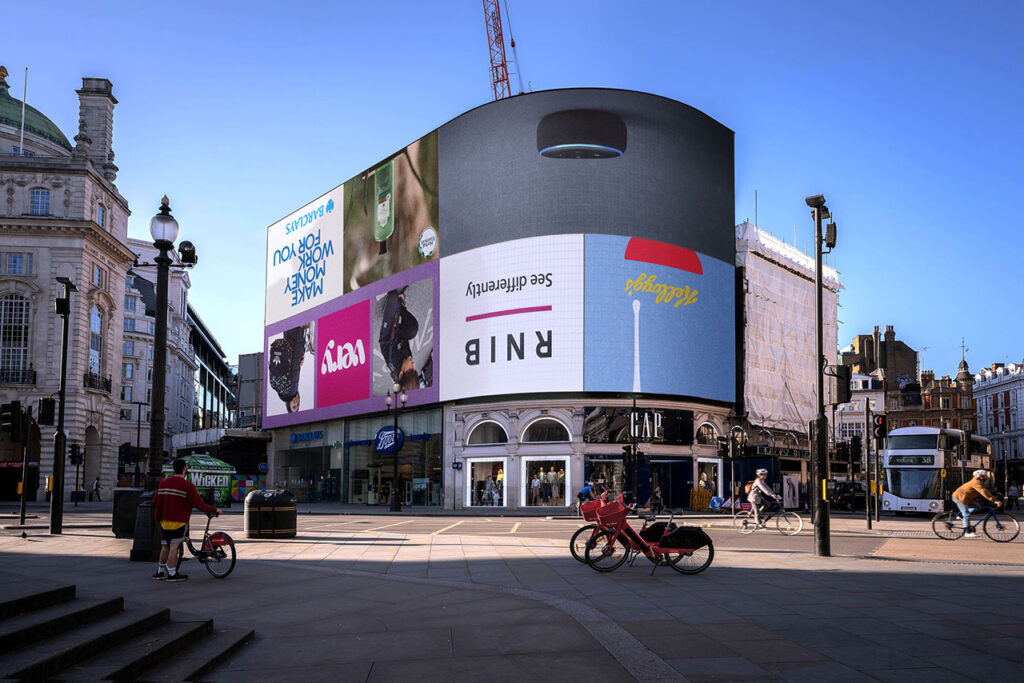
    Piccadilly Lights turned upside down to raise awareness of challenges faced by blind people

    • For the week of the 6th July, London’s infamous advertising billboard at Piccadilly Circus was turned upside down to raise awareness of the challenges raised by social distancing for the blind and partially sighted. RNIB said “the usual methods of navigating around public spaces rely on human contact, guidance and touch, all of which are no longer considered safe”. Adverts appeared 180° rotated, alternating with text “The world has been turned upside down, especially for people with sight loss”.

    Disney+ Honored by the American Council of the Blind for Their Audio Description Tracks

    • Audio descriptions are added to films in order to recreate the visual experiences happening onscreen. Disney+ has received an Achievement Award in Audio Description from the American Council of the Blind (ACB) for their commitment to adding audio description tracks to original programming. Disney+ has already added audio descriptions to their modern catalogue including The Mandalorian, and is now working through older classics like Cinderella.

    Missouri woman sews accessible masks with vinyl mouth ‘window’

    • An article from May, but on a subject that still dominates. The introduction of mask wearing to reduce coronavirus spread has had a disproportionate impact on the deaf and hard of hearing community, and many of us rely on lip reading more than we know. Demand for Stacie Amschler’s masks has gone as far as Utah, Maryland and Florida, particularly for doctors trying to reach their patients.

    Planning, creating and publishing accessible social media campaigns

    • This guide from the Government Communication Service has great tips, such as testing the readability of your content (aiming for a 9-year old’s reading age), avoiding use of bit.ly links, avoiding baking in text overlays into your video and ensuring voiceovers are at least 20db louder than background music. There are also platform-specific alt text advice for Twitter and LinkedIn.

    Building the Woke Web: Web Accessibility, Inclusion & Social Justice

    • A List Apart article by Olu Niyiawosusi, drawing attention to the 40% of the world’s population that still does not have access to the internet. More locally, only 37% of people living in social housing in the UK are online. This further divides the world, as those shopping in person tend to overpay compared to online, and those without digital skills are three times as likely to be in low-income bands. We must continue to offer non-online options for vital services, and attempt to reduce the barrier to becoming digital by building inclusive, accessible sites.

    Online retail giant Zappos is now selling single shoes to help those with disabilities

    • American shoes and accessories seller Zappos have started allowing customers to purchase single shoes, or shoes in different sizes. The pilot program, which claims to be the first of its kind, allows amputees and people with physical disabilities to purchase exactly what they need.

    Did you know that you can subscribe to dai11y, week11y, fortnight11y or month11y updates! Every newsletter gets the same content; it is your choice to have short, regular emails or longer, less frequent ones. Curated with ♥ by developer @ChrisBAshton.

  • fortnight11y issue 17

    Your fortnightly frequent11y newsletter, brought to you by @ChrisBAshton:

    Enhancing ARIA landmarks with aria-labelledby

    • Article by Léonie Watson describing how to use aria-labelledby to distinguish between multiple navigational elements. Example: <nav role="navigation" aria-labelledby="firstLabel"><p>Choose an <span id="firstLabel">aisle</span> to browse</p><ul><li><a href="fresh.html">Fresh foods</a></li>...</ul>.

    How Does HTML Microdata Help With Accessibility?

    • Scott Vinkle explains how pages marked up with microdata helps the ‘Reader Mode’ in browsers to find and arrange content. For example, <img src="source.jpg" alt="" itemprop="image" /> determines the image that will be displayed in Reader Mode. Reader Mode is a useful feature for many, especially for people with dyslexia, as it removes distractions such as navigation, animations and ads.

    #accessiBe Will Get You Sued

    • Adrian Roselli writes about accessiBe, a company (whose article I’ve shared before) that offers an add-on for sites to automatically make them ‘accessible’. Adrian presents a scathing review of their practices, including that they incorrectly interpret WCAG, are cited in accessibility lawsuits and attempt to spoof automated checkers.

    The Latest Barbie Dreamhouse Now Includes A Wheelchair-Accessible Elevator

    • Mattel, the manufacturer behind the Barbie brand, started producing Barbies with wheelchairs in February 2019. They’ve now released a ‘Dreamhouse’ dollhouse that has a button-operated lift, big enough to accommodate the wheelchair. It’s a great step forward in seeing a full range of diversity from a young age.

    An app for everything, but can everyone use it?

    • Anne Spencer Ross tested almost 9000 apps and found that a quarter were missing labels for >90% of their icons. ‘Floating action buttons’, representing the most important action on the screen, lacked labels in 92% of cases. The tools used to build apps can greatly affect their accessibility: 100% of screen elements coming from Unity and 53% of screen elements from Cocos2dx were completely unusable. And Education apps made up 7% of apps overall but 19% of completely unusable apps.

    A Complete Guide to Links and Buttons

    • An excellent resource by CSS-Tricks. I learned that the download attribute on links instructs the browser to download the resource; that links can have a rel attribute that define the relationship to the target (e.g. rel="author"); that you can chain link styles (a:focus:hover {}); and that if you wrap a lot of content inside a single <a> tag, the entire contents are read to the screen reader before it announces that it is a link (so don’t do it!).

    Meaning without markup: Accessibility Object Model

    • Hidde de Vries writes about the Accessibility Object Model proposal for JavaScript, which allows devs to hook into the accessibility tree (like Service Workers are able to hook into the network). It should make code easier to test, and HTML less verbose, since you would operate on the element directly, e.g. el.ariaExpanded = true. This can make canvas-based applications more accessible too, without having to maintain DOM node equivalents that are only for your screen reader users.

    iOS 14 is filled with accessibility improvements

    Blindness cure in sight

    • Macular degeneration is a common eye disease affecting 200 million people worldwide. It can lead to complete blindness. Scientists are working on a new treatment utilising gene therapy and near-infrared light. Early tests on human retinas show that ‘near-infrared light exposures reactivate the human retina’s visual circuitry’.

    Did you know that you can subscribe to dai11y, week11y, fortnight11y or month11y updates! Every newsletter gets the same content; it is your choice to have short, regular emails or longer, less frequent ones. Curated with ♥ by developer @ChrisBAshton.
  • fortnight11y issue 16

    Your fortnightly frequent11y newsletter, brought to you by @ChrisBAshton:

    Legacy Applications and Accessibility

    • A deque.com blog post describing approaches to finding accessibility issues in legacy code; for example, scanning the codebase for positive tab index values (tabindex="1" etc). An interesting idea is an ‘accessibility JavaScript file’ that you can include on pages to help fix a11y issues without having to modify the legacy code. For example, var contButton = document.getElementById('continue'); if (contButton) { contButton.setAttribute('role', 'button'); // etc }.

    Modesto Teen Who’s Legally Blind, Hearing Impaired Becomes Household Name In World Of Bowling

    • Jacob Gaddam is a sixteen year old who bowls like a champion – despite being legally blind and hearing impaired. Watch the video on YouTube (I had trouble getting any video content in the article itself).

    My Accessibility-Tinged WWDC 2020 Wishlist

    • The Apple Worldwide Developers Conference is running from June 22-26 this year. Steven Aquino shares his hopes for what Apple will showcase, including the ability to zoom in on emoji; brightness slider for the Apple Watch display; and a Magic Keyboard with Touch Bar.

    For Mothers Of Black Children With Disabilities, Living With Twice The Fear

    • Kim Kaiser voices the fears she has for her black, autistic 14 year old son. “When an African American person is disabled and can’t process a police command, [the result could be fatal]”. She’s taught her son to to keep his hands out of his pockets, to not carry anything that could be perceived as a weapon, and to put his hands up if approached by police. If questioned by police, he is to immediately inform them that he is on the autism spectrum. The sad reality is that his characteristics “automatically look suspicious to first responders”.

    Volunteer scheme that tackles loneliness amongst young disabled people thrives online during pandemic

    • The Sense Buddying scheme matches volunteers and young people with disabilities to spend time together to help combat loneliness, something experienced by 77% of this demographic. Prior to the pandemic, matches did activities in local communities in East London, but now video-chat instead. One testimonial from Saihan Islam reads: “Maria is someone that I can talk to outside of my family which is really nice when I am feeling anxious. She is always really kind and helpful”. You can volunteer by emailing Buddying@sense.org.uk.

    The troubled state of screen readers in multilingual situations

    • Xurxe Toivo García shares their findings when testing different screen reader / browser / OS combinations with a simple English web page featuring a <span> with a different lang to the main page. All were inconsistent and none worked perfectly. On VoiceOver for desktop, paragraph text would be read with a Finnish voice (wrong) during continuous reading, and with an English voice (right) when using the keyboard to move the reading pointer. VoiceOver mobile ignored any language declarations.

    How Web Accessibility Works

    • Segun Ola gives a brief but useful overview of how browsers generate an Accessibility Object Model (AOM) in addition to the DOM/CSSOM, and how this AOM interfaces between the browser and the assistive technology used by the user. He distinguishes between native primitives (e.g. checkbox) and more complicated widgets (such as autocomplete) which require ARIA markup.

    How Eastenders’ Ben Mitchell is setting new standards for deaf representation

    • Eastenders‘ Ben Mitchell character was deaf in one ear but has now lost hearing in his other after a dramatic boating accident, and has to learn how to adapt. Interesting stats: 12 million people in the UK are deaf or live with hearing loss. Every day, 5 children are born deaf, and another 5 will become deaf by adulthood. Only 1 in 10 deaf children use sign language (most children considered ‘deaf’ do have access to some sound), and most attend a local school rather than a deaf school.

    Inheritance Tax: The Real Cost of not Making Content Accessible

    • Simon Mellins, Ebook Technology Coordinator at Penguin, writes a condensed version of a talk he gave at the London Book Fair, where he described the accessibility case for creating good tags, metadata and logically structuring e-books. Here, he concentrates more on the legacy it leaves; the semantic richness that enables the curation and adoption of content into hitherto unknown reading systems. Simon argues that failing to add these features now is merely delaying the cost to a later date.
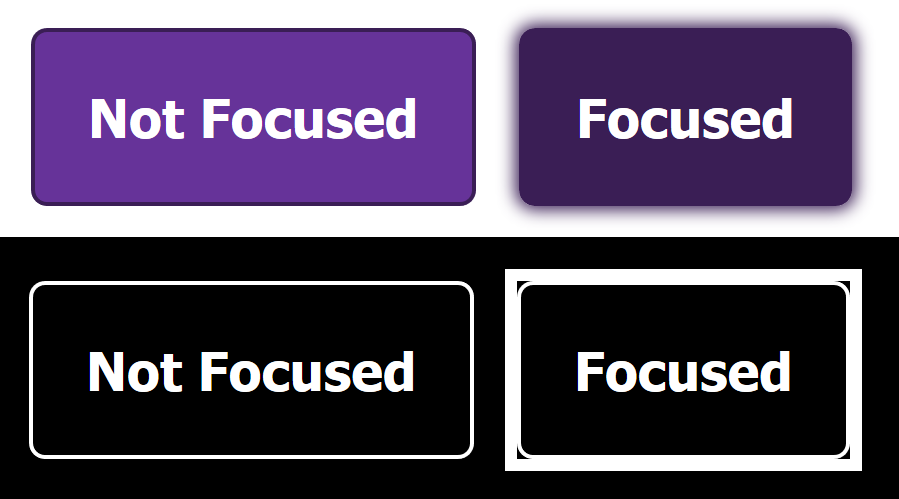
    If overriding focus styles, use *:focus { outline: 3px solid transparent } to support Windows High Contrast Mode

    Quick Tips for High Contrast Mode

    • Sarah Higley shares some tips for supporting Windows High Contrast Mode (WHCM). WHCM ignores ARIA roles/states/properties, so <a role="button"> will be styled as a link. Use svg { fill: currentColor } to have it match the color of the surrounding text. Beware that the -ms-high-contrast media query is being retired in favour of forced-colors, which is still experimental; current advice is to avoid using media queries at all.

    Did you know that you can subscribe to dai11y, week11y, fortnight11y or month11y updates! Every newsletter gets the same content; it is your choice to have short, regular emails or longer, less frequent ones. Curated with ♥ by developer @ChrisBAshton.
  • fortnight11y issue 15

    Your fortnightly frequent11y newsletter, brought to you by @ChrisBAshton:

    Sa11y – accessibility quality assurance assistant

    • An accessibility quality assurance tool geared towards content authors: Sa11y visually highlights common errors, with contextual information. Try out the demo.

    Text link Accessibilty: aria-label and title

    • Deque article testing <a> links with various combinations of title and aria-label. The conclusion is that aria-label is the best supported attribute, and links to the ARIA8 WCAG technique which sites good use cases such as: <a aria-label="Read more about Seminole tax hike">Read more...</a>.

    Twitter announces change to default alt text setting

    • Via TwitterA11y: starting May 27th, you no longer need a setting to add alt text to your images on Twitter. Prior to this, it was an exclusively opt-in feature.

    Could coronavirus kickstart more accessible tech?

    • In this BBC video, we discover how live captioning enables deaf colleagues to participate in remote meetings in this era of coronavirus. It references an article on bighack.org comparing the best video conferencing software for accessibility, which found that some popular platforms such as Zoom do not provide live captioning.

    HTMHell special: close buttons

    • Article by HTMHell picking apart the real-world implementations of the ‘close’ button. Some sites use images or SVGs with no alt text, some use ‘X’ to represent ‘close’ (which is lost on screen readers), some use <div> or <a> elements where a <button> is required. There are a few recommended solutions depending on the visual style you’re going for.

    Is it ok to ‘grey out’ disabled buttons?

    • UX Collective article that makes some interesting points: WCAG 2.1 success criterion 1.4.3 (“Contrast”) does not apply to text that is “part of an inactive user interface component”. However, if providing low-contrast styles for disabled buttons, the author encourages measures such as ensuring colour is not the only affordance, reducing opacity of the primary button colour when disabled rather than opting for grey, adding supporting text, and applying aria-disabled="true" to disabled buttons to support all screen readers.

    I Don’t Care What Google or Apple or Whoever Did

    • Adrian Roselli complains that when he raises accessibility/usability issues with clients, their response is “but Google does this”. He then lists several poor UI changes the big companies have made and subsequently U-turned on, such as Google’s form fields without boxes, or Apple’s super thin typefaces in iOS. Heydon Pickering wrote a similar article in January. Both alluded to the fact that you wouldn’t want to replicate these companies’ designs anyway: why make your product look and feel like Google’s?

    The Last of Us Part II: Accessibility features detailed

    • A comprehensive article on the PlayStation blog, detailing how The Last of Us Part II comes with three presets for different kinds of disabilities, but every setting can be individually overwritten. Gameplay alterations such as ‘invisible while prone’ allow gamers to enjoy stealth mode they might otherwise not be able to. Directional arrows accompanying subtitles show deaf gamers where the speech is coming from. Every command, including touchpad swipes and controller shake, can be remapped to different controller inputs.

    Deaf fitness instructor calls for more accessibility in workout classes

    • India Morse (@youleanmeup) is a fitness instructor on Instagram. She was born deaf, and found that workout classes aren’t visual enough for the deaf community, and Instagram as a platform is lacking live-captions. So she launched Coaching by India; an online coaching app with captions and an interpreter voicing India’s signs, so that is accessible to everyone.

    Did you know that you can subscribe to dai11y, week11y, fortnight11y or month11y updates! Every newsletter gets the same content; it is your choice to have short, regular emails or longer, less frequent ones. Curated with ♥ by developer @ChrisBAshton.

  • fortnight11y issue 14

    Your fortnightly frequent11y newsletter, brought to you by @ChrisBAshton:

    Celebrate Global Accessibility Awareness Day with GDS

    • GDS ran a conference on Thursday 21st May. Agenda: “An introduction to digital accessibility regulations”, “How to avoid common accessibility statement fails”, “How to carry out basic accessibility checks”, “Making accessibility accessible: the secret to engaging your workforce”, “What would Marie Kondo do? How to clear your website of inaccessible PDFs”. Stay tuned for how you can watch the talks back.
    A modified image of Kim Kardashian: her left eye has been switched with her lips.
    Source: https://hackernoon.com/capsule-networks-are-shaking-up-ai-heres-how-to-use-them-c233a0971952

    AI Is Not Similar To Human Intelligence. Thinking So Could Be Dangerous

    • Dr Elizabeth Fernandez gives three reasons why AI is not the same as human thought. 1) they’re easy to fool: a neural network might correctly classify an image as a banana, but introduce a slight amount of noise and it might re-classify it as a toaster. 2) they need an enormous amount of data to learn: thousands of pictures, versus just a few for a toddler. 3) they’re “myopic”: powerful enough to correctly identify Kim Kardashian, yet seeing nothing wrong if her eye and lips swap places. I found this article via Marco Zehe’s blog, who references it to suggest that AI will never be able to write reliable alt text.

    Supporting users who change colours on GOV.UK

    • A post from 2018 that resurfaced recently and still has lots of great tips. GOV.UK uses the CSS triangle method to create a back link component whose triangle arrow icon renders even when the user has overridden their colours. The site logo was once a PNG, but under these conditions would disappear, so was replaced with inline SVG. Focus states and panels that ought to stand out would also get lost when colours are overridden, so a transparent border was added.

    WCAG 2.1 and PDF Accessibility

    • Lots of useful reminders. Something that conforms to WCAG 2.1 AA will also conform to WCAG 2.0 AA. Users should be able to override the following styles with no loss to content or functionality: line height (up to 1.5x font size); spacing following paragraphs (up to 2x font size); letter spacing (up to 0.12x font size); word spacing (up to 0.16x font size). JavaScript inside PDF forms that sets a timer must warn what data will be lost if not completed in time, and/or should allow time extensions.

    Proper VoiceOver support coming soon to Firefox on MacOS

    • Mozilla announces that by the end of June, Firefox should have basic support for MacOS VoiceOver. By the end of the year, the experience should be improved for visually impaired VoiceOver users, including live region support and rotor item support. The post goes into detail about what was achieved in each Firefox version from v75 onwards.

    Building an accessible autocomplete control

    • Adam Silver explains in detail how to build an accessible autocomplete component, taking into account the noJS experience, announcing results to screen readers, hiding suggestions ‘on blur’, keyboard support and endonym/typo support. It’s always surprising just how complicated autocompletes can be, and this is a really good example of one done right.

    Screen readers and cookie consents

    • In this video from the London Web Performance Group this month, Léonie Watson demonstrates that by using headings to navigate with a screen reader, she never encounters the GDPR cookie notice on a lot of websites. And if she does, it’s often difficult to figure out what she’s consenting to. A good example of an accessible cookie notice is on the Atlassian website.

    Rail stations across Great Britain receive £20 million funding boost for accessibility improvements

    • 124 stations in Great Britain will gain new lifts, accessible toilets and/or improved customer information screens. A list of affected stations appears at the bottom of the page.

    Employers Don’t Understand the Work People with Disabilities Can Do, SHRM Research Finds

    • The USA is struggling to fill millions of jobs, but people with disabilities are often overlooked. 51-61% of HR professionals and managers have had no disability inclusion training, and 13-32% of managers say they’d feel uncomfortable working with colleagues with disabilities. However, 92% of managers (and 97% of HR professionals) who have employees who have a disability said those individuals perform the same or better than their peers.

    Less than 1% of Brazilian sites are fully accessible, research points out

    • A survey of 14.65 million active Brazilian websites found just 0.74% passed all accessibility tests. On this scale, it’s unclear how the sites were tested, though the article makes reference to checking images, links and validation fields. By the same criteria, this is still a 20% improvement on the previous survey from September 2019, in which 5.60% of sites failed all tests, compared to just 0.01% this year.

    Did you know that you can subscribe to dai11y, week11y, fortnight11y or month11y updates! Every newsletter gets the same content; it is your choice to have short, regular emails or longer, less frequent ones. Curated with ♥ by developer @ChrisBAshton.

  • fortnight11y issue 13

    Your fortnightly frequent11y newsletter, brought to you by @ChrisBAshton:

    Why to Avoid Accessibility Overlay Toolbars, Pugins & Widgets

    • Accessibility Works article warning against the installation of third-party overlays/widgets that promise to make your site accessible. These tools provide options for customising text size, providing magnifiers, and in some cases a built-in screen reader or alt-text generator. However, they cannot address the 70% of accessibility issues that can only be manually addressed – and they require the user to have to find and learn how to use a whole new accessibility tool.

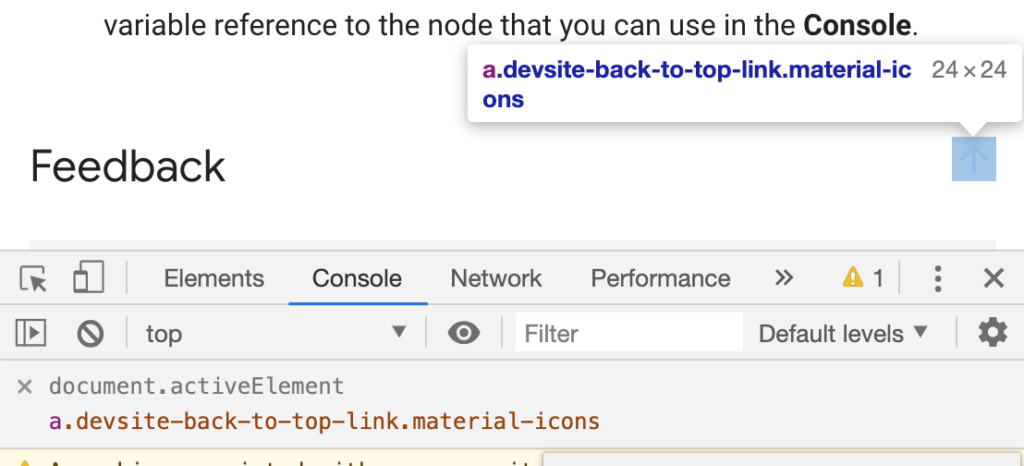
    Track Which Element Has Focus

    Using a Chrome “Live Expression” to show the current focused element
    • Kayce Basques, technical writer at Google, shares a Chrome tip for developers/testers. By creating a “Live Expression” with the value document.activeElement, you can tab around the web page and always know where the focus state is, even if there aren’t any associated focus styles.

    Treating cataracts in the 21st century

    • Brief but interesting article highlighting that one billion people in the world have preventable or treatable visual impairments; 300 million of these are cataracts, which accounts for 50% of blindness worldwide. A cataract is an opacity in the lens of the eye, often caused by ageing, and can be fixed with surgery: a small incision, fragmenting the lense, emitting ultrasound to aspirate the cataract.

    Facing coronavirus while deaf and blind: ‘Everything relies on touch’

    • Article by ABC News, highlighting the plight of the 40,000 deaf-blind Americans who rely on touch but have to maintain social distancing. They use hand-over-hand signing to communicate, and finger-scan braille public signs for mobility, now prone to contagion. The community uses computers and internet to try to counter isolation and loneliness. There are fears that states have considered putting people with disabilities at the back of the line for treatment.

    Semantic sidenotes for the web

    • Article (or video) by UI designer Koos Looijesteijn, describing ‘sidenotes’ that have been in print media for centuries, and the difficulty in representing them in HTML. His solution is a <span> containing a <label> that can be clicked to expand a corresponding <small> on mobile, or that highlights the text at the side on desktop. At publish time it required JS but now appears to have been refactored to be CSS-only, using clever checkbox logic. By the author’s admission, it’s ugly, and we should campaign for a native solution instead.

    Avoid aria-roledescription

    • Adrian Roselli writes about this attribute that describes the role of an element. It overrides what is announced to the screen reader, e.g. <input type="text" aria-roledescription="Only numbers allowed"> will read as “Only numbers allowed” instead of “input type text”. This hides meaning and the control type – a confusing experience for the user. It also doesn’t translate. There’s an open issue about the global nature of this attribute. Don’t use it!

    When (not) to use the <br> element

    • Šime Vidas shares a helpful reminder that the <br> line break element is useful in some cases. Whilst web developers have generally moved away from <br> use – seeing line breaks as presentation, not content, and therefore using CSS instead – it should still be used when line breaks are part of the content. For example: poems or addresses.

    The Complete Guide to Accessibility for WordPress Websites

    Did you know that you can subscribe to dai11y, week11y, fortnight11y or month11y updates! Every newsletter gets the same content; it is your choice to have short, regular emails or longer, less frequent ones. Curated with ♥ by developer @ChrisBAshton.

  • fortnight11y issue 12

    Your fortnightly frequent11y newsletter, brought to you by @ChrisBAshton:

    This Is What Happened at a Captioned Virtual Reality Webinar

    • Meryl K. Evans describes their experience of attending A11yVR meetup, which you can watch. Meryl is deaf and relies on the captions, but being in a VR environment raised several issues, such as other avatars standing in front of the captions. Technical issues such as captions disappearing or being delayed didn’t help.

    Accessible page title in a single-page React application

    • Post by Hugo Giraudel, describing how following a link on a ‘normal’ web page loads a new page and causes a screen reader to read out the page title – this behaviour might be missing from your React SPA. He creates a <TitleAnnouncer> component, which listens for a change in Helmet state to update the contents of a screen-reader hidden <p> element, and apply focus to it. Hugo acknowledges this element could be avoided altogether if you can guarantee there is always a relevant <h1> in the page.

    How home working leaves deaf people out of the loop during coronavirus

    • Three quarters of people who live with deafness fear they will be less productive working from home. People who lip-read or use British Sign Language are especially at risk of being excluded from phone and video interactions. We can all help by speaking one at a time, using a well lit camera, and providing textual or visual presentations.
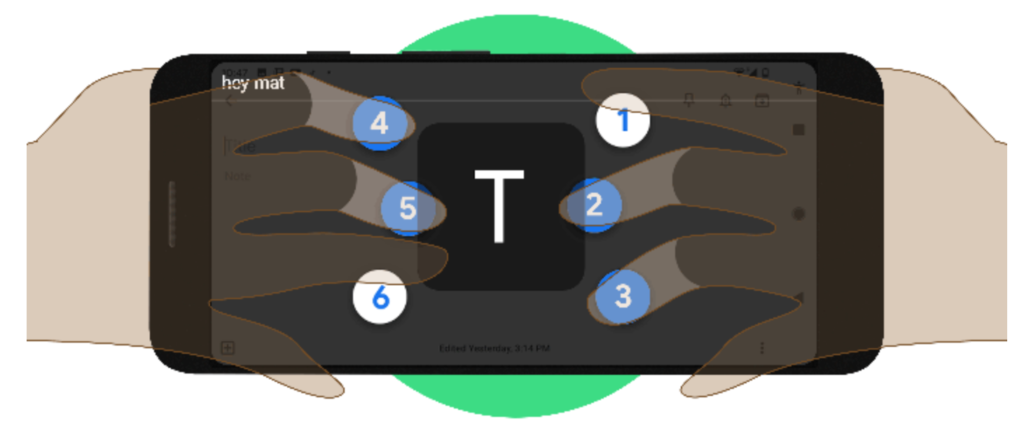
    Braille keyboard for Android

    Google develops virtual braille keyboard for Android, rolling out now

    • Currently, people plug in physical braille keyboards when they want to type, which can be inconvenient on mobile. Google have developed a virtual TalkBack keyboard integrated into Android, which you hold in landscape orientation, supporting both grade 1 and grade 2 braille.

    Styling yourself when you are blind

    • Nas Campanella, who is blind, describes how she used a designer to create her wedding dress, feeling dozens of fabrics before arriving at one with flowers, lace and beads. Journalist Catherine Mahony uses stylists, maintaining a written book of tactile things so she can identify what’s in her wardrobe. She says she used to think she couldn’t have a fashion style when blind, but now thinks about other areas of life where she has a style – music, food, books – and talks to stylists about getting these into what she wears. Online shopping is difficult due to lack of descriptions, and Nas always asks a sighted friend to double-check items before she purchases.

    Models of Disability: Types and Definitions

    • A useful reference to bookmark. The medical model of disability is “a problem of the person… [requiring ‘fixing’ with] a cure or an adjustment/behavioural change”. The social model sees disability as a socially created problem, requiring individual, community and large-scale change for full integration in society. Whilst there are the main two, other distinct models include the minority, expert, tragedy, religious and economic models. There are a number of others too which are subtle variations of the distinct ones.

    XR Accessibility User Requirements

    • W3 have released a working draft for accessibility user requirements for XR (virtual/augmented reality). XR currently requires that the user be in a physical position, with high degree of precision, timing and simultaneous action. The draft suggests users should be allowed to navigate an XR environment and interact with objects in it using just their voice, keyboard, Switch, gesture or eye tracking. They should be able to switch between input devices without any tracking issues. Screen magnification users need to be aware of critical messaging in their environments, and should be able to route these to ‘second screens’. Blind users should be able to get detail about items closest to them, and must be allowed to query items and make selections.

    Squarespace, Wix, & Weebly: Accessibility Review

    • Terrill Thompson tries out three website builders and examines the accessibility of their output. All three produce unsemantic headings in their default templates, such as Wix’s main heading being a <h3>. Alt text is generated from filenames, and is editable, but it’s not always clear that you’re editing alt text, especially to the novice user. Terrill recommends Wix above the others, but just barely – especially as it allows you to upload videos, but doesn’t allow you to provide captions or subtitles. Website builders still have a long way to go.

    Did you know that you can subscribe to dai11y, week11y, fortnight11y or month11y updates! Every newsletter gets the same content; it is your choice to have short, regular emails or longer, less frequent ones. Curated with ♥ by developer @ChrisBAshton.

  • fortnight11y issue 11

    Your fortnightly frequent11y newsletter, brought to you by @ChrisBAshton:

    Accessibility Maze

    • A game developed by The Chang School, Ryerson University (Ontario). It simulates various challenges which are only overcome by good accessible design, providing good metaphors that encourage things like alt text. I don’t want to give too much away as it would ruin the game – it’s extremely well made and only takes around ten minutes to complete, and there’s a handy accessibility booklet to download as a ‘prize’ at the end. Give it a play!

    Cleaning our way to accessibility

    • A post from the good folks at leeds.gov.uk, describing how they’ve been working through the 9,800 inaccessible PDFs on their site. Making them all compliant would cost huge amounts of time and money. Instead, they’re assessing each document on its own merit and asking if it serves a user need. They’re gradually bringing the content into web pages, or removing it altogether: they’ve now removed over 3,000 documents. They have a dedicated maintenance team tasked with chipping away at the remaining documents. Like all good technological ceremonies, they’ve taken inspiration from Sweden and practice ‘death cleaning’.

    Quick Tip: How to Convert Image Text to Text

    • If you have an image with text and want to retrieve the text from it without typing it all out by hand, you can upload the image to Google Drive. Once uploaded, “Open with Google Docs” (by right-clicking and selecting the option from the contextual menu). A new Google Docs file will be created, with the image at the top and the converted text underneath.

    Unexpected accessibility tips

    • An article in broken English, but don’t let that put you off. Chris Cid shares tips for testing your app: use it on your train commute to work (one-handed usage, motion sickness, etc). Test it on people who are in a hurry (grab someone outside a WC!) to simulate lots of distractions, ADHD. Hold your mobile with straight arms, use keyboard only, and wear thick gloves when using a mouse, to test various motor a11y issues. Test your UI colour contrast with a cheap projector in a bright room. Finally, take off your glasses and see how well you can scan for information.

    CSS Can Influence Screenreaders

    • Ben Myers explains that some CSS may have unintended side-effects on assistive technologies. <button style="text-transform: uppercase">Add</button>, for example, is read out as the acronym “A.D.D.” on VoiceOver. The line between presentation and content is increasingly blurred with ::before/::after pseudo elements, the output of which is compiled into the same accessibility tree consumed by screen readers. It’s a confusing world.

    As a disabled person, it’s hard to watch accessibility only improve now that able-bodied are affected

    How accessible is the HTML video player?

    • Scott Vinkle concludes that the native HTML video player is not particularly accessible, citing a number of issues in certain browser / AT combinations. For example, content ‘behind’ full screen video can still be navigable when it shouldn’t be; controls aren’t always announced when using the tab key; continuous announcements about the current lapsed value distract from the video content. Scott uses Plyr instead, and acknowledges that native YouTube/Vimeo players aren’t suitable for him as he needs to support multiple platforms.

    The WebAIM Million – An annual accessibility analysis of the top 1,000,000 home pages

    • A discouraging report on the accessibility of the top 1 million homepages. 98.1% failed at least one WCAG 2 criterion. Most commonly, this was low contrast text (86.3% of all homepages), missing alt text (66% – over half of these were linked images), empty links (59.9%), or missing form input labels (53.8%). All of these (with the exception of alt text) are worse than they were last year. It’s also interesting to note that accessibility varies by site category, language and TLD (law/politics-based English sites on .gov domains tend to be better, news & adult based sites in Russian/Chinese tend to be worse).

    Did you know that you can subscribe to dai11y, week11y, fortnight11y or month11y updates! Every newsletter gets the same content; it is your choice to have short, regular emails or longer, less frequent ones. Curated with ♥ by developer @ChrisBAshton.

  • fortnight11y issue 10

    Your fortnightly frequent11y newsletter, brought to you by @ChrisBAshton:

    Why videos on GOV.UK use the YouTube video player

    • Anika Henke explains how GDS investigated 20 different video players for their usability, performance and accessibility, by using keyboard only, increasing font sizes and trying it with screen readers. Their conclusion was that the native YouTube player was the best (and more sensible than building their own), though it’s interesting to note that no player was perfect, and they all had issues when changing system colours.

    New media queries you need to know

    • Article by Kristofer Selbekk, suggesting several up-and-coming media queries you can use to cater for all users. There are some useful boolean ones: prefers-reduced-motion, prefers-reduced-data, prefers-reduced-transparency, prefers-contrast. But there are also some variable ones: light-level to accommodate people in bright sunlight or in bed at night, for example. Finally, a @custom-media keyword is coming, which could be used to script your own media queries, such as @media(--logged-in) or @media(--no-connection).

    16 Things to Improve Your Website Accessibility

    • Bruce Lawson describes the most common errors sites make & how to remedy them. The main one: too much content, which should be broken up into sections with headings and bulleted lists, and should be in plain English and a legible font. Avoid reCAPTCHA (or use reCAPTCHA v3; a pure JavaScript API that returns a ‘score’) and autoplaying videos/graphics. Use unique text for your links (never just “here”), and make them look like links (don’t remove focus style). Label your form fields, and don’t disable autofill. There are several more tips, so it’s worth a read.

    That Time I Tried Browsing the Web Without CSS

    • Jon Kantner describes his experience of disabling CSS, for checking accessibility standards like like headings, form controls, visual hierarchies, content order and images existing as <img> rather than background images that get lost. It’s not just theoretical: 12.5% of users who rely on assistive tech use custom stylesheets. The results are predictable: sprites that no longer make sense, unsemantic form inputs, images with no specified widths, and duplicate elements (e.g. both mobile and desktop equivalents existing in the same DOM).

    How I disclose my disability during a job search

    • Haley Moss describes the experience of applying for jobs and wondering when and whether to disclose her autism, for fear of being treated differently. Haley suggests disclosure should generally happen only when you realise you can’t perform an essential function of your job because of your disability and need an accommodation. Most accommodations require little to no financial investment, such as allowing you to wear headphones to drown out office noise. How much to disclose, and how you do it, depends on why you’re disclosing it and who you are talking to.

    On Voice Coding

    • Dusty Phillips shares his experience of using his voice to code, triggered by a carpal tunnel syndrome diagnosis a few months ago. He invested around a thousand dollars in his setup, which includes Dragon Naturallyspeaking, a Windows machine and a high-end microphone. Dusty uses Caster, which is built on top of Dragon, for coding-oriented voice commands. The article describes his configuration in great detail, and there’s a video of voice coding in the comments if you want to see something similar in action.

    The First U.S. Web Accessibility Agreement was Signed Twenty Years Ago

    • On March 14th, 2000, Bank of America was the first US company to sign an agreement to make its website accessible, referencing WCAG 1.0 (only a few months old at the time). It was the output of a ‘structured negotiation’ between the bank and five blind customers. The bank hired a mutually agreed accessibility consultant, Shawn Henry, to oversee the work. It’s interesting to note that no lawsuit was required, and that digital accessibility in law is now two decades old.

    Video game accessibility aided by consultants who say it’s not about compromising game design

    • Article about how accessibility consultants are working behind the scenes to create a more inclusive video game industry. A common argument against accessibility adjustments is that they’ll ruin the ‘creative vision’ of the game. In reality, lowering difficulty settings is a cheap and unsatisfying way of ‘achieving accessibility’. It is far better to provide custom control mapping, add subtitles, enable camera snapping, etc. Another myth is that these features are rarely used, however: one third of Uncharted 4 players used the ‘one handed control’ option, and 60% of Assassins Creed: Origins players turned subtitles on.

    Did you know that you can subscribe to dai11y, week11y, fortnight11y or month11y updates! Every newsletter gets the same content; it is your choice to have short, regular emails or longer, less frequent ones. Curated with ♥ by developer @ChrisBAshton.

  • fortnight11y issue 9

    Your fortnightly frequent11y newsletter, brought to you by @ChrisBAshton:

    ‘Show Me a Sign’ recounts the deaf experience for young readers

    • MV Times article from last December, describing Ann Clare Le Zotte‘s new novel “Show me a Sign”, which is now available online. It is set in early 19th century Chilmark, Massachusetts – a town famous for its unusually high percentage of deaf citizens (one in 25 people, vs one in 6000 on the mainland). Everyone could communicate with one another, deaf or not, through Martha’s Vineyard Sign Language (MVSL). It sounds like an exciting read, centered around a scientist that uses Mary as a “live specimen” in a cruel experiment, tribal/colonial tensions of the time, and an insight into how Mary lives without sound.

    Why the GOV.UK Design System team changed the input type for numbers

    • Article by Hanna Laakso, explaining why GOV.UK has moved away from using <input type="number"> for things like credit card / passport numbers. It has big issues in NVDA and Dragon Naturally Speaking, and its native increment/decrement behaviour (triggered by UP/DOWN arrow keys or scrolling) is often unintended. Some browsers also attempt to round the number or add comma separation. GOV.UK now uses <input type="text" inputmode="numeric" pattern="[0-9]*">, which retains the numeric keyboard without compromising usability.

    7 users share their struggles navigating the (sometimes inaccessible) digital world

    • Real users with disabilities sum up their biggest struggles with the digital world. Robert (who has a visual impairment) struggles with date inputs where websites don’t let you enter the date manually, forcing him to navigate an often inaccessible calendar. Rhian, who is autistic, shares her frustration with auto-playing videos and poor website load speeds. Sally, who has a mobility impairment, says that increasing font sizes is hard in apps, and that zooming causes its own problems. Kasia needs someone’s assistance when online shopping, as they don’t feel comfortable sharing their bank details on inaccessible sites where it is difficult to know if they’re filling it in correctly. Several complain about CAPTCHA forms that force you to prove you’re not a robot.

    Could browsers fix more accessibility problems automatically?

    • Whilst web developers/designers have a duty to make their website accessible, many simply don’t – be it through lack of awareness, skills, resources or empathy. Hidde de Vries proposes that browsers bridge the gap by providing ways of forcing colour contrasts, focus states, text sizes, disabling autoplay and allowing zoom, even if a developer has explicitly disabled such features. Some browsers do some (but not all) of this already, and what does exist is not easily discoverable.

    Stop Using ‘Drop-down’

    • Article by Adrian Roselli, asking people to stop using ‘dropdown’ in their vocabulary, as it is ambiguous. Do you actually mean a ‘select’ element, or an ARIA listbox, datalist, ARIA combobox, or autocomplete (or several other possibilities)? Adrian describes the subtle differences in each, and doesn’t preach about the use of ‘select’ (which you may have expected from the title).

    Thisten

    • An interesting site/app: “we transcribe conferences, to make them accessible.” It is an audio-to-text platform that transcribes speaker sessions at conferences, in real-time. Designed to be used whether at small gatherings or at large conferences.

    Online Altruists Are Making Reddit More Accessible

    • Fascinating article about the r/TranscribersOfReddit community that has over 3,000 volunteers who have transcribed almost 100,000 pieces of content on Reddit. A bot links to all image/video related content that gets posted to any partnered subreddits, and transcribers then ‘claim’ the post by commenting underneath, before manually providing a detailed transcription for that content. Everyone has a different motivation for doing it; it’s worth a read to find out more. You may remember a similar story about Facebook groups dedicated to transcribing.

    HTML: The Inaccessible Parts

    • Article by Dave Rupert, sharing his frustration and highlighting some cases where native HTML is not as accessible as it ought to be. Inputs of types number, date and search are considered problematic, as are native HTML <video>, role="tablist" for tabs and various HTML5 tags. Dave links off to articles explaining the issues with each in more detail. This is kind of a glossary and is worth a bookmark for referencing.

    Did you know that you can subscribe to dai11y, week11y, fortnight11y or month11y updates! Every newsletter gets the same content; it is your choice to have short, regular emails or longer, less frequent ones. Curated with ♥ by developer @ChrisBAshton.