Category: fortnight11y

Accessibility themed newsletter released every fortnight.

  • fortnight11y issue 28

    Your fortnightly frequent11y newsletter, brought to you by @ChrisBAshton:

    A plan for accessible maps

    • Benjy Stanton describes how he would design a map service from the ground up, considering the needs of all users. Maps are inherently inaccessible – they require digital and geographic literacy as well as visual methods of communication, so they should always be seen as an enhancement. Benjy’s tips can be largely summed up as follows:
    • The core content should be available outside of the map, e.g. as a data table or downloadable spreadsheet. Design your map in black and white first, to help prevent you relying on colour alone to convey meaning. Avoid pan & zoom interactivity unless they’re required. Ensure all interactive features (rivers, roads etc) are high contrast enough to see. Turn off background layers you don’t need. Test the map works on mobile and with a keyboard.

    Here’s What It’s Like To Live With A Tracheostomy

    • Ginny Butcher describes her experience of living with a tracheostomy (or ‘trache’): a tube in her neck, connected to a ventilator to enable her to breathe.
    • She’s completed a master’s degree to become a lawyer, and has done many impressive things such as rock climbing, abseiling, canoeing and zip lining, all with a ventilator strapped to her body. She’s also flown a plane and completed a half-marathon.
    • The practical aspects are that she needs to carry three bags of machines and some spare batteries at all times. One of the machines is to assist with coughing and secretions. The tube needs changing daily, which Ginny likens to something as boring as “clipping your toenails”.
    • It has its upsides too – Ginny doesn’t breathe through her nose or mouth, which makes her “the absolute best at downing pints”. Worth a read!

    Accessible Web Animation: The WCAG on Animation Explained

    • Val Head gives a detailed overview of WCAG animation recommendations. These include:
      • Pause, Stop, Hide“: provide a way of pausing, stopping or hiding any autoplaying animation that lasts more than 5 seconds.
      • Three flashes or below threshold“: avoid flashing more than 3 times in a one second period, to reduce chances of triggering seizures.
      • Animation from interactions“: any animation triggered by the user, which gives the illusion of motion (so not including things like colour or opacity change) should have an option to be disabled, as they can cause people with motion sensitivities to become ill. You can implement this with a ‘toggle’ on your site, and also pay attention to the prefers-reduced-motion media query.
    • These recommendations come under different WCAG conformance levels. for example, the first two rules are level A rules – the bare minimum standard to be met. The “animation from interactions” rule is AAA, which is the highest level of conformance. In general most people aim for the middle level: AA compliance.

    More Accessible Skeletons

    • Adrian Roselli describes – quite late on in his blog post – why he thinks skeletons (placeholder areas to display to the user while content is loading) are a bad idea. But he also describes how he would build one if he had to.
    • Some skeletons have aria-busy="true" markup, which is designed to be temporarily ignored by screen readers, though few screen readers support it. Adrian recommends pairing it with aria-hidden="true" for now at least. In practice, this means having two sibling nodes; one for the skeleton and one of the content.
      • When your content is loading, it should be hidden and have aria-busy="true", and the skeleton node should be visible. When it has loaded, it should be flipped to aria-busy="false" and the skeleton node should be set to aria-hidden="true".
      • You should have CSS which sets display: none on aria-hidden content, and on aria-busy="true" content.

    How we made GOV.UK more accessible

    • A team on GOV.UK analysed a small subset of representative pages to identify any violations of the WCAG 2.1 AA standard. They prioritised each issue by its regularity / likelihood of occurrence and its impact on the user’s ability to use GOV.UK. These were either technical issues, content issues or a mixture. They could generally be fixed in one central place (the Design System or components) or by an improvement in the guidance. There’s a great video on how differently marked up tables are experienced by screen readers.

    iPhones can now automatically recognize and label buttons and UI features for blind users

    • iOS 14 has a new feature, “Screen Recognition”, which is built into VoiceOver. It uses AI to detect interactable elements on the screen, even when such elements aren’t properly labelled / exposed to assistive technology. It has the potential to allow blind users to use apps that are otherwise inaccessible.
    • I highly recommend this GadgetHacks article which goes into more detail on the feature and includes screenshots demonstrating how to enable it.
    • I haven’t had a chance to try out the feature myself yet, but it looks as though you first enable the feature, then ‘opt in’ to the feature on individual apps. I don’t yet know whether that means it would work on browsers such as Safari and Chrome. If it does, this could be a game changer, as it might allow the user to navigate previously inaccessible websites.

    Are your Anchor Links Accessible?

    • Amber Wilson describes the HTML structure she came up with for turning headings into ‘linkable headings’, whose links can be used as anchor links to that specific part of the page. It can be tricky to implement these without making it a noisy or confusing experience for screen reader users. Here is the markup she ended up with:
    • <h2 id="introduction">Introduction</h2><a href="#introduction"><span aria-hidden="true">#</span><span class="hidden">Section titled introduction</span></a>
    • You could also wrap your link inside your heading, which is simpler but arguably has usability issues (e.g. makes it harder to select heading text):
    • <h2 id="introduction"><a href="#introduction">Introduction</a></h2>

    A placeholder is not a label

    • This is your regular reminder from HTMHell that <input type="text" placeholder="First name"> is not accessible and requires an associated <label>. Some screen readers will fall back to using the placeholder if a label is missing, but it can’t be relied upon.
    • There are various UI issues with a placeholder-only approach. Contrast is often too low to read the text easily (though this can be tweaked by styling with the ::placeholder rule, at the risk of making the user think the input is already filled in). Placeholders get cut off if the input is too small, and get removed as soon as you start typing, straining your short term memory.

    Alexa Makes Shopping Lists Sharable as Accessibility Feature

    • Alexa allows you to create lists such as shopping lists and todo lists, adding and removing items with your voice. And now, users can ask Alexa to send a given list to a specific contact. Once Alexa confirms it has identified the right person, the recipient gets a message on their Alexa account through the app. This feature is designed to help those with limited access to a grocery store connect with those who can help get them supplies in the ongoing COVID-19 situation.

    Did you know that you can subscribe to dai11y, week11y, fortnight11y or month11y updates! Every newsletter gets the same content; it is your choice to have short, regular emails or longer, less frequent ones. Curated with ♥ by developer @ChrisBAshton.

  • fortnight11y issue 27

    Your fortnightly frequent11y newsletter, brought to you by @ChrisBAshton:

    What would an ethical overlay look like?

    • Karl Groves writes about the ‘overlay widgets’ offered by companies such as accessiBe, and how their claim that including their product on your website will make it fully WCAG compliant is simply untrue. Many a11y issues, such as missing alt text, can only be fixed by a person. Moreover, the extra features an overlay often provides (e.g. screen magnification) are poor imitations of what’s already available to the user on their computer. The only ‘ethical’ overlay is a temporary one, Karl says: it should only be used as a discovery tool to find accessibility problems, which you should then spend time fixing the root cause of.

    Accessible Game Design / Accessible Player Experiences

    • I came across accessible.games while watching the 2020 Video Game Accessibility Awards. It lists the basic “access design patterns” to follow when developing your games. Examples include “second channel” (such as captioning that alerts you to incoming attacks; not just relying on sound) and “improved precision” (allowing gamers to adjust sensitivity of mouse/controller input). There are also “challenge design patterns”, which are patterns to follow once you’ve got the basics sorted, which go beyond core access into the realm of inclusion, so that people can fully enjoy your game. Examples include “slow it down“, allowing gamers to adjust game speed or reduce enemy damage so that they can successfully progress through the game.

    PlayStation 5: The Accessibility Review

    Pros:

    • The integrated screen reader is available across the PS5 system and comes in multiple languages, which can be adjusted for speed, volume, and choice of male or female voice.
    • There are a number of global settings to accommodate different types of colour blindness.
    • You can set a ‘game preset’ for game difficulty ranging from Easiest to Hardest, which should map to the standard options in most games. Similarly you can indicate a preference for subtitles, inverted controls, and audio language, which games should obey automatically.
    • There are options to increase text size, and to remap your controller.
    • 3D Audio, alongside supported headsets, give surround sound to the player, enabling blind players to pinpoint with accuracy where enemies are (as well as improving the experience for everybody).
    • The new DualSense controller has a built-in microphone, which can be used for voice-to-text. Haptic feedback in the controllers is designed to immerse the player, but can be disabled if uncomfortable.

    Cons:

    • The controller is larger and heavier than before, and the accessible ‘Back Button Attachment’ accessory for the PS4’s controller doesn’t fit on this one.
    • The ‘zoom’ option that allowed screen magnification on the PS4 has not yet been carried over.

    Under-Engineered Responsive Tables

    • Adrian Roselli describes how to create an accessible table that scrolls horizontally on mobile. You need to put your <table> element inside a <div role="region" aria-labelledby="mycaption" tabindex="0">, where “mycaption” references the <caption id="mycaption"> that should be inside the table. The tabindex satisfies WCAG Success Criteria 2.1.1 Keyboard, and the aria-labelledby satisfies 4.1.2 Name, Role, Value. For the CSS, apply overflow: auto to the table, and don’t forget to apply a focus style.

    Accessibility Testing is like Making Coffee

    • This article by Madalyn Parker was very popular back in August. Madalyn describes accessibility testing through different coffee brewing methods, with some nice illustrations. French Press is like automated testing: quick, easy, but doesn’t catch all of the grit. Aeropress, like semi-automated testing, is a step up from that, but requires more judgement. Pour Over is like manual testing, requiring the most time and attention but giving the smoothest brew. Going to a Café is like User Testing: you’ll learn things (either how to make coffee in new ways, or how users with disabilities use your site). a11y.coffee is kind of a sister site to this article and is also worth a look.

    Survey of Web Accessibility Practitioners #3

    • This WebAIM survey, which was previously conducted in 2014 and 2018, is aimed at “everyone that implements accessibility, whether casually or as a primary part of your job”. It is open until January 20th 2021 and its results will be published in the same month. Please take 5-15 minutes of your day to complete the 36 short questions and help inform the web accessibility field.

    Introducing the Accessibility VRCs

    Almost 50% Got This #a11y Question Wrong! — WCAG Explained (8m video)

    • Eric Eggert asked Twitter if the following code fails WCAG:
    • <button aria-level="2">Action</button>
    • 49% thought it failed WCAG, but Eric explains why it doesn’t. This all may seem a bit hypothetical, but it’s actually quite a useful exercise in how to judge code against the WCAG criteria.
    • Eric admits the code is invalid ARIA, as buttons can’t have levels (level doesn’t appear on the button role documentation, nor does button appear on the aria-level docs), but that does not constitute a WCAG failure.
    • It doesn’t fail SC 4.1.1 Parsing, as the HTML can still be parsed. SC 4.1.2 Name, Role, Value also passes; it says that “states, properties, values that can be set by the user can be programmatically set”, but as aria-level is unsupported on the button element, it cannot be set by the user.
    • Eric explains a couple more WCAG criteria that people cited, and why they don’t apply. Worth a watch.

    My watch told me I have a leak

    • An AbilityNet article describes how Google’s Live Transcribe app, which turns speech into text for live conversations, can also be trained with non-voice data. An update to the app can now identify environmental sounds such as “crying baby”, “door knocking”, “smoke alarm”, or as the title suggests, “running water”. The app can vibrate or flash for these noises, and Google announced in October 2020 that it will soon be able to notify your Android watch (Wear OS), though the ‘listening’ will still be done through a nearby phone. The next step will be to bring environmental noise detection natively to any devices that contain a microphone.

    Did you know that you can subscribe to dai11y, week11y, fortnight11y or month11y updates! Every newsletter gets the same content; it is your choice to have short, regular emails or longer, less frequent ones. Curated with ♥ by developer @ChrisBAshton.
  • fortnight11y issue 26

    Your fortnightly frequent11y newsletter, brought to you by @ChrisBAshton:

    Use feature flags to make your website more accessible

    • Interesting idea from Heidi Waterhouse: allow users of your app to set their preferences for things like font size, contrast, and font family, and persist these preferences in a database [or cookie]. Then, when rendering the page for the returning user, retrieve their preferences and give them a personalised, accessible display. Heidi recommends building in these flags for every new feature, even if you haven’t built the part that lets users configure it yet (just return the default value). When you do come to implement it, your UI will already be set up to give the personalised view.

    Sony Outlines PS5 And DualSense Accessibility Features

    • Sony has released a blog post describes the PS5’s new accessibility features, such as built-in screen reader, and voice dictation software. Gamers will be able to adjust colour contrast on subtitles/closed captions, and reduce or disable haptic feedback in the DualSense controllers. Well done to the lucky few who have managed to pre-order one so far (I haven’t, and it baffles me why it’s so difficult)! PS5 is released on November 19th in the UK.

    Accessible Routing in JavaScript Frameworks

    • A Deque article by Mark Steadman, describing how to handle transitions between page loads in Single Page Applications. Ideally the focus would go to a <h1>, or failing that, it should go to the body of the page. In either case, the focussed element needs a tabindex="-1" so that JavaScript can assign focus. As a last resort, you could instead shift focus to the “skip to main content” link if you have one, but should also use aria-live to announce to the screen reader that the page has changed.

    6 Ways Travel Has Become More Accessible During the Pandemic

    1. Flexible booking & cancellation policies (to encourage people to book flights etc; those who have bouts of debilitating medical symptoms have long requested more flexibility).
    2. More accessibility fixes on websites (due to suffering businesses trying to market to more customers).
    3. A move toward contact-free (e.g. more automatic doors, less paperwork, less face-to-face check-in).
    4. Public spaces easier to navigate (lack of crowds, increased spatial awareness).
    5. Increased local offerings (some hotels & tour operators are extending discounts to residents, in the absence of out-of-town visitors).
    6. Events with virtual access (business conferences, concerts etc, which prior to the pandemic would not have allowed participation from a distance)

    What is ARIA even for? (video, ~8 mins)

    • A quirky, almost NSFW video by Heydon Pickering, explaining when and why to add ARIA roles and attributes to your HTML. It is best used when there is no good native HTML solution to your problem. For example, a ‘toggle button’ could be achieved with checkboxes, but is difficult to style and would be announced as input to the screen reader: better to use <button aria-pressed="false">Toggle</button> and use JavaScript to change the aria-pressed value. And <button> already has an implicit role="button", so there is no need to add it here.
    Sample of Atkinson Hyperlegible font characters, including how they look with low vision

    Atkinson Hyperlegible Font

    • A font has been designed to be read more easily by people with low vision. It differentiates commonly misinterpreted letters and numbers, such as capital I and lower-case l, using exaggerated forms including angled spurs and differentiated tails. It comes in four variants (regular, bold, italics, italics bold), supports 27 languages, and is available for free on Windows, Mac and the web.

    Accessible Fonts: Please, STOP Using PX For Screen!

    • A very ranty article that nevertheless explains quite well the reasons for using em (rather than px) for your font sizes, media queries, margins and padding. It dispels the myth that the ‘default’ font size is always 16px (the author’s default is 20px). rem is argued against as theme changes have to be applied in more places. pt, mm, cm and other ‘real-world’ metrics have their place only in your print styles.

    Soccer players’ head injury risk could be reduced with simple adjustments to the ball, study finds

    • Football governing bodies FIFA/NCAA govern the size, weight limit and inflated pressure of footballs. Purdue University engineers have concluded that when footballs get wet, they quickly breach the weight limit, so should be swapped out mid-game. Inflating balls to the lowest allowable pressure can reduce its force by 20%. Adopting these measures could reduce concussion risk, which account for 22% of all soccer injuries. A professional player heads the ball 12 times in a single game and 800 times in a season.
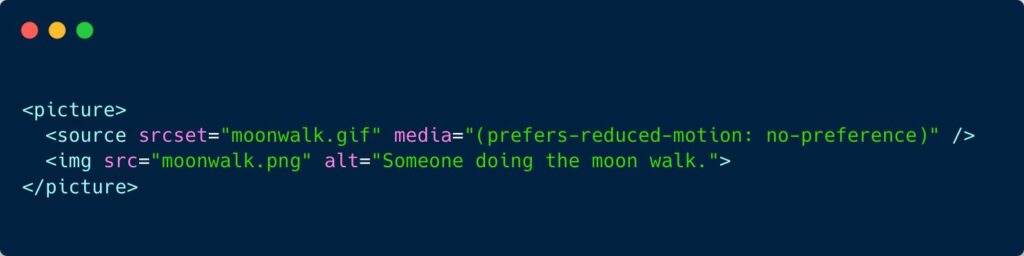
    <picture><source srcset="moonwalk.gif" media="(prefers-reduced-motion: no-preference)"><img fetchpriority=
    Snapshot of the code. Credit: Manuel Matuzović

    GIFS and prefers-reduced-motion

    • Some people find animations nausea-inducing or distracting. They might well configure their browser to indicate that they prefer reduced motion. This CSS Tricks article highlights a really neat trick from Manuel Matuzović: display a static image by default, or play an animated gif if users have no preference for reduced motion, using <picture> / <source> elements combined with a media query (see screenshot above). The article goes on to describe how you can use a <details> element to allow gifs to be ‘paused’ (see the demo).

    This $1 hearing aid could treat millions with hearing loss

    • Saad Bhamla, a bioengineer from India, wanted to buy his grandparents some hearing aids. He was shocked to find that they can cost $500 to $5000 per pair, so set out to build his own. He soldered a microphone to a circuit board, then added an amplifier, a frequency filter and a volume control, as well as on/off switch and audio jack. His makeshift product, LoCHAid, passes five out of six of the World Health Organization’s recommendations for hearing aids, and cost around $15 to build. This could be reduced to $1 if produced at scale. It needs clinically testing before it can be legally sold as a hearing aid in most countries.

    Did you know that you can subscribe to dai11y, week11y, fortnight11y or month11y updates! Every newsletter gets the same content; it is your choice to have short, regular emails or longer, less frequent ones. Curated with ♥ by developer @ChrisBAshton.
  • fortnight11y issue 25

    Your fortnightly frequent11y newsletter, brought to you by @ChrisBAshton:

    frequent11y is now 1 year old! 🎉 Since the first issue of dai11y on 28th October 2019, I’ve published well over 200 posts covering design, technology, science and ethics in the world of accessibility. I’ve been really enjoying reading so many articles and sharing them with you, and I’ve really appreciated the nice comments and encouragement from you. Please continue to share the newsletter with your friends and colleagues.

    Looking to the future – would you like me to cover any topics I haven’t covered yet? Is there a way I can improve the format? Let me know your comments by emailing me at chris@ashton.codes or reaching out to me on Twitter. Thanks in advance! Without further ado…

    Intro to Web Accessibility (see video)

    • What could be a more appropriate 1-year anniversary post than this excellent presentation by Michele A. Williams? In just 16 minutes she explains accessibility in great detail, starting with no assumed knowledge, and bringing the audience up to a good level of understanding about WCAG, WAI, HTML standards, Assistive Technology and team responsibilities. I learned something too – that JAWS stands for Job Access With Speech. A highly recommended watch for anyone new to accessibility!

    Google Slides – Present slides with captions

    • When you present Google Slides, you can turn on automatic captions to display your words in real time as you speak them (this only works with Chrome devices set to U.S. English). After you click “Present”, click the “CC” button or use CTRL + SHIFT + C (use CMD instead of CTRL on Mac). As you speak, captions appear at the bottom of the screen (but they won’t include punctuation). To change text position or size, click the drop-down menu Down arrow next to the “CC” button.

    :focus-visible Is Here

    • Matthias Ott writes about the situation where clicking on an element activates its :focus styles – something that can be perceived as ugly. With this new property, you can style elements if they receive keyboard focus, while avoiding styling if they receive focus via mouse click. Example: :focus:not(:focus-visible) { outline: 0 } paired with :focus-visible { outline: 3px solid blue }.

    Games are being remastered with little thought to accessibility

    • This article came out in June in response to a slew of remastered games being released around May. Many of these games from circa 2010 lacked accessibility features at the time, and haven’t been given any accessibility love in the remaster, lacking basic things like controls mapping. The author shows lots of screenshots and provides a quick overview of games including Mafia 2 and Minecraft Dungeons. Worth a read to remind ourselves how generally terrible in-game subtitles are.

    How we recruited people with low/no digital skills on Carer’s Allowance

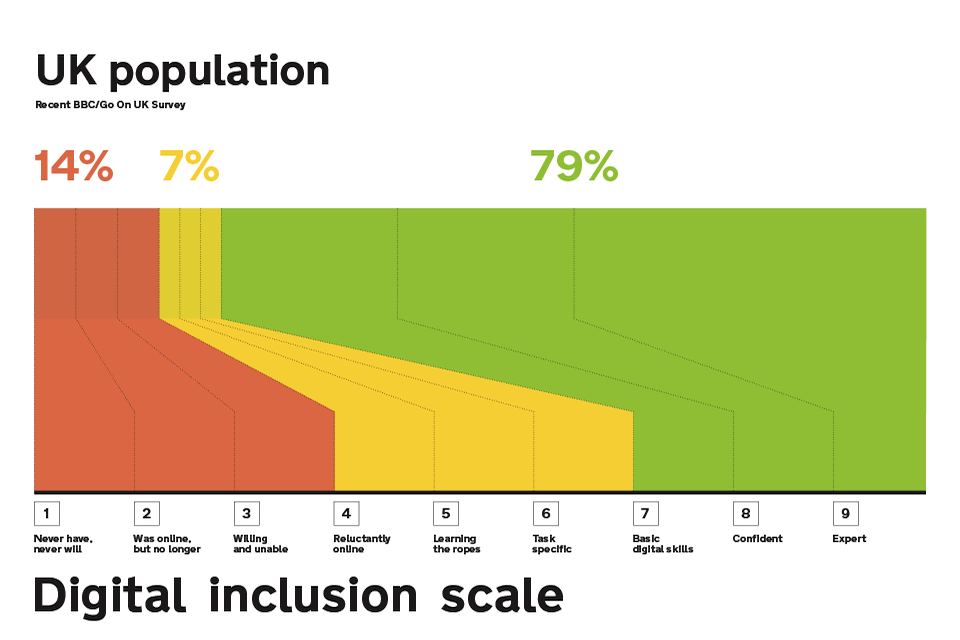
    • A GOV.UK blog from 2015. They wanted to find people on the lowest end of the digital inclusion scale for user research, to ensure a service they were building could be used by anybody. Asking people “How would you rate your computer skills?” wasn’t a reliable indicator of digital literacy as people tend to underestimate their skills and subsequently complete tasks with ease. Making people score themselves against explicit criteria, e.g. “How comfortable are you finding stuff using a search engine such as Google”, was a much better way of finding participants on the lower end of the scale.

    ARIA in CSS

    • Jeremy Keith writes about a technique (prompted by Sara Soueidan) that ‘forces’ you to create accessible experiences. You can use ARIA attributes as CSS hooks to ensure your component only looks/functions properly if said attributes are used in the HTML.
    • Consider this CSS: aria-hidden['true'] { display: none }. It ensures you’re properly hiding content from both sighted and screen-reader users; the aria-hidden hides from the screen readers, and the display: none hides from sighted users*.
    • *Jeremy seems to imply that display: none doesn’t hide content from screen reader users, which would indeed make this approach really clever. But display: none does hide from screen readers, so I think there’s been a misunderstanding somewhere. However, I still think the ARIA-in-CSS approach is more semantic, and could be marginally beneficial…
    • Imagine if your CSS fails to load for some reason. With ARIA-in-CSS, at least screen reader users will still ignore the content. If you’d used a class instead (.hide { display: none }), then a CSS load failure would be a broken experience for everybody.

    Math, schizophrenia and the story of a life saved by the Internet

    • A US podcast sent in by frequent11y subscriber Nick. It’s an anonymous interview with someone who has schizophrenia. Whilst studying to become a mathematician, they were faced with severe anxiety attending the face-to-face lectures, so asked if they could just do the assignments and skip the classroom parts. They were told “no”. After dropping out of school and reaching suicidal lows, they enrolled in an online-only degree, graduated, and now have a lucrative full-time job. They hope that the pandemic leads to academia becoming more remote-friendly and accommodating of mental health.
    • (The relevant portion is about 31 minutes into the podcast, or you can switch to the Transcript tab and search for “coming up, math” to find the relevant portion.)

    Developing Real-Time, Automatic Sign Language Detection for Video Conferencing

    • Google intern Amit Moryossef writes about a research paper on real-time sign language detection using human pose estimation. The model, called PoseNet, reduces input from a HD image to a small set of landmarks on the user’s body, which can be analysed frame-to-frame to predict whether a user is signing, to an accuracy of 83-92% – you can try this for yourself in the demo or watch the video.
    • As conferencing software tends to focus on someone who is speaking verbally, it is hoped sign detection could be used to move focus to someone communicating via sign language. The researchers found a clever way of triggering the focus: when the model determines that a user is signing, it passes an ultrasonic audio tone. The audio is transmitted at 20kHz, which is outside the hearing range for humans, but fools any video conferencing application into thinking the user is speaking. This research could be used to better include those who communicate via sign language.

    That Time I Tried Browsing the Web Without CSS

    • Jon Kantner describes his experience with some popular sites after turning off CSS. 12.5% of users with low vision (who use assistive technology) browse the web with custom stylesheets, so sites need to have good structural markup to build upon. The most common issues Jon encountered were: images/SVGs with no width/height attributes, so appeared massive on the screen; lack of whitespace between elements (sites rendering <a>Link 1</a><a>Link 2</a>, not marked up as a list); unlabelled buttons (which would also be a huge problem for voice input or screen reader users); and missing images (e.g. logos applied with CSS background-image).
    • Did you like this article? I’ve written a number of similar posts on Smashing Magazine.

    The Robot That Gives Humans a Job (video, 3 minutes)

    • At the “Avatar Robot Cafe” in Tokyo, all of the servers are robots – but this isn’t the typical story of automation taking peoples’ jobs. These robots are controlled by people outside of the cafe who would never be able to physically do the job otherwise. Massa – the avatar that serves Alice Levine in the clip – has severe physical disabilities that confine him to his bed. But he can control the robot waiters using sophisticated eye tracking technology, and can talk to customers to take their orders and have a conversation. The arrival of 5G could soon mean he can send his robot to any location, indoor or out. It provides Massa “a huge amount of hope”.
    • Watch the full episode of Kevin McCloud’s Rough Guide to the Future on Channel 4 (47 minutes).

    Did you know that you can subscribe to dai11y, week11y, fortnight11y or month11y updates! Every newsletter gets the same content; it is your choice to have short, regular emails or longer, less frequent ones. Curated with ♥ by developer @ChrisBAshton.
  • fortnight11y issue 24

    Your fortnightly frequent11y newsletter, brought to you by @ChrisBAshton:

    How studying fruit flies might help us prevent age-related hearing loss in humans

    • Fruit flies are prone to age-related hearing loss – just like humans, whose molecular pathways of hearing are very similar – maintaining their sensitive hearing for about 85% of their 58 day lives. The article goes into more scientific detail than I’m able to summarise here, but the TLDR is that gene therapies have been applied to fruit flies such that older flies had hearing capabilities similar to younger flies. The same approach could in theory be applied to humans.

    Virusdogs

    • On BBC Radio 4 this morning, they were talking about how dogs can be trained to detect coronavirus in humans, and could be used for mass screenings at places like airports and train stations. Each dog takes around 8 weeks to train, and can process 250 people per hour. This initiative is still at the early feasibility study stage, and is asking for volunteers who have recently tested positive for coronavirus to apply for a training pack. The pack contains a mask and a T-shirt to wear for a few hours, and a prepaid envelope to return the worn contents to ARCTEC for training. A successful program could re-enable global travel.

    Here are a couple of interesting articles focused on accessibility law suits in the USA, but well worth a read wherever you live: Expert witnesses in web accessibility cases (Part 1) and Expert witnesses in web accessibility cases (Part 2).

    • In Part 1, Ken Nakata describes the Daubert standard of expert witness testimony, which requires that a scientific methodology is followed (peer-review, standards followed, widespread acceptance within the community, etc). Testimonies fail because they’re too high level, describing a general audit, which is “not a sufficient replacement for a proper explanation of overall methodology and process” [pertaining to this specific case].
    • In part 2, Ken gets more specific. Many testimonies fail because they’re too broad, describing all the WCAG issues encountered, as that’s what accessibility specialists are used to doing in their reports. They should instead concentrate solely on issues that caused the plaintiff to “suffer injury”, where the “injury can be traced to the defendant’s illegal conduct”. So a blind person can sue a site where they were unable to purchase a product (the injury) if the site has not been built to be accessible to a screen reader (the illegal conduct). On the other hand, a blind person couldn’t sue a site for having a video missing captions because lack of captioning alone should not injure the blind plaintiff; a deaf plaintiff would have more grounds.

    Accessible HTML toggle buttons

    • Erik Kroes describes his accessible toggle switch, which makes use of a <button> with role="switch" and aria-checked="true" attributes. He chose <button> because “I want something to change instantly which a checkbox really should not be doing. In my experience, checkboxes that change things often clash with WCAG Criterion 3.2.1: On Focus. A aligns better with the goal of instant change”. It’s always interesting to see how different devs approach this problem.

    webhint.io

    • Webhint is an OpenJS Foundation project backed by Microsoft, that lints your website for accessibility, speed and cross-browser compatibility. It can be installed as a CLI tool, a browser extension, or run directly from the webhint scanner page. I tried it on one of my sites and though it didn’t find any accessibility issues, it found a lot of redundant meta tags which I should consider removing. A talk by Rachel Weil includes a live demonstration of the usage.

    Renting while disabled: ‘Being in a wheelchair means I pay double the rent’

    • 93% of the UK’s 8.5 million rental properties are inaccessible. It’s up to local authorities to set and enforce accessibility targets, but just 5% are requiring developers to construct wheelchair-suitable housing.
    • Finding an accessible home is difficult as property websites lack accessibility filters, and estate agents are often useless. Habinteg Housing Association are hoping to launch an ‘online accessible property directory’, but it’s unclear from the article what scope it will have. There’s certainly a business opportunity here for someone to build the Rightmove of accessible housing.
    • The Equality Act 2010 gives wheelchair users the right to make adaptations to their rented homes, but changes must be ‘reasonable’ (giving room to landlords to say no) and they must intend to live in the property for at least 5 years, making this unviable for many young renters.
    • These adaptations cost on average £9,000, with a means-tested Disabled Facilities Grant covering only some of that cost. Life costs £583 per month more on average if you are disabled.

    Alternative Text for CSS Generated Content

    • An Adrian Roselli post about the new “CSS generated content alternative text” syntax, which allows you to specify alt text for CSS background images. For example: .new::before { content: url("./star.png") / "New!"; }. Browser support is very patchy and this should not be relied on yet, but it is a promising step as currently background images are not accessible to screen readers nor to sighted users using Windows High Contrast mode. It’s worth noting that the alt text won’t display if the image fails to load, so it’s still generally best to use a normal <img>.

    The new normal — its something of a strain

    • David Banes writes some tips on looking after your eyes now that many of us work from home and don’t have an office-like environment to work in. Some are obvious but need stating: take eye breaks, limit screen time where possible, remember to blink, etc. Try to reduce glare on your screen by turning lights behind you off, but aim for a softly lit environment. Try to keep your screen at arm’s length from you, with the top of the screen roughly at eye level. Finally, consider installing f.lux (for desktop and mobile) – software that adds a tint to your screen, getting gradually darker as the evening draws in, reducing blue light. It helps reduce eye strain and can also have a positive impact on your sleep.

    The most useful accessibility testing tools and techniques

    • Artem Sapegin describes how he tests a11y as a frontend developer. FastPass mode in the Accessibility Insights browser extension highlights the two most common issues to fix. He also uses axe. For contrast checking, he uses Chrome DevTools’ built-in contrast checker and Spectrum. He manually tests navigating the site with a keyboard (focus states etc), using a screen reader, and attempting to zoom in 200%. Finally, he checks the site in ‘browser reading mode’ and in dark mode.

    Cursor Pro Mouse Highlighter

    • This popped up in my inbox and it looks like a useful tool for people with mild/moderate visual impairments. Through a global toggle in your Mac’s native menu bar, it can be turned on to provide a highlight ‘orb’ around your cursor so that it is easier to keep track of, and a built-in magnifier such that if you hold a particular key while hovered over something, you zoom in slightly. It’s a paid app ($7.99), so a free alternative would be to go to Settings -> Accessibility -> Display -> Cursor and increase the ‘Cursor Size’, though this doesn’t have the highlight orb or zoom functionality.

    Did you know that you can subscribe to dai11y, week11y, fortnight11y or month11y updates! Every newsletter gets the same content; it is your choice to have short, regular emails or longer, less frequent ones. Curated with ♥ by developer @ChrisBAshton.
  • fortnight11y issue 23

    Your fortnightly frequent11y newsletter, brought to you by @ChrisBAshton (due to an oversight, I’m publishing this a week late – apologies!):

    How do the new iOS 14 accessibility features stack up?

    • Deque reviews the new a11y features in iOS 14. It supports widgets on the home screen, e.g. for at-a-glance weather reports, which makes it easier for everybody to find out pertinent information quickly. Back Tap (tapping 2-3 times on the back of the phone) can be mapped to do things such as take screenshots, and seems beneficial as another ‘shortcut’ alongside the existing triple-click-home button. VoiceControl can in theory be used with VoiceOver, but it’s hard to make a voice command when so much content is being read out on screen; Deque recommends delaying supporting the VoiceControl/VoiceOver combination in your applications until Apple has ironed out a few issues.

    WAVE 3.1 Release

    • Version 3.1 of the accessibility evaluation tools has been released, with improvements including: YouTube videos are identified as an Alert (prompts users to verify it has captions), better ARIA and title support, reduced false errors for contrast testing, and identifying structures that could be lists (but are not marked up as such).

    As diabetes increases in sub-Saharan Africa, so will blindness

    • A large number of people arriving at a health organisation in Tanzania have developed diabetic retinopathy – a complication of diabetes that can cause permanent blindness and is the leading cause of blindness in working age adults globally. Many patients are unaware they’re diabetic and are arriving too late for early stage treatment (lasers and injections) and so up to 20 patients per week are being referred for eye surgery at a private hospital, where surgery costs $2,500-$4,000. Many patients cannot afford this. A 143% increase in diabetes is expected in Africa by 2045. It is also on the rise globally, particularly in low and middle income countries. The article suggests that AI could be used to make screenings for diabetic retinopathy more affordable.

    Gutenberg Accessibility Costs WordPress the W3C Work

    This is a story that has taken up a lot of headlines, and many articles assume a fair bit of background knowledge, so I’ll be giving a longer TLDR than normal (though still largely based on Adrian Roselli‘s article above):

    Sound thinking: BBC helps audience to hear the details

    • Article about how the BBC used ‘object-based media’ when recording Casualty (Series 34, Episode 36), which features a character with a hearing impairment. Object-based media samples sounds from different parts of the scene – the main dialogue, a heart rate monitor, background noise – and allows the viewer to adjust the levels (or stick to the default ‘broadcast mix’) so that they can hear the most important things clearly.
    • The article claims viewers watching on “an internet-connected device” should see a “slider… which enables them to adjust the level of the audio to suit their own particular needs”. Regrettably, I could not see a slider on BBC iPlayer at time of writing.

    a11yresources

    • A curated list of a11y resources by Hannah Milan. Browse browser extensions, bookmarklets, checklists, colour picker tools, articles, and even other accessibility focused newsletters (I won’t be offended 😉).

    Tech volunteers develop new online tool to help visually impaired access COVID-19 data

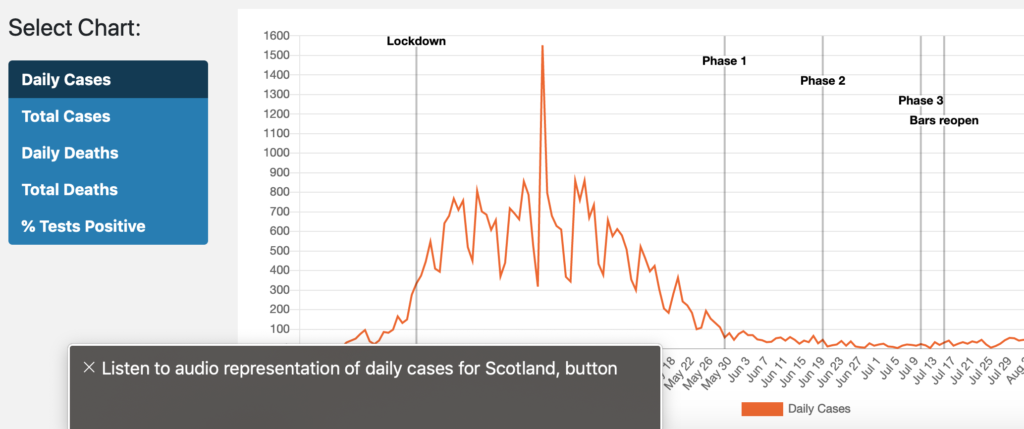
    Screenshot of line graph with VoiceOver overlay
    • The ‘Scottish Tech Army’ have created a dashboard of COVID-19 statistics in Scotland, which, in a ‘world first’ uses ‘sonification’ to interpret visual data as sound. This enables screen reader users to get an idea of the general trend of a chart, without having to keep track of every data point like they would in a table. I’m not a screen reader user myself, so don’t know how useful this is, but it is certainly an interesting experiment. To try, turn on your screen reader and navigate to the visually hidden “Listen to audio representation of daily cases for Scotland” button.

    Work In Progress: Tabbing Order in the Accessibility Panel

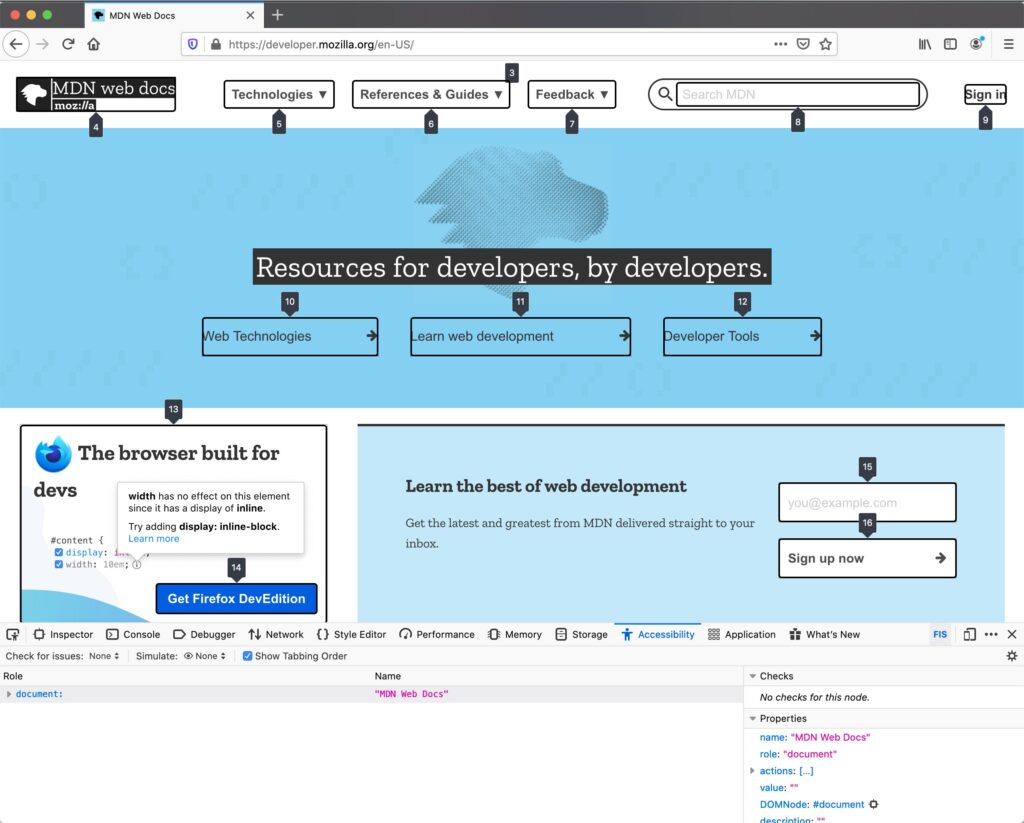
    • Firefox are adding a devtools feature which highlights all focusable elements and the order in which they will be tabbed. To view, download the Nightly version of Firefox, open the devtools, switch to the Accessibility panel, and check the “Show Tabbing Order” option. It’s not yet clear when or if it will make it into the mainstream browser.

    VoiceOver on iOS 14 Supports Description Lists

    • This isn’t the first time I’ve talked about iOS 14, but Adrian Roselli highlights a lesser known improvement the update brings: support for <dl> description lists. Now, in some contexts, terms and definitions are read sensibly, e.g. “louche, term. ‘not reputable or decent’, definition”. In other contexts, such as in VoiceOver’s ‘read-all’ mode, it still fails to parse properly, garbling the entire list as one sentence.

    Did you know that you can subscribe to dai11y, week11y, fortnight11y or month11y updates! Every newsletter gets the same content; it is your choice to have short, regular emails or longer, less frequent ones. Curated with ♥ by developer @ChrisBAshton.

  • fortnight11y issue 22

    Your fortnightly frequent11y newsletter, brought to you by @ChrisBAshton:

    6 webinars from GDS to improve accessibility within your organisation

    Typing With One Hand on Your iPhone Just Got a Little Easier

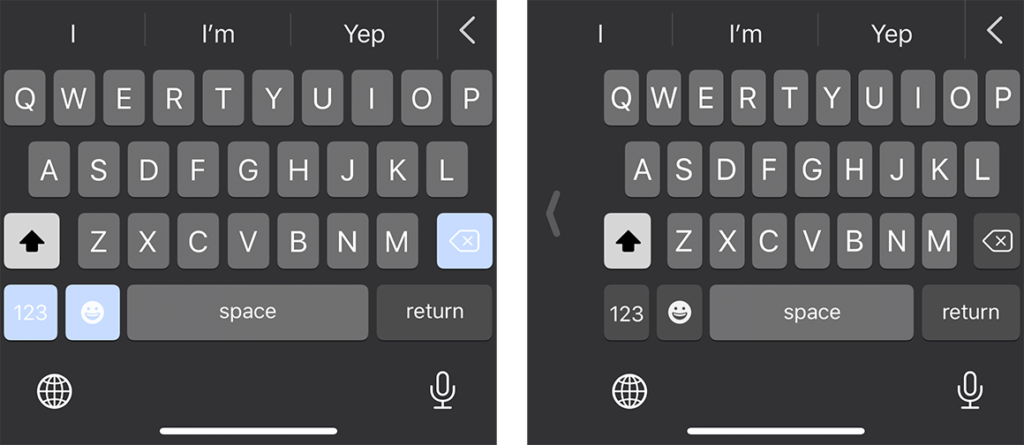
    Screenshot of full size iPhone keyboard next to one-handed keyboard
    On the iPhone 11 Pro, the right-handed keyboard (shown on the right) is roughly 5/16″ narrower than its full-sized companion on the left.
    • As iPhones get bigger, it can be harder to reach certain keys on your keyboard when using just one hand. Apple have built a “One-Handed Keyboard” mode, which squashes the keys together and makes it easier to reach any given key with your thumb. To enable: when using the keyboard in any app, press and hold the globe icon in the bottom left corner and choose “Keyboard settings”, then switch to right-handed or left-handed keyboard.

    What to look for in an accessibility audit

    • A blog post by Glenda Sims, describing Deque’s different audit offerings. Clients need to choose the browsers and assistive technologies included in the audit, though this needs to be balanced against the cost of testing. Pragmatically, Glenda claims that using Chrome with NVDA will catch >90% of accessibility issues. Clients also need to choose which pages to test, which should include the site’s entry points, core paths and highest traffic pages. Lastly, they must choose what standard to test against: usually WCAG 2.1 Level A (lowest level of conformance) or AA.

    Five Things I Use My Phone For On A Daily Basis

    • Luke Sam Sowden, who is “Severely Partially Sighted”, describes how he uses the accessibility features of his iPhone XR, and apps. He uses Microsoft Seeing AI, Tap Tap See and Digit-Eyes to use his phone’s camera to recognise objects, people and text in his surroundings. Google Maps gives good directions. The built-in Camera App is VoiceOver-compatible and tells him where his face is on the screen if he’s trying to take a selfie. Finally, he finds Twitter and Instagram quite accessible – the latter is improving with “Photo descriptions” and Instagram Stories.

    AudioEye Sues AccessiBe for Patent Infringement

    • AudioEye is suing accessiBe for allegedly using tech that AudioEye has a U.S. patent on (patent no. 10,762,280). Both companies are involved with accessibility. accessiBe announced 12 million dollars of funding in May 2020. The article laments the fact that one a11y-focussed company is suing another, and wishes the money was spent improving the lives of disabled people instead. You can read the legal filing by AudioEye, but I’m inclined to agree that it’s a waste.

    GDS updates its Government Service Standard requirements for assistive technology (AT) testing

    • Other than updating version numbers of AT and browser combinations, the main changes are: adding TalkBack (Android screen reader); reducing magnification level to test in from 10x to 4x; swapping ZoomText with Windows Magnifier or Apple Zoom; and specifying VoiceOver should be tested in iOS (testing in macOS is in a new ‘optional’ list for further testing).
    • There’s also a helpful note about it being good to test with any screen reader, speech recognition tool or screen magnifier in your development environment, but that you should test against the full list prior to launch.

    alt attributes like paragraphs

    • Developer and accessibility expert Dave Rupert came to a realisation recently: “alt text is like a paragraph”. To clarify, Dave isn’t talking about the length of the alt text here, but the order in which it appears, and its contextual relevance. A lot of designs have images appearing before headings, but screen reader users who navigate by headings would miss the image (and alt) entirely. If the image is important (e.g. “Sale” or “New”), it should probably be moved below the heading in the source order, but then perhaps rendered above the heading using something like the CSS order property.
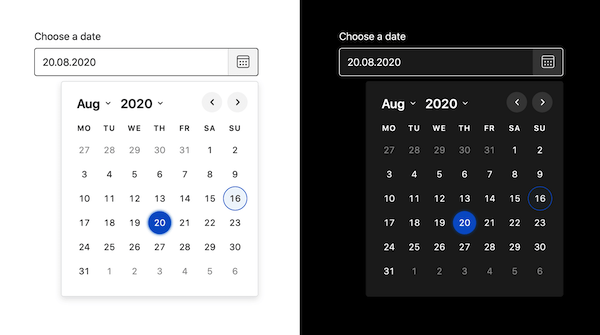
    Screenshot of the Duet Date Picker output.

    Duet Date Picker

    • This is a WCAG 2.1 compliant date picker, from the Duet Design System, that also allows you set a minimum and maximum allowed date. It can be used standalone or incorporated into any JavaScript framework, and weighs 10kb minified and Gzip’ed. It supports modern browsers and screen readers, and has limited support for IE11.

    10 Things to Know About Twitter’s Alternative Text for Images

    • Article by Deborah Edwards-Oñoro, summarising a few things you may not know about alt text for images in tweets. Alt text is now enabled by default on the web and apps (no need to turn on image descriptions in settings). Alt text cannot be added to already published tweets. It can be added to animated GIFs. You can use up to 1000 characters for alt text. If you leave it blank, Twitter will add “Image” as the alt text.
    Woman wearing face mask with clear plastic window cut through it, so that you can see her mouth.

    Are clear masks the way to clearer communication? The deaf community isn’t so sure.

    • Yahoo! article by Abby Haglage, explaining that clear face masks may not be the panacea we think it is for the deaf community. The masks can fog up, reducing visibility – and even if that is put aside, lip reading is only about 30% effective. Many advocates are encouraging people to learn some BSL (British Sign Language) instead. However, Abby acknowledges that clear masks are a step in the right direction.

    Did you know that you can subscribe to dai11y, week11y, fortnight11y or month11y updates! Every newsletter gets the same content; it is your choice to have short, regular emails or longer, less frequent ones. Curated with ♥ by developer @ChrisBAshton.
  • fortnight11y issue 21

    Your fortnightly frequent11y newsletter, brought to you by @ChrisBAshton:

    How to Create Accessible Cooking Videos

    • Article describing what to do as a content creator to make your videos accessible. It pertains to cooking, but could equally be applied to most videos. 1: provide captions, either via sidecar caption file or embedding directly into video. 2: describe visual elements via a separate audio description track, which is difficult because many players don’t natively support it. For cooking videos, describing while you go should be sufficient. Here’s a good example.

    These volunteers are making Black Lives Matter videos accessible to deaf activists

    • A group of volunteers on Twitter noticed that many Black Lives Matter videos were missing captions, so they set up @ProtestAccess. Users can tag this account to ask for transcriptions of a video, which over 250 people are on hand to transcribe. Since starting in June, they’ve posted over 500 captioned videos, whilst encouraging the original uploaders (especially large organisations) to provide captions from now on.

    44×44 Pixel Cursor Bookmarklet

    How Animal Crossing: New Horizons Players Use The Game’s Customization To Make It More Accessible

    • Blind athlete Ross Minor navigates the Animal Crossing world by hearing; the sound of your character’s footsteps stops if you walk into an obstacle, and you can use noisy waterfalls and tiki torches to signpost areas of your village. Shannon Natale set up a sign for her aunt, asking players to come close to her aunt’s character before attempting to chat, so that messages are centered in the most visible part of the screen. Some features are still inaccessible, such as insects making no noise: there is a petition to get these fixed.

    Autonomous vehicles should benefit those with disabilities, but progress remains slow

    • An MIT report estimates that autonomous vehicles might not hit the streets for another decade. The benefits when they arrive, however, will be massive for the disabled community. In the USA alone, it would enable employment for 2 million people with disabilities, while saving $19 billion annually in missed medical appointments. It could also have resulted in 3 million more people voting in the 2012 US election. Anthropologist Megan Strickfaden is advocating for a standard, universally designed autonomous vehicle with side entry ramp so that everybody can access it regardless of ability.
    • “This is a unique opportunity in history to vastly improve the lives of millions of people with disabilities. All of us will grow old, if we are fortunate to live long lives, and many of us will need, either permanently or temporarily, the assistance that [autonomous vehicles] afford” ~ Sheryl Gross-Glaser, director of the nonprofit Community Transportation Association of America.

    Operating System and Browser Accessibility Display Modes

    • Eric Bailey summarises several global settings users might use to change their display, the reason for their existence and the effect they can have on your website. The modes are Dark, Increased Contrast, Inverted Colors, Reduced Motion, and High Contrast. He also describes how to target them in code, so that you can better tailor your site to your users. A very useful resource.

    When there is no content between headings

    • This is a question that often comes up: are you allowed to have a heading immediately followed by another heading, with no content in between? Hidde de Vries gives us a useful rule: “Always have content between headings of the same level.” I.e. a <h2> immediately followed by a <h3> is fine, but a <h2> followed by a <h2> is not.

    upyoura11y.com

    Decoding Label and Name for Accessibility

    • Consider the following HTML: <label>Name: <input aria-label="First name" placeholder="e.g. Chris" title="Enter a name"></label>. What gets read out by screen readers?
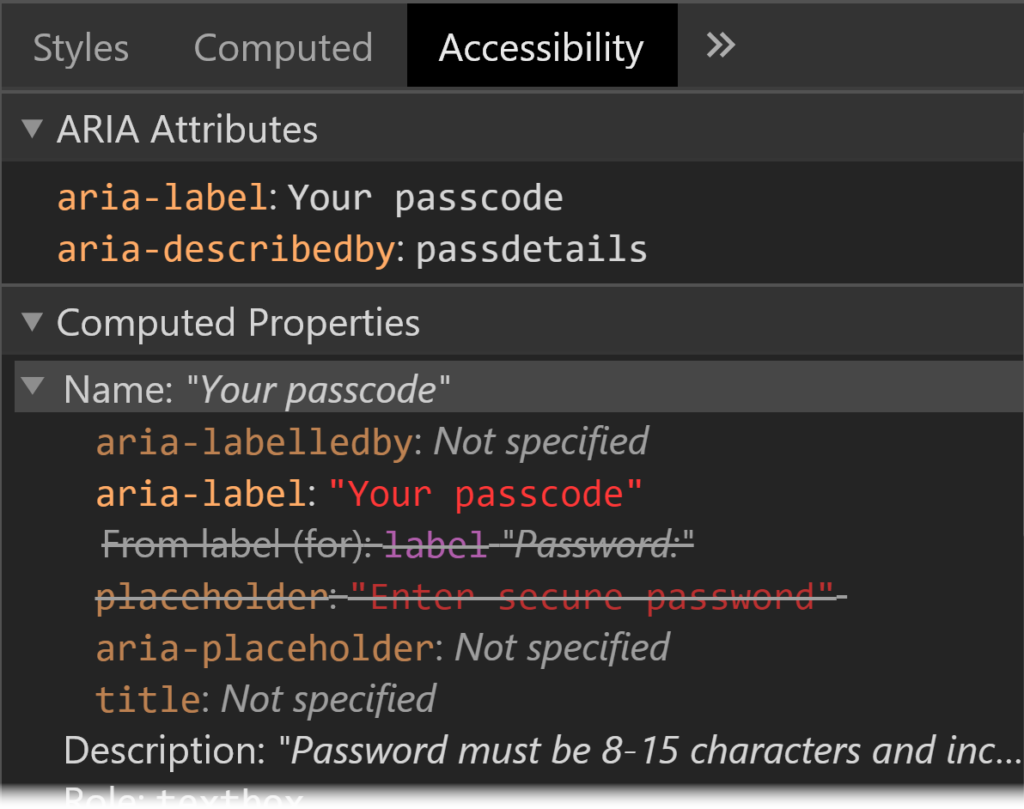
    • Answer: the aria-label always takes priority. In its absence, it would be the label, and in the absence of that, the title, or if nothing else, the placeholder. These rules are defined in the HTML Accessibility API Mappings’ Accessible Name and Description Computation. Browsers have built-in tools to allow you to inspect an element’s accessibility properties.
    Screenshot of Chrome DevTools showing Accessibility tab with ARIA Attributes section and Computed Properties section. They show that the element has aria-label, aria-describedby, label and placeholder properties, and that the aria properties are the ones that are being applied.
    Chrome DevTools show the hierarchy of the accessible name computation for a specific element.

    Did you know that you can subscribe to dai11y, week11y, fortnight11y or month11y updates! Every newsletter gets the same content; it is your choice to have short, regular emails or longer, less frequent ones. Curated with ♥ by developer @ChrisBAshton.
  • fortnight11y issue 20

    Your fortnightly frequent11y newsletter, brought to you by @ChrisBAshton:

    Equal Entry Website Called Out as Inaccessible

    • A bit of a clickbaity headline, describing how Equal Entry responded to a complaint that one of their web pages had 2 accessibility errors, which was the result of an automated tool and turned out to be all false positives. For example, one of the errors was that an input was missing a label, but it was a textarea used for visual spacing only. It had aria-hidden="true", so it didn’t need a label. The post has a useful overview of how the consultancy conducts an accessibility test, with a reminder that aiming for a 100% pass rate can be a false prophet.

    Why Deaf People Oppose Using Gene Editing to “Cure” Deafness

    • Article suggesting that people who are deaf view themselves through the social model, rather than medical model, where societal barriers are the source of disability. It argues that an inaccessible society causes more harm than being deaf itself, and that there can be biological advantages to being deaf. ‘Deaf gain’, as it is known, includes being better able to accurately recognise faces, having faster peripheral vision reaction times, and perhaps some protection against Alzheimer’s. A gene that causes hereditary deafness may actually offer improved wound healing.

    What’s New in WCAG 2.2

    New TfL app to help Londoners travel safely round capital

    • The TfL Go app for iPhone (with an Android version landing this autumn) shows real-time train times for the London Underground, with information aimed to enable travel at quieter times to help customers maintain social distancing. It includes ‘step-free mode’ which shows all the stations with street-to-platform wheelchair access. It also has dynamic text sizes and is VoiceOver-compatible – read more on tfl.gov.uk.

    Amazon Expands Accessibility Features With New Text Banner for Fire TV

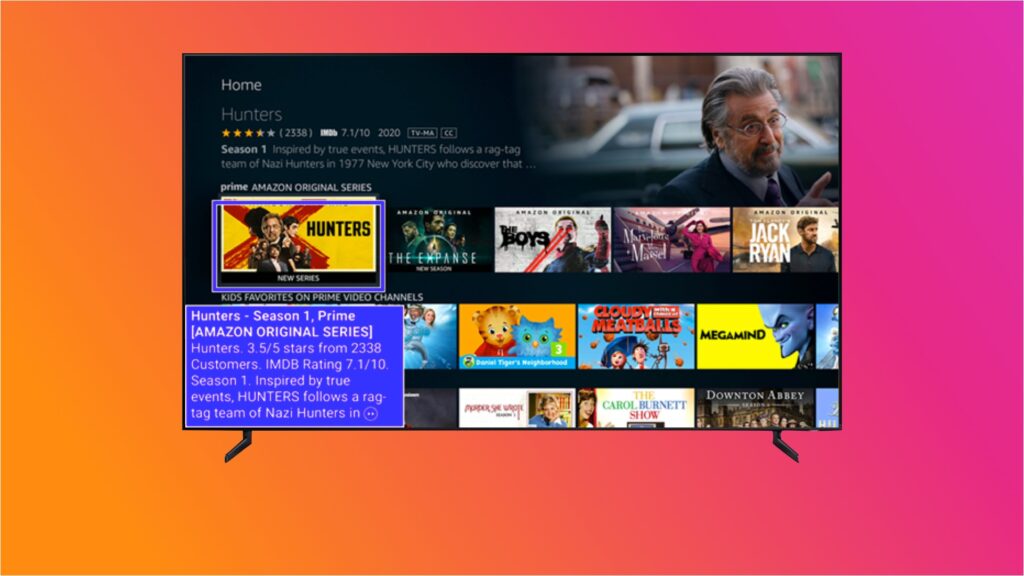
    • Amazon has launched ‘Text Banner’, aimed at assisting users who struggle to read the onscreen text. This text banner appears in a fixed location on the screen and works across the Fire TV UI, but also Prime Video and other applications on your Amazon device. It can be enabled within Settings under Accessibility.
    The new mode on the Fire TV summarises the currently focussed content in the bottom left hand side of the screen, in a high contrast purple/white box. Source: thestreamable.com.

    a11y is web accessibility

    • Eric Bailey provides a comprehensive summary of why the term ‘a11y’ is useful, to address the common ironic adage “the term ‘a11y’ is itself inaccessible”. It is easier to type and to say, it allows more room for content inside tweets, and, crucially, it is more specific than ‘accessibility’ as it pertains to digital accessibility rather than something physical like wheelchair ramps for libraries. It is no different than using terms like i18n, 3D or WWII, and to suggest it is a problem is arguably a sign of ableism.

    Is Twitter Trolling Us? Why Voice Tweets Are Already Problematic

    Did you know that you can subscribe to dai11y, week11y, fortnight11y or month11y updates! Every newsletter gets the same content; it is your choice to have short, regular emails or longer, less frequent ones. Curated with ♥ by developer @ChrisBAshton.
  • fortnight11y issue 19

    Your fortnightly frequent11y newsletter, brought to you by @ChrisBAshton:

    How Alexa has change the life of a disabled person

    • Colin Hughes describes how his muscular dystrophy can make it difficult to use remote controls. He now uses Alexa to control thermostats, lights and blinds with his voice. Taking inspiration from a video showing how a garage door can be opened/closed with a cheap wireless switch, Colin retrofitted his front door to be voice-powered for £150. This contrasts with a £5000 quote he received from a company, highlighting the financial burden people with disabilities are put under. His command of ‘open sesame’ has to be regularly changed in case passers by figure out how they can enter his home.

    Accessibility Best Practices for Classes Using Zoom

    • PDF from The University of Texas. Tips include: don’t require people to turn on their webcams (anxiety, physical tics etc); read screen shared contents and any chat content aloud; use Show/Hide Non-video participants to hide names and profile pictures if recording; do not force mute participant audio (required for deaf students to pin the sign language interpreters); post materials before or after class for students to review.

    Accessible Font Sizing, Explained

    • The WCAG does not define a minimum font size for the web: just that fonts should be resizable and of a sufficient contrast. Contrast should be 4.5:1 for small text, 3:1 for larger text (defined as text that is a minimum of 18 point or 14 point with bold), though different screen densities and alphabets mean the pixel size will vary. Browser font sizes are accessible by default, so avoid using px and instead make your font sizes relative to the base font size (usually 16px) using rem/em. About 3% of users change their default font size in the browser settings, and some will override the font-family too (e.g. to OpenDyslexic, which increases readability for users with dyslexia).

    Control your iPhone with your voice (and leave Siri out of it)

    • iOS 13 brings ‘Voice Control’, which allows you to use commands like ‘swipe left’ or ‘scroll up’, open apps or take pictures. You can also dictate text messages or notes, and delete text you’ve typed without having to touch your phone. It’s also highly customisable: you can set up shortcuts for inserting your email rather than saying it out loud, or have Voice Control perform custom gestures, e.g. touch-and-hold. This article explains how to set that all up.

    Disabled Nurses Find Covid-19 Silver Lining; Hope For More Inclusive Future

    • A Forbes article about three nurses with disabilities, and the opportunities the current pandemic has afforded them. Andrea Dalzell interviewed for 76 hospital jobs and was rejected from them all once they realised she was in a wheelchair. The desperate plea for nurses since March has now meant employers look past her disability, and she’s found a job. All three nurses in the article strongly state that they work as effectively as other nurses.
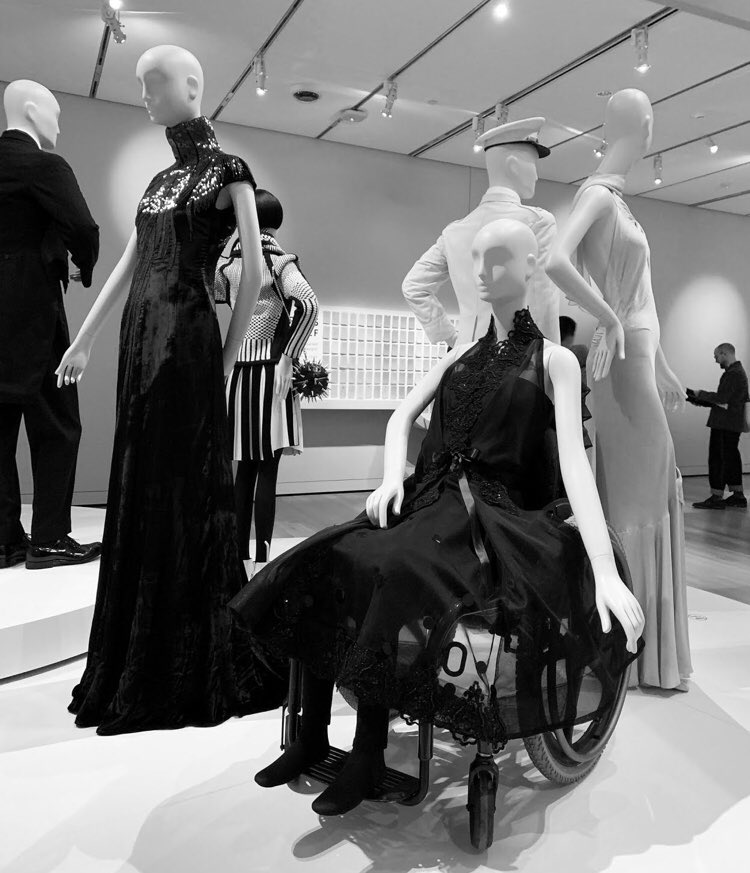
    • On a semi-related note, #DisabledAndCute is trending on Twitter. I came across this image in a New York Times article, showcasing an ‘accessible party dress’ on manikin positioned in a wheelchair, amongst other manikins. It’s not something you usually see and I liked that the visibility of wheelchairs in social/fun settings is being normalised.
    Fashion and Textiles Collection of the Peabody Essex Museum

    Making Facebook.com accessible to as many people as possible

    • A Facebook Engineering article describing how the site redesign in React provided opportunities to improve accessibility. Using React Context, heading levels automatically increase as they are nested (i.e. <Heading /><section><Heading /></section> automatically creates a h1 followed by a h2). They use the same mechanism for contextual keyboard commands, to perform actions relevant to the thing that is in focus. Components such as FocusList are wrapped around lists to handle focus and to define up/down arrow key behaviour. A static analysis tool errors when it encounters a form control without a label, and a runtime tool monitors the DOM in real time and visually alerts devs to any inaccessible components.

    YouTube Axes Community Captions Feature, Citing Low Usage

    • A feature allowing viewers to contribute subtitles to a channel’s videos will be discontinued on 28th September 2020. YouTube says less than one-thousandth of a percent of channels approved a community captions track in the last month, and only 0.2% of watch time had a community caption track selected. Subtitles ranged in quality, and it is known that some contributors were exploiting the tool to spam or troll its users. Content providers can still provide captions on their own videos, and YouTube is improving its automated captions service.

    Going Colorblind: An Experiment in Empathy and Accessibility

    • Sara Novak writes about her three-day experiment using Chrome extension See, to emulate deuteranomaly and better understand the needs of one of her colleagues. This is the most common type of colour blindness, making it difficult to differentiate green and red. She realised that the way she’d been highlighting her emails in different colours was not accessible, and switched to using italics or bold for differentiation. A site Sara used wouldn’t let her fill out a form because it used red and green borders to indicate whether the fields passed validation, which she couldn’t distinguish between.

    Diamond: Strides Made in Website Accessibility This Year, But More Work Needed

    • A report from May, which I’ve only now found time to read: accessibility for the Alexa Top 100 websites has improved from 2019 to 2020. 40% are ‘fully accessible on all platforms tested’, vs 29% last year. And 39% of sites are ‘fully inaccessible’, down from 43%. 21% were accessible ‘with difficulty’, down from 28%. An example of ‘accessible with difficulty’ includes triggering a login button but then needing to search for form elements because focus was not given to the modal.

    Did you know that you can subscribe to dai11y, week11y, fortnight11y or month11y updates! Every newsletter gets the same content; it is your choice to have short, regular emails or longer, less frequent ones. Curated with ♥ by developer @ChrisBAshton.