Category: frequent11y newsletter

Accessibility themed newsletter. Sign up for the frequency you want: dai11y, week11y, fortnight11y or month11y.

  • week11y issue 43

    Your weekly frequent11y newsletter, brought to you by @ChrisBAshton:

    6 webinars from GDS to improve accessibility within your organisation

    Typing With One Hand on Your iPhone Just Got a Little Easier
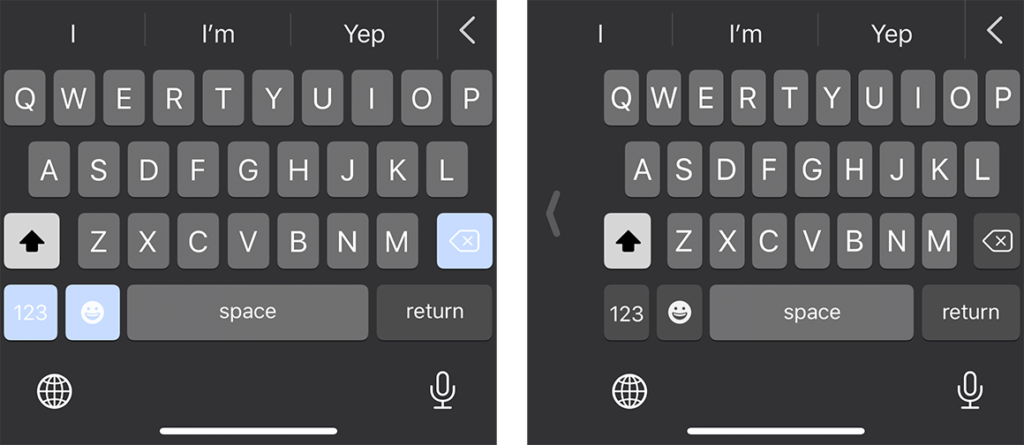
    Screenshot of full size iPhone keyboard next to one-handed keyboard
    On the iPhone 11 Pro, the right-handed keyboard (shown on the right) is roughly 5/16″ narrower than its full-sized companion on the left.
    • As iPhones get bigger, it can be harder to reach certain keys on your keyboard when using just one hand. Apple have built a “One-Handed Keyboard” mode, which squashes the keys together and makes it easier to reach any given key with your thumb. To enable: when using the keyboard in any app, press and hold the globe icon in the bottom left corner and choose “Keyboard settings”, then switch to right-handed or left-handed keyboard.

    What to look for in an accessibility audit

    • A blog post by Glenda Sims, describing Deque’s different audit offerings. Clients need to choose the browsers and assistive technologies included in the audit, though this needs to be balanced against the cost of testing. Pragmatically, Glenda claims that using Chrome with NVDA will catch >90% of accessibility issues. Clients also need to choose which pages to test, which should include the site’s entry points, core paths and highest traffic pages. Lastly, they must choose what standard to test against: usually WCAG 2.1 Level A (lowest level of conformance) or AA.

    Five Things I Use My Phone For On A Daily Basis

    • Luke Sam Sowden, who is “Severely Partially Sighted”, describes how he uses the accessibility features of his iPhone XR, and apps. He uses Microsoft Seeing AI, Tap Tap See and Digit-Eyes to use his phone’s camera to recognise objects, people and text in his surroundings. Google Maps gives good directions. The built-in Camera App is VoiceOver-compatible and tells him where his face is on the screen if he’s trying to take a selfie. Finally, he finds Twitter and Instagram quite accessible – the latter is improving with “Photo descriptions” and Instagram Stories.

    AudioEye Sues AccessiBe for Patent Infringement

    • AudioEye is suing accessiBe for allegedly using tech that AudioEye has a U.S. patent on (patent no. 10,762,280). Both companies are involved with accessibility. accessiBe announced 12 million dollars of funding in May 2020. The article laments the fact that one a11y-focussed company is suing another, and wishes the money was spent improving the lives of disabled people instead. You can read the legal filing by AudioEye, but I’m inclined to agree that it’s a waste.

    Did you know that you can subscribe to dai11y, week11y, fortnight11y or month11y updates! Every newsletter gets the same content; it is your choice to have short, regular emails or longer, less frequent ones. Curated with ♥ by developer @ChrisBAshton.
  • dai11y 21/09/2020

    Your daily frequent11y newsletter, brought to you by @ChrisBAshton:

    AudioEye Sues AccessiBe for Patent Infringement

    • AudioEye is suing accessiBe for allegedly using tech that AudioEye has a U.S. patent on (patent no. 10,762,280). Both companies are involved with accessibility. accessiBe announced 12 million dollars of funding in May 2020. The article laments the fact that one a11y-focussed company is suing another, and wishes the money was spent improving the lives of disabled people instead. You can read the legal filing by AudioEye, but I’m inclined to agree that it’s a waste.

    Prefer longer newsletters? You can subscribe to week11y, fortnight11y or even month11y updates! Every newsletter gets the same content; it is your choice to have short, regular emails or longer, less frequent ones. Curated with ♥ by developer @ChrisBAshton.

  • dai11y 18/09/2020

    Your daily frequent11y newsletter, brought to you by @ChrisBAshton:

    Five Things I Use My Phone For On A Daily Basis

    • Luke Sam Sowden, who is “Severely Partially Sighted”, describes how he uses the accessibility features of his iPhone XR, and apps. He uses Microsoft Seeing AI, Tap Tap See and Digit-Eyes to use his phone’s camera to recognise objects, people and text in his surroundings. Google Maps gives good directions. The built-in Camera App is VoiceOver-compatible and tells him where his face is on the screen if he’s trying to take a selfie. Finally, he finds Twitter and Instagram quite accessible – the latter is improving with “Photo descriptions” and Instagram Stories.

    Prefer longer newsletters? You can subscribe to week11y, fortnight11y or even month11y updates! Every newsletter gets the same content; it is your choice to have short, regular emails or longer, less frequent ones. Curated with ♥ by developer @ChrisBAshton.

  • dai11y 17/09/2020

    Your daily frequent11y newsletter, brought to you by @ChrisBAshton:

    What to look for in an accessibility audit

    • A blog post by Glenda Sims, describing Deque’s different audit offerings. Clients need to choose the browsers and assistive technologies included in the audit, though this needs to be balanced against the cost of testing. Pragmatically, Glenda claims that using Chrome with NVDA will catch >90% of accessibility issues. Clients also need to choose which pages to test, which should include the site’s entry points, core paths and highest traffic pages. Lastly, they must choose what standard to test against: usually WCAG 2.1 Level A (lowest level of conformance) or AA.

    Prefer longer newsletters? You can subscribe to week11y, fortnight11y or even month11y updates! Every newsletter gets the same content; it is your choice to have short, regular emails or longer, less frequent ones. Curated with ♥ by developer @ChrisBAshton.

  • dai11y 16/09/2020

    Your daily frequent11y newsletter, brought to you by @ChrisBAshton:

    Typing With One Hand on Your iPhone Just Got a Little Easier

    Screenshot of full size iPhone keyboard next to one-handed keyboard
    On the iPhone 11 Pro, the right-handed keyboard (shown on the right) is roughly 5/16″ narrower than its full-sized companion on the left.
    • As iPhones get bigger, it can be harder to reach certain keys on your keyboard when using just one hand. Apple have built a “One-Handed Keyboard” mode, which squashes the keys together and makes it easier to reach any given key with your thumb. To enable: when using the keyboard in any app, press and hold the globe icon in the bottom left corner and choose “Keyboard settings”, then switch to right-handed or left-handed keyboard.

    Prefer longer newsletters? You can subscribe to week11y, fortnight11y or even month11y updates! Every newsletter gets the same content; it is your choice to have short, regular emails or longer, less frequent ones. Curated with ♥ by developer @ChrisBAshton.

  • dai11y 15/09/2020

    Your daily frequent11y newsletter, brought to you by @ChrisBAshton:

    6 webinars from GDS to improve accessibility within your organisation

    Prefer longer newsletters? You can subscribe to week11y, fortnight11y or even month11y updates! Every newsletter gets the same content; it is your choice to have short, regular emails or longer, less frequent ones. Curated with ♥ by developer @ChrisBAshton.

  • fortnight11y issue 21

    Your fortnightly frequent11y newsletter, brought to you by @ChrisBAshton:

    How to Create Accessible Cooking Videos

    • Article describing what to do as a content creator to make your videos accessible. It pertains to cooking, but could equally be applied to most videos. 1: provide captions, either via sidecar caption file or embedding directly into video. 2: describe visual elements via a separate audio description track, which is difficult because many players don’t natively support it. For cooking videos, describing while you go should be sufficient. Here’s a good example.

    These volunteers are making Black Lives Matter videos accessible to deaf activists

    • A group of volunteers on Twitter noticed that many Black Lives Matter videos were missing captions, so they set up @ProtestAccess. Users can tag this account to ask for transcriptions of a video, which over 250 people are on hand to transcribe. Since starting in June, they’ve posted over 500 captioned videos, whilst encouraging the original uploaders (especially large organisations) to provide captions from now on.

    44×44 Pixel Cursor Bookmarklet

    How Animal Crossing: New Horizons Players Use The Game’s Customization To Make It More Accessible

    • Blind athlete Ross Minor navigates the Animal Crossing world by hearing; the sound of your character’s footsteps stops if you walk into an obstacle, and you can use noisy waterfalls and tiki torches to signpost areas of your village. Shannon Natale set up a sign for her aunt, asking players to come close to her aunt’s character before attempting to chat, so that messages are centered in the most visible part of the screen. Some features are still inaccessible, such as insects making no noise: there is a petition to get these fixed.

    Autonomous vehicles should benefit those with disabilities, but progress remains slow

    • An MIT report estimates that autonomous vehicles might not hit the streets for another decade. The benefits when they arrive, however, will be massive for the disabled community. In the USA alone, it would enable employment for 2 million people with disabilities, while saving $19 billion annually in missed medical appointments. It could also have resulted in 3 million more people voting in the 2012 US election. Anthropologist Megan Strickfaden is advocating for a standard, universally designed autonomous vehicle with side entry ramp so that everybody can access it regardless of ability.
    • “This is a unique opportunity in history to vastly improve the lives of millions of people with disabilities. All of us will grow old, if we are fortunate to live long lives, and many of us will need, either permanently or temporarily, the assistance that [autonomous vehicles] afford” ~ Sheryl Gross-Glaser, director of the nonprofit Community Transportation Association of America.

    Operating System and Browser Accessibility Display Modes

    • Eric Bailey summarises several global settings users might use to change their display, the reason for their existence and the effect they can have on your website. The modes are Dark, Increased Contrast, Inverted Colors, Reduced Motion, and High Contrast. He also describes how to target them in code, so that you can better tailor your site to your users. A very useful resource.

    When there is no content between headings

    • This is a question that often comes up: are you allowed to have a heading immediately followed by another heading, with no content in between? Hidde de Vries gives us a useful rule: “Always have content between headings of the same level.” I.e. a <h2> immediately followed by a <h3> is fine, but a <h2> followed by a <h2> is not.

    upyoura11y.com

    Decoding Label and Name for Accessibility

    • Consider the following HTML: <label>Name: <input aria-label="First name" placeholder="e.g. Chris" title="Enter a name"></label>. What gets read out by screen readers?
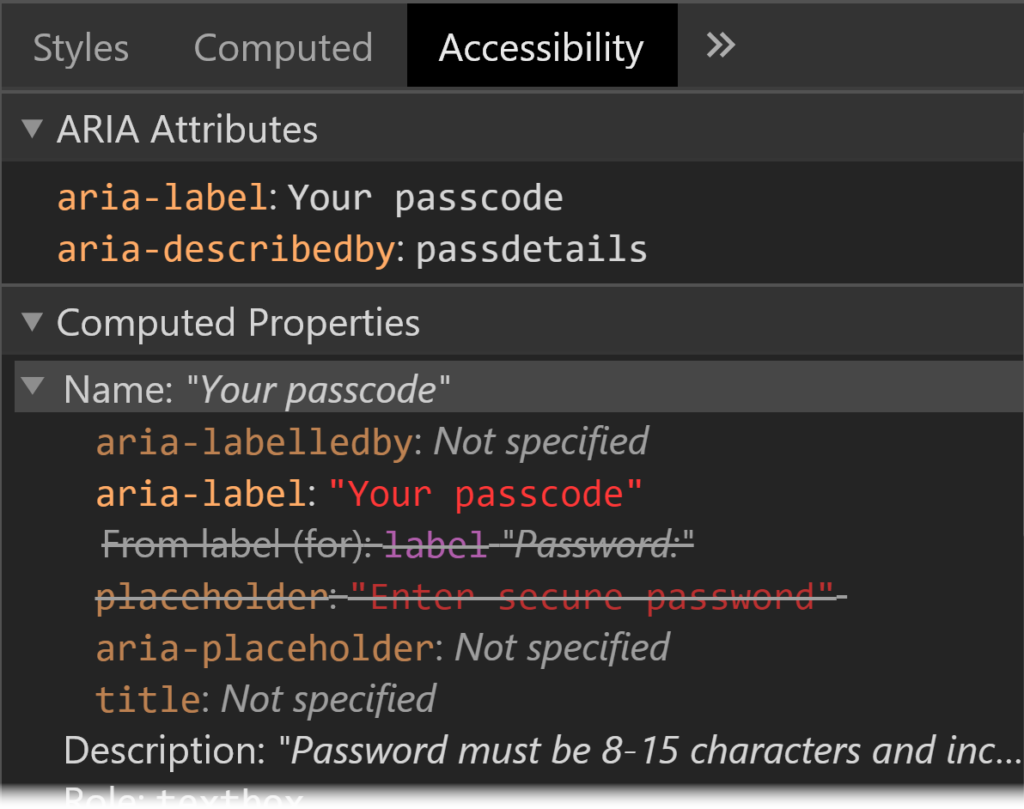
    • Answer: the aria-label always takes priority. In its absence, it would be the label, and in the absence of that, the title, or if nothing else, the placeholder. These rules are defined in the HTML Accessibility API Mappings’ Accessible Name and Description Computation. Browsers have built-in tools to allow you to inspect an element’s accessibility properties.
    Screenshot of Chrome DevTools showing Accessibility tab with ARIA Attributes section and Computed Properties section. They show that the element has aria-label, aria-describedby, label and placeholder properties, and that the aria properties are the ones that are being applied.
    Chrome DevTools show the hierarchy of the accessible name computation for a specific element.

    Did you know that you can subscribe to dai11y, week11y, fortnight11y or month11y updates! Every newsletter gets the same content; it is your choice to have short, regular emails or longer, less frequent ones. Curated with ♥ by developer @ChrisBAshton.

  • week11y issue 42

    Your weekly frequent11y newsletter, brought to you by @ChrisBAshton:

    Operating System and Browser Accessibility Display Modes

    • Eric Bailey summarises several global settings users might use to change their display, the reason for their existence and the effect they can have on your website. The modes are Dark, Increased Contrast, Inverted Colors, Reduced Motion, and High Contrast. He also describes how to target them in code, so that you can better tailor your site to your users. A very useful resource.

    When there is no content between headings

    • This is a question that often comes up: are you allowed to have a heading immediately followed by another heading, with no content in between? Hidde de Vries gives us a useful rule: “Always have content between headings of the same level.” I.e. a <h2> immediately followed by a <h3> is fine, but a <h2> followed by a <h2> is not.

    upyoura11y.com

    Decoding Label and Name for Accessibility

    • Consider the following HTML: <label>Name: <input aria-label="First name" placeholder="e.g. Chris" title="Enter a name"></label>. What gets read out by screen readers?
    • Answer: the aria-label always takes priority. In its absence, it would be the label, and in the absence of that, the title, or if nothing else, the placeholder. These rules are defined in the HTML Accessibility API Mappings’ Accessible Name and Description Computation. Browsers have built-in tools to allow you to inspect an element’s accessibility properties.
    Screenshot of Chrome DevTools showing Accessibility tab with ARIA Attributes section and Computed Properties section. They show that the element has aria-label, aria-describedby, label and placeholder properties, and that the aria properties are the ones that are being applied.
    Chrome DevTools show the hierarchy of the accessible name computation for a specific element.

    Did you know that you can subscribe to dai11y, week11y, fortnight11y or month11y updates! Every newsletter gets the same content; it is your choice to have short, regular emails or longer, less frequent ones. Curated with ♥ by developer @ChrisBAshton.

  • dai11y 11/09/2020

    Your daily frequent11y newsletter, brought to you by @ChrisBAshton:

    Decoding Label and Name for Accessibility

    • Consider the following HTML: <label>Name: <input aria-label="First name" placeholder="e.g. Chris" title="Enter a name"></label>. What gets read out by screen readers?
    • Answer: the aria-label always takes priority. In its absence, it would be the label, and in the absence of that, the title, or if nothing else, the placeholder. These rules are defined in the HTML Accessibility API Mappings’ Accessible Name and Description Computation. Browsers have built-in tools to allow you to inspect an element’s accessibility properties.
    Screenshot of Chrome DevTools showing Accessibility tab with ARIA Attributes section and Computed Properties section. They show that the element has aria-label, aria-describedby, label and placeholder properties, and that the aria properties are the ones that are being applied.
    Chrome DevTools show the hierarchy of the accessible name computation for a specific element.

    Prefer longer newsletters? You can subscribe to week11y, fortnight11y or even month11y updates! Every newsletter gets the same content; it is your choice to have short, regular emails or longer, less frequent ones. Curated with ♥ by developer @ChrisBAshton.

  • dai11y 10/09/2020

    Your daily frequent11y newsletter, brought to you by @ChrisBAshton:

    upyoura11y.com

    Prefer longer newsletters? You can subscribe to week11y, fortnight11y or even month11y updates! Every newsletter gets the same content; it is your choice to have short, regular emails or longer, less frequent ones. Curated with ♥ by developer @ChrisBAshton.