Category: dai11y

Accessibility themed newsletter: get your daily dose of a11y.

  • dai11y 03/12/2021

    Your daily frequent11y newsletter, brought to you by @ChrisBAshton:

    Today’s dai11y is a two-article special – both written by Raghavendra Satish Peri:

    • The Captcha Conundrum & Accessible Alternatives
      • Raghavendra, a blind, accessibility specialist, talks through the problems they faced trying to create an account on Wikipedia. They were faced with a CAPTCHA (Completely Automated Turing test to tell Computers and Humans Apart). It was visual only, and had no audio alternative and no option to use a one-time confirmation code sent to email or phone.
      • Some CAPTCHA solutions do provide an audio alternative, but this is inaccessible to deafblind users.
      • In addition to email/phone options, you could also use the honeypot method, whereby a text field is added to the form but visually hidden. Bots will find the input and fill it with text, so you can avoid a lot of spam form submissions by filtering out all submissions that contain that input.
      • Another inclusive option is a logical or mathematical test, e.g. “Is fire hot or cold?”, as bots will struggle with this. It can be confusing for some users to know how to respond, however.
      • Google’s reCAPTCHA is apparently quite good, requiring only a box to be checked. However, it sometimes treats screenreader behaviour as bot behaviour.
      • Raghavendra concludes “it’s always better to offer multiple options that work for multiple types of disabilities than just one or two”.
    • Scroll to top: Where should the focus land?
      • This is more of a placeholder than an article, in which Raghavendra asks us, the community, where the focus should land when activating a “scroll to top” link. What exactly is the ‘top’? It’s easy enough to visually scroll to the top of the page, but where should the keyboard focus go? We have three options:
        1. Move focus to the <body> tag (a poor experience in NVDA, as nothing is announced).
        2. Move focus to the “Skip to main content” link.
        3. Move focus to the <h1> heading level one, or <main> region landmark.
      • There is no definitive answer, but there are some interesting comments at the bottom. The community seems largely split on whether it should be 2 or 3.

    Prefer longer newsletters? You can subscribe to week11y, fortnight11y or even month11y updates! Every newsletter gets the same content; it is your choice to have short, regular emails or longer, less frequent ones. Curated with ♥ by developer @ChrisBAshton.
  • dai11y 02/12/2021

    Your daily frequent11y newsletter, brought to you by @ChrisBAshton:

    Today’s dai11y is a double HTMHell issue!

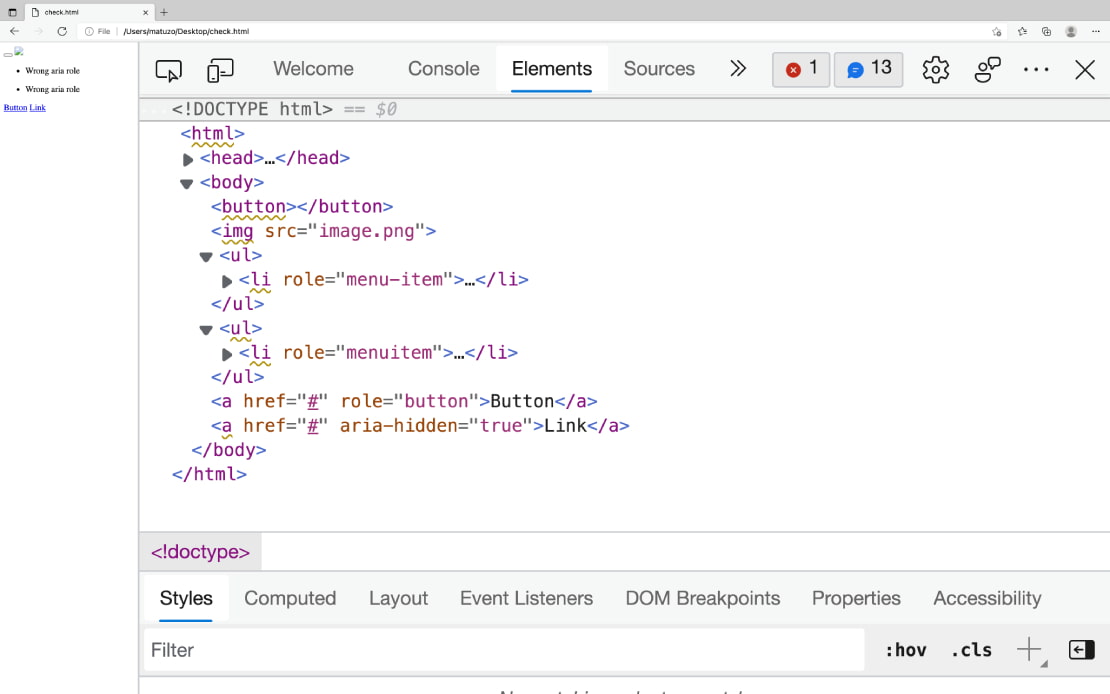
    Edge dev tools screenshot: A demo site with broken html like empty buttons, img without alt, wrong aria roles, missing aria roles, and aria-hidden on focusable elements.
    Screenshot of Edge browser’s “Elements” tab, showing ‘warning’ underlines on inaccessible HTML.
    • Debugging HTML: Accessibility
      • “In Chrome or Edge open DevTools, click the Elements tab, select the element you want to inspect and click the Accessibility tab. The accessibility pane shows you how the element is represented in the accessibility tree, which ARIA attributes it has, and its computed properties.”
      • Buttons need a label (denoted by Name:, populated by fields such as aria-label, title, or button innerText).
      • Buttons need a suitable role (denoted by Role: "button").
      • Buttons need to be focusable (denoted by Focusable: true).
      • Note that you also need to be able to activate buttons with Space or Enter, but this information isn’t exposed in the Accessibility tab.
      • There are also instructions for Firefox, which uses a different accessibility API. For example, the role name in Firefox will be pushbutton, rather than button.
    • Debugging HTML: Linting
      • The Edge browser now highlights accessibility issues directly in the elements panel of the DevTools (see screenshot).
      • “The built-in linter highlights potential issues in your HTML by marking affected elements with a squiggly yellow line”.
      • “If you hover over the opening tag, a tooltip with a description of the issue appears.”

    Prefer longer newsletters? You can subscribe to week11y, fortnight11y or even month11y updates! Every newsletter gets the same content; it is your choice to have short, regular emails or longer, less frequent ones. Curated with ♥ by developer @ChrisBAshton.

  • dai11y 01/12/2021

    Your daily frequent11y newsletter, brought to you by @ChrisBAshton:

    Please note that an unfinished draft of this article was accidentally published earlier. The finished draft below has been hastily rewritten. I don’t know what happened to the previous version – very frustrating my changes were lost!

    The ADA lawsuit settlement involving an accessibility overlay

    • A UX Collective article about a recent case against accessibility overlays.
    • Eyebobs is an online glasses company that used an accessibility overlay to attempt to conform to WCAG. It was sued by a blind plaintiff in January 2021, for violations of the ADA (Americans with Disabilities Act).
    • The case enrolled Karl Groves as an expert witness, who wrote a 35-page indictment of how inaccessible the Eyebobs site was even with the overlay. Karl also created overlayfactsheet.com, to educate on how accessibility overlays don’t work.
    • The settlement requires Eyebobs to take the following actions:
      • Create an accessibility coordination team
      • Perform an accessibility audit of its ‘digital properties’ (using an accessibility consultant)
      • Adopt an accessibility statement
      • Implement an accessibility strategy
      • Provide accessibility training to its employees
    • It must comply with these measures within two years.
    • It must also work with third-parties (such as embedded maps) to make their content accessible. The deadline for this can be extended up to five years, reflecting the added complexity.
    • The article ends with a link to Lighthouse vs ADP – “the next lawsuit to keep an eye out for”.

    Prefer longer newsletters? You can subscribe to week11y, fortnight11y or even month11y updates! Every newsletter gets the same content; it is your choice to have short, regular emails or longer, less frequent ones. Curated with ♥ by developer @ChrisBAshton.

  • dai11y 26/11/2021

    Your daily frequent11y newsletter, brought to you by @ChrisBAshton:

    Twitch streamer beats Dark Souls 3 with a single button

    • Twitch streamer Rudeism used a homemade, single-buttoned controller to complete Dark Souls 3, a notoriously difficult game. In order for the one-button system to work, he mapped the game’s inputs to Morse code.
    • He pressed the button 258,250 times during his two-month run of the game.
    • During the challenge, Rudeism raised money for AbleGamers: “a nonprofit organization that advocates for accessibility in the video game industry”. He was also advocating for games to support more accessibility options and difficulty modifiers as standard.

    Prefer longer newsletters? You can subscribe to week11y, fortnight11y or even month11y updates! Every newsletter gets the same content; it is your choice to have short, regular emails or longer, less frequent ones. Curated with ♥ by developer @ChrisBAshton.

  • dai11y 25/11/2021

    Your daily frequent11y newsletter, brought to you by @ChrisBAshton:

    Letting users tick a ‘none’ checkbox

    • A GOV.UK blog post from the Design System team, describing why they’ve added a new feature to the checkboxes component.
    • When answering questions, users can be unsure what to do if none of the options apply to them. Users “want to give a clear answer, especially if they’re concerned about completing an application accurately and truthfully”.
    • Additionally, some users might assume that if they leave the checkboxes unchecked, that the system will return them to the question later, not realising that they’ve actually skipped the question.
    • Some services using the checkboxes component were already adding their own “None” option, which was not ideal as it meant users could provide contradictory answers, such as “None” in addition to other options.
    • Supporting “None” natively in the component meant that the developers were able to add JavaScript to prevent users from ticking the “None” checkbox in addition to other boxes. It also meant they could style the option slightly differently.
    • It is still up to services to decide on the wording of the “None” checkbox. The blog post advises against directions like “None of the above”, as this is a visual reference that makes little sense to screen reader users. “None of these” is better.

    Prefer longer newsletters? You can subscribe to week11y, fortnight11y or even month11y updates! Every newsletter gets the same content; it is your choice to have short, regular emails or longer, less frequent ones. Curated with ♥ by developer @ChrisBAshton.

  • dai11y 24/11/2021

    Your daily frequent11y newsletter, brought to you by @ChrisBAshton:

    • Chancey Fleet writes a Twitter thread about their experience using Google Translate’s new “Transcribe” feature for iOS.
    • Chancey wanted to watch Netflix’s House of Flowers, which is in Spanish. It has English subtitles, but the ‘audio description’ of scenes is in Spanish.
    • Chancey uses VoiceOver with a Braille screen reader, i.e. it outputs to a Braille display rather than as speech. Chancey wanted to use Transcribe to catch the dialog and audio description, translate it, and output it to Braille.
    • Evidently, Google was not happy with this, failing immediately with “PLUG IN HEADPHONES TO USE TRANSCRIBE WITH VOICEOVER”. Chancey tried to fool it by plugging in a Lightning headphone dongle, but that didn’t work. They tried closing VoiceOver, starting the Transcribe, and then launching VoiceOver again, at which point the transcribing immediately stopped with the same error message.
    • Why was this happening? Because VoiceOver speech would, naturally, mess with the effectiveness of the transcription. However, outputting to Braille would not interfere with the transcription. This is not a scenario that the team behind Transcribe have considered, so Transcribe simply shuts down, rather than giving the user a friendly warning and then allowing them to continue.
    • In my developer career, I have sometimes been asked if it is possible to detect whether someone is using a screen reader, to give them a different experience. This Twitter thread shows exactly why this is a bad idea. You’re never going to know your users better than they know themselves.

    Prefer longer newsletters? You can subscribe to week11y, fortnight11y or even month11y updates! Every newsletter gets the same content; it is your choice to have short, regular emails or longer, less frequent ones. Curated with ♥ by developer @ChrisBAshton.

  • dai11y 23/11/2021

    Your daily frequent11y newsletter, brought to you by @ChrisBAshton:

    Blind People Won the Right to Break Ebook DRM. In 3 Years, They’ll Have to Do It Again

    • This Wired article details how accessibility advocates in America regularly have to go to court in order to be granted an exemption to the Digital Millennium Copyrights Act (DMCA). The exemptions, which last for three years at a time, mean that blind people are able to circumvent copy protections on ebooks for the sake of accessibility. It would otherwise be illegal for these users to use third party programs (such as JAWS) to lift text and save in a different, accessible file format.
    • In 2014, publishers fought Amazon for enabling a text-to-speech (TTS) feature on the Kindle, claiming that it violated their copyright on audiobooks. To this day, publishers are able to disable TTS on their books, which makes it difficult for blind people to consume their content.
    • Even when TTS is enabled by the publisher, many ebooks lack alternative text for their illustrations. Non-profit initiatives like Bookshare can provide semi-accessible versions of inaccessible books, but they must agree not to change the content, meaning they’re not permitted (or, in the world of academia, sufficiently qualified) to fill in any missing alternative text.
    • In Europe, there is already a law (the European Accessibility Act) requiring all ebooks published in the EU to be fully accessible from June 2025. There is hope that this might set a precedent in the USA, meaning that advocates would no longer have to fight the case for exemption every three years.

    Prefer longer newsletters? You can subscribe to week11y, fortnight11y or even month11y updates! Every newsletter gets the same content; it is your choice to have short, regular emails or longer, less frequent ones. Curated with ♥ by developer @ChrisBAshton.

  • dai11y 19/11/2021

    Your daily frequent11y newsletter, brought to you by @ChrisBAshton:

    National Convention Sponsorship Statement Regarding accessiBe

    • The (American) National Federation of the Blind made a statement in June, about accessiBe, the market leading ‘accessibility overlay’ company that I’ve written about several times now.
    • I missed this when it came out, and wouldn’t have known about it were it not for Steve Faulkner’s tweet. He picks out this pretty damning quote:
    • “This week, the Board of Directors reviewed accessiBe’s business practices at the urging of members who have researched and interacted with the company, and the Board believes that accessiBe currently engages in behavior that is harmful to the advancement of blind people in society”.
    • The statement goes on to announce that the NFB has “revoked accessiBe’s sponsorship of the convention”.

    Prefer longer newsletters? You can subscribe to week11y, fortnight11y or even month11y updates! Every newsletter gets the same content; it is your choice to have short, regular emails or longer, less frequent ones. Curated with ♥ by developer @ChrisBAshton.

  • dai11y 18/11/2021

    Your daily frequent11y newsletter, brought to you by @ChrisBAshton:

    Gorillas’ nav: a case study

    • A really interesting article by developer & accessibility advocate Kitty Giraudel, explaining how they built the main navigation on their employer’s website, Gorillas.
    • It’s a hamburger menu style across all screen sizes, not just on mobile. You have to tap on the ‘hamburger’ to expand the menu and show the menu items.
    • This behaviour comes for free with the <details>/<summary> HTML elements, which as native elements, work without JavaScript. However, clicking outside of the menu should cause the menu to ‘close’ again, and that doesn’t happen with those elements, so Kitty & the team replace the elements with a <button> if JavaScript is available, adding a listener to the click and focusin events to close the menu if the event takes place outside of the menu container.
    • “Landmarks such as <nav> can be listed by assistive technologies, [therefore] it’s important that the <nav> itself is not the element whose visibility is being toggled. Otherwise, it’s undiscoverable when hidden”. So Kitty’s implementation wraps the menu in a <nav role="navigation"> and the CSS visibility toggling is only applied to its contents, not to the <nav> element itself.
    • Kitty walks through a good example of progressive enhancement in CSS, using the @supports query to check if backdrop-filter is supported before overriding the background-color.
    • Elsewhere on the Gorillas page, there is a language selector. Kitty points out that they avoided using flags to denote language, as flags are ultimately for countries, not languages (think UK vs USA flags for English).
    • The language selector uses 2-letter codes, e.g. “EN” for “English”, with visually hidden text to clarify the language name: <a href="/en" hreflang="en">EN<span class="sr-only" lang="en"> — English</span></a>. Note the hreflang attribute, which I hadn’t heard of before, but is supposed to indicate the language of the page that is being linked to. Kitty admits it “might do nothing”, given the lack of documentation on it.
    • They initially tried applying an aria-hidden to the 2-letter language codes to avoid assistive technologies reading them out (as they’re often incorrect, e.g. “DE” being pronounced “duh”). However, this would fail WCAG SC 2.5.3 Label in name, as voice navigation users should be able to navigate the page by what they see, e.g. “click DE”.
    • Finally, I’ve learned that “When using aria-expanded="true", the label should not mention “open” or “close” (or similar) as the state is already conveyed via the attribute”.

    Prefer longer newsletters? You can subscribe to week11y, fortnight11y or even month11y updates! Every newsletter gets the same content; it is your choice to have short, regular emails or longer, less frequent ones. Curated with ♥ by developer @ChrisBAshton.

  • dai11y 17/11/2021

    Your daily frequent11y newsletter, brought to you by @ChrisBAshton:

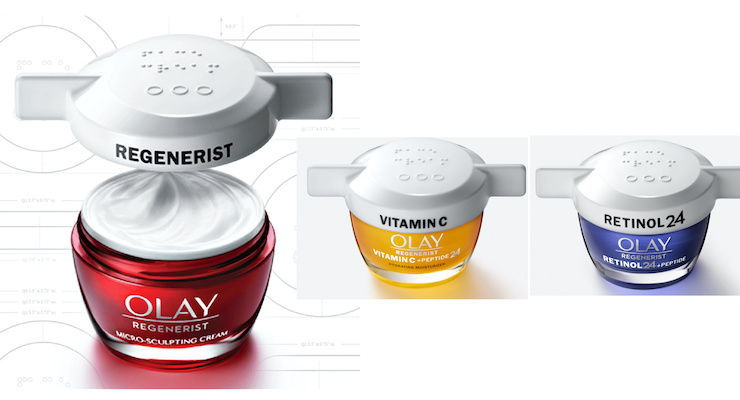
    Three Olay jars of cream, in different colours, each topped with a white easy-open lid.
    Credit: beautypackaging.com

    Olay Designs An Easy-Open Lid—& Shares the Inclusive Design

    • Olay, the beauty products manufacturer, have designed a new lid prototype for its creams, designed to be accessible.
    • It has an “easy open winged cap”, “extra grip raised lid”, “high contrast product label”, and Braille text spelling out “face cream”.
    • The lids are currently only available on Olay’s website.
    • The design is open-source, meaning other beauty brands are free to use it and build upon it.

    Prefer longer newsletters? You can subscribe to week11y, fortnight11y or even month11y updates! Every newsletter gets the same content; it is your choice to have short, regular emails or longer, less frequent ones. Curated with ♥ by developer @ChrisBAshton.