Category: dai11y

Accessibility themed newsletter: get your daily dose of a11y.

  • dai11y 16/11/2021

    Your daily frequent11y newsletter, brought to you by @ChrisBAshton:

    Vicky Teinaki shares this tip on Twitter: “I was today years old when I found out that I can share a Google Slides presentation in html (for screen reader users and magnification users) by swapping out ‘/edit’ in the URL for ‘/htmlpresent’.”

    Share presentation in html (for screen reader users and magnification users): 
https://docs.google.com/presendation/d/[link censored]/htmlpresent
    Screenshot of a Google Slides URL, ending in “/htmlpresent”.

    Prefer longer newsletters? You can subscribe to week11y, fortnight11y or even month11y updates! Every newsletter gets the same content; it is your choice to have short, regular emails or longer, less frequent ones. Curated with ♥ by developer @ChrisBAshton.

  • dai11y 15/11/2021

    Your daily frequent11y newsletter, brought to you by @ChrisBAshton:

    Redundantly Redundant a11y Accessibility

    • A really interesting deep-dive by Scott O’Hara, who looks at some ARIA-heavy markup for indicating that an input field is ‘required’. He tests this markup out with VoiceOver and NVDA, and finds that the auditory experience ends up being extremely verbose: “Enter your name, required, Your name, required, edit text. (pause) This field is required“. He then digs into why that is, looking attribute by attribute.
    • In his revised markup, Scott removes the aria-label, title and placeholder attributes from his <input>. Each of these attributes can be used to ‘name’ a text field, but as we already have a <label>, each of these do something slightly different, and all were providing pretty similar text.
    • He also removes aria-required="true", leaving only a required attribute, as the ARIA attribute would be ignored anyway due to conflicts with host language semantics (the HTML attribute overrides the ARIA one). Note that this conflicts rule does not apply to aria-label, aria-labelledby and aria-describedby.
    • aria-describedby is used to point to where a validation message would display. Scott notes that the DOM element that is pointed to should be empty by default, and only populated with a message when there is an error, otherwise the aria-describedby attribute would be constantly announced.

    The final markup looks like this:

    <label for="name">
      Name <span aria-hidden="true">*</span>
    </label>
    <input id="name" aria-required="true" aria-describedby="msg" autocomplete="name">
    <div id="msg">
      <!-- the following is only added to the DOM when needed -->
      Error: This field is required
    </div>

    Prefer longer newsletters? You can subscribe to week11y, fortnight11y or even month11y updates! Every newsletter gets the same content; it is your choice to have short, regular emails or longer, less frequent ones. Curated with ♥ by developer @ChrisBAshton.

  • dai11y 11/11/2021

    After a few days off work, I bring you a button a11y special!

    Buttons vs. Links

    • Eric Eggert describes the difference between a link and a button:
      • A link changes what the URL in the browser points to; either a new page, or a file to download, or a frame to update the source of.
      • A button performs an action. Originally only available as an <input type="submit" />, with the sole purpose of submitting forms, then along came the <button> element which allowed more versatility. It’s great for creating things like calculators, where the end result URL is not an important thing to be able to share.
    • Links and buttons have different roles. Assistive technologies announce them as “link” and “button” respectively, and this sets a user expectation as to the behaviour.
    • Screen readers have a way of easily presenting all the links in the page; buttons are harder to surface.
    • Links can be activated with the return key, whereas buttons can be activated with return or space.
    • Context is important. You can style a link to look like a button, and that’s fine, if the button says something like “Read the full story”, which hints that it will take you to another page.
    • Eric concludes that the link vs button debate is a grey area. He’s surprisingly unopinionated in the close: “there is no one true way to code or design something”.

    As a bonus for today’s article, I read THE BUTTON CHEAT SHEET (buttoncheatsheet.com). It compares different ways of marking up buttons and button-like things. I don’t really see how useful it can be, but it’s worth a quick look through, if only to see how many different ways it can be done.

    Prefer longer newsletters? You can subscribe to week11y, fortnight11y or even month11y updates! Every newsletter gets the same content; it is your choice to have short, regular emails or longer, less frequent ones. Curated with ♥ by developer @ChrisBAshton.

  • dai11y 02/11/2021

    Your daily frequent11y newsletter, brought to you by @ChrisBAshton:

    This is a two-article special, covering accessibility advances by Android and Apple!

    Google Improving Smartphone Accessibility

    • Two new features are coming to Android smartphones: “Camera Switches“, and “Project Activate”. These features will allow users to use gestures like smiling, raising eyebrows, or looking in a particular direction, to issue a command such as returning to the homescreen or opening notifications.
    • The gestures are configurable: users can set how long to hold the gesture for, or how big the gesture must be, to issue the command.
    • “The updates are aimed at people with motor and speech disabilities, Google said, and the new tools were developed with feedback from people who rely on alternative communication technology.”

    Apple is testing AirPods as possible hearing aids, posture improvers and in-ear thermometers

    • Apple is prototyping to see motion sensors inside AirPods can be used to tell users if they’re slouching. They’re also experimenting with measuring core body temperature, and perhaps most excitingly, whether or not AirPods can be used as “proper hearing aids” (they already come with a ‘conversation boost‘ feature).
    • Under US federal law, devices marketed as hearing aids must “be sold through licensed specialists, who adjust them to the specific user”. However, “in July, President Biden signed an executive order directing the Department of Health and Human Services to allow hearing aids to be sold over the counter and be adjusted by consumers”; promising news for Apple.

    Prefer longer newsletters? You can subscribe to week11y, fortnight11y or even month11y updates! Every newsletter gets the same content; it is your choice to have short, regular emails or longer, less frequent ones. Curated with ♥ by developer @ChrisBAshton.

  • dai11y 01/11/2021

    Your daily frequent11y newsletter, brought to you by @ChrisBAshton:

    Accessibility inception: sharing your knowledge (video, 46m)

    • This is a Mischa Andrews talk from #ID24 in November 2017. I’ve had it in my bookmarks for a while, and am so pleased I’ve finally managed to watch it.
    • Mischa talks openly and candidly about how you can effect accessibility change in your organisation, whilst overcoming the inevitable office politics that come with the territory.
    • I liked the idea of creating a “decoy audience”. Let’s say you have a colleague who feels they have nothing to learn about accessibility – they “know it all already” – but they consistently make accessibility mistakes. You can teach them how to do things properly, without bruising their ego, by arranging a talk or workshop about accessibility, and inviting them to present part of it. The theory is that they can continue to feel good about their own knowledge, whilst also opening up to learning from your side of the talk.
    • A common tactic used by organisations is to have a ‘gatekeeper’ for accessibility, e.g. someone doing accessibility testing as part of the acceptance tests at the end of a project. Mischa warns that you have to tread carefully here, as it’s often too late or difficult to do much about accessibility issues if they’re left until the end of the process. You may also find people try to work around you, such as go to your manager or try to argue that their project shouldn’t go through the normal process. It is best to only use this ‘gatekeeper’ tactic if your organisation is already practising good accessibility.
    • Make it as easy as possible to do the right thing, e.g. by adding accessibility information directly as code comments, or embedded in Word templates, rather than expecting people to seek out and find the guidance independently.
    • Practice what you preach. You may be seen as the a11y expert in the organisation, and people will reuse your resources, such as colour choices, etc, on the assumption that they’ve already been accessibility tested.
    • It is useful to memorise a handful of things that can be used as opportunities to motivate people – and to convince people to listen to you. If you know statistics around how many people have particular kinds of disabilities, or how much money the organisation loses through being inaccessible, or what accessibility laws your country has to abide by, or the difference between different versions of WCAG, you’ll look knowledgeable enough for your words to carry more weight. You can also slip these facts into conversations, which can help to inspire the next generation of accessibility advocates in your organisation.

    Prefer longer newsletters? You can subscribe to week11y, fortnight11y or even month11y updates! Every newsletter gets the same content; it is your choice to have short, regular emails or longer, less frequent ones. Curated with ♥ by developer @ChrisBAshton.

  • dai11y 29/10/2021

    A spooky-themed game for you, just in time for Halloween!

    HOCUS :FOCUS – A keyboard accessibility horror game.

    • A game that highlights issues caused by missing focus styles, unexpected tab orders, and so on.
    • I completed the game in 1 minute and 16 seconds. Can you beat my time?

    Prefer longer newsletters? You can subscribe to week11y, fortnight11y or even month11y updates! Every newsletter gets the same content; it is your choice to have short, regular emails or longer, less frequent ones. Curated with ♥ by developer @ChrisBAshton.

  • dai11y 28/10/2021

    Your daily frequent11y newsletter, brought to you by @ChrisBAshton:

    Blaming Screen Readers 🚩×5

    • There is, apparently, a trend going around on Twitter (example tweet): to state something that raises red flags for you, followed by a number of ‘red flag emojis’, i.e. “🚩”.
    • Except that this isn’t a red flag emoji, other than by coincidence. It could just as easily have been yellow or green. What screen readers actually announce when they reach that emoji is “triangular flag on post”. So the meaning is lost on screen reader users.
    • The great Adrian Roselli gives a detailed write-up of the problem – and plenty of places where it’s cropped up in the past – in this blog post. He’s heard a number of responses from people along the lines of “the screen reader is the problem”; Adrian argues otherwise, stating that screen readers don’t use natural language processing and do not ‘see what you see’. Nor can screen readers be updated overnight, to suddenly understand these short-lived trends and memes.
    • The onus is on us to write our content in an accessible way. The blog post summary is frustratingly vague on answers: “Techniques to make your content accessible abound. They are no more than a quick search away should you care to try”, which doesn’t explain what you should do if you want to participate in a trend but the trend is inherently inaccessible. My personal recommendation would be to write an ‘alt text’ “reply” to your tweet, to clarify the original tweet for screen reader users.

    Prefer longer newsletters? You can subscribe to week11y, fortnight11y or even month11y updates! Every newsletter gets the same content; it is your choice to have short, regular emails or longer, less frequent ones. Curated with ♥ by developer @ChrisBAshton.

  • dai11y 27/10/2021

    Your daily frequent11y newsletter, brought to you by @ChrisBAshton:

    Accessibility overlays are a hot topic in the a11y world, so it’s worth keeping on top of all legal proceedings in this space. In her blog post below, accessibility consultant Julie Moynat writes a cautionary tale of how an accessibility overlay company have started legal proceedings against her, off the back of a single tweet.

    Help for my lawyer’s fees in the FACIL’iti lawsuit against me

    • In November 2020, the French Secretary of State to Digital Transition and Electronic Communications tweeted positively about the use of FACIL’iti to make sites accessible. (You can see the accessibility overlay in action on https://www.facil-iti.com/).
    • Julie responded to the tweet, “expressing disapproval”. Her response ended up getting 9 retweets and 32 likes.
    • At the end of December 2020, FACIL’iti sent a formal notice to Julie’s employer, demanding that the tweet be deleted. NB, Julie had tweeted from her personal account, outside of working hours.
    • Julie deleted the tweet within two days of being informed of the letter, on 28th December.
    • On 21st May 2021, a subpoena letter was served to Julie’s home address, intending to press charges to the tune of €10,500.
    • Julie reached out for help via the blog post above, asking the community to donate to cover her legal fees. She raised almost €6,000, which has fulfilled her target.
    • She updated her blog post on 12th October: the proceedings are still ongoing, and no trial date has yet been set.

    Prefer longer newsletters? You can subscribe to week11y, fortnight11y or even month11y updates! Every newsletter gets the same content; it is your choice to have short, regular emails or longer, less frequent ones. Curated with ♥ by developer @ChrisBAshton.

  • dai11y 26/10/2021

    Your daily frequent11y newsletter, brought to you by @ChrisBAshton:

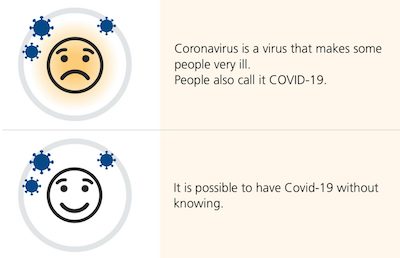
    Image split into two columns. Left column has 'sad face' smiley, right column says 'Coronavirus is a virus that makes some people very ill. People also call it COVID-19.' On the next row, left column has a happy smiley face with little virus icons over it. Right column says 'It is possible to have Covid-19 without knowing.'
    Example screenshot of an “easy read” format.

    Easy read is hard to get right

    • This is a GOV.UK blog from the Inclusive Design team at UK Health Security Agency.
    • It is about the “easy read” format – something I’d never actually come across before.
    • The format, intended for people with learning difficulties, has a very specific template and definition:
      • wide margins
      • images on the left (to help convey meaning to the text on the right)
      • large text (14 to 16pt)
      • bigger spaces between lines (1.5 spacing)
      • 1 idea per image
    • The nature of these requirements mean that ‘easy read’ content is often published as a PDF. This comes with its own accessibility issues, described in the article.
    • The intended audience often has a ‘support person’ that they share this kind of content with, so it is important that they are easily able to print off the information and keep it together.
    • Some users preferred text-only versions of the content, as they found the use and choice of images patronising.

    Prefer longer newsletters? You can subscribe to week11y, fortnight11y or even month11y updates! Every newsletter gets the same content; it is your choice to have short, regular emails or longer, less frequent ones. Curated with ♥ by developer @ChrisBAshton.

  • dai11y 25/10/2021

    Your daily frequent11y newsletter, brought to you by @ChrisBAshton:

    Xbox reveals a huge new accessibility feature that puts Sony and Nintendo to shame

    • A clickbait headline, no doubt, but an interesting announcement: Xbox are introducing a classification system to their stores (Xbox.com, PC, Game Pass), ‘tagging’ games with information related to their accessibility. This is to make it easier for disabled gamers to know whether a game supports their needs.
    • “Testing of the feature is currently underway in the public Xbox Accessibility Insider League (XAIL) branch on all modern Xbox consoles. XAIL is free for all Xbox owners to join and is a group specifically designed for testing accessibility features in games and the Xbox operating system. It currently has around 60,000 enrolled members.”
    • Microsoft has made this system quite strict. For example, for a game to be tagged as having accessible “subtitle options”, the game needs to do more than just ‘have subtitles’, as it must allow the subtitles to be customised and resizable to a minimum of 200% of their original size.

    Prefer longer newsletters? You can subscribe to week11y, fortnight11y or even month11y updates! Every newsletter gets the same content; it is your choice to have short, regular emails or longer, less frequent ones. Curated with ♥ by developer @ChrisBAshton.