Adam Silver explains in detail how to build an accessible autocomplete component, taking into account the noJS experience, announcing results to screen readers, hiding suggestions ‘on blur’, keyboard support and endonym/typo support. It’s always surprising just how complicated autocompletes can be, and this is a really good example of one done right.
Prefer longer newsletters? You can subscribe to week11y, fortnight11y or even month11y updates! Every newsletter gets the same content; it is your choice to have short, regular emails or longer, less frequent ones. Curated with ♥ by developer @ChrisBAshton.
GDS is running a conference this Thursday 21st May, with registration closing at 5pm on the 20th. Agenda: 9:30am “An introduction to digital accessibility regulations”, 11am “How to avoid common accessibility statement fails”, 12:30pm “How to carry out basic accessibility checks”, 3pm “Making accessibility accessible: the secret to engaging your workforce”, 4pm “What would Marie Kondo do? How to clear your website of inaccessible PDFs”.
Dr Elizabeth Fernandez gives three reasons why AI is not the same as human thought. 1) they’re easy to fool: a neural network might correctly classify an image as a banana, but introduce a slight amount of noise and it might re-classify it as a toaster. 2) they need an enormous amount of data to learn: thousands of pictures, versus just a few for a toddler. 3) they’re “myopic”: powerful enough to correctly identify Kim Kardashian, yet seeing nothing wrong if her eye and lips swap places. I found this article via Marco Zehe’s blog, who references it to suggest that AI will never be able to write reliable alt text.
A post from 2018 that resurfaced recently and still has lots of great tips. GOV.UK uses the CSS triangle method to create a back link component whose triangle arrow icon renders even when the user has overridden their colours. The site logo was once a PNG, but under these conditions would disappear, so was replaced with inline SVG. Focus states and panels that ought to stand out would also get lost when colours are overridden, so a transparent border was added.
Lots of useful reminders. Something that conforms to WCAG 2.1 AA will also conform to WCAG 2.0 AA. Line height should be at least 1.5 times font size; spacing following paragraphs should be at least 2 times; letter spacing at least 0.12 times; word spacing at least 0.16 times. JavaScript inside PDF forms that sets a timer must warn what data will be lost if not completed in time, and/or should allow time extensions.
EDIT 21/05/2020: I had misread the article – WCAG does not stipulate that line height should be 1.5 times the font size (nor any of the other rules quoted). Instead it says that if a user sets their own custom style override such that line height is 1.5 times the font size, there should be no loss to content or functionality. Apologies for the confusion – I have now struck out the offending lines above. Thanks to Anika Henke for pointing this out.
Mozilla announces that by the end of June, Firefox should have basic support for MacOS VoiceOver. By the end of the year, the experience should be improved for visually impaired VoiceOver users, including live region support and rotor item support. The post goes into detail about what was achieved in each Firefox version from v75 onwards.
Did you know that you can subscribe to dai11y, week11y, fortnight11y or month11y updates! Every newsletter gets the same content; it is your choice to have short, regular emails or longer, less frequent ones. Curated with ♥ by developer @ChrisBAshton.
GDS is running a conference this Thursday 21st May, with registration closing at 5pm on the 20th. Agenda: 9:30am “An introduction to digital accessibility regulations”, 11am “How to avoid common accessibility statement fails”, 12:30pm “How to carry out basic accessibility checks”, 3pm “Making accessibility accessible: the secret to engaging your workforce”, 4pm “What would Marie Kondo do? How to clear your website of inaccessible PDFs”.
Prefer longer newsletters? You can subscribe to week11y, fortnight11y or even month11y updates! Every newsletter gets the same content; it is your choice to have short, regular emails or longer, less frequent ones. Curated with ♥ by developer @ChrisBAshton.
Mozilla announces that by the end of June, Firefox should have basic support for MacOS VoiceOver. By the end of the year, the experience should be improved for visually impaired VoiceOver users, including live region support and rotor item support. The post goes into detail about what was achieved in each Firefox version from v75 onwards.
Prefer longer newsletters? You can subscribe to week11y, fortnight11y or even month11y updates! Every newsletter gets the same content; it is your choice to have short, regular emails or longer, less frequent ones. Curated with ♥ by developer @ChrisBAshton.
Lots of useful reminders. Something that conforms to WCAG 2.1 AA will also conform to WCAG 2.0 AA. Line height should be at least 1.5 times font size; spacing following paragraphs should be at least 2 times; letter spacing at least 0.12 times; word spacing at least 0.16 times. JavaScript inside PDF forms that sets a timer must warn what data will be lost if not completed in time, and/or should allow time extensions.
EDIT 21/05/2020: I had misread the article – WCAG does not stipulate that line height should be 1.5 times the font size (nor any of the other rules quoted). Instead it says that if a user sets their own custom style override such that line height is 1.5 times the font size, there should be no loss to content or functionality. Apologies for the confusion – I have now struck out the offending lines above. Thanks to Anika Henke for pointing this out.
Prefer longer newsletters? You can subscribe to week11y, fortnight11y or even month11y updates! Every newsletter gets the same content; it is your choice to have short, regular emails or longer, less frequent ones. Curated with ♥ by developer @ChrisBAshton.
A post from 2018 that resurfaced recently and still has lots of great tips. GOV.UK uses the CSS triangle method to create a back link component whose triangle arrow icon renders even when the user has overridden their colours. The site logo was once a PNG, but under these conditions would disappear, so was replaced with inline SVG. Focus states and panels that ought to stand out would also get lost when colours are overridden, so a transparent border was added.
Prefer longer newsletters? You can subscribe to week11y, fortnight11y or even month11y updates! Every newsletter gets the same content; it is your choice to have short, regular emails or longer, less frequent ones. Curated with ♥ by developer @ChrisBAshton.
Dr Elizabeth Fernandez gives three reasons why AI is not the same as human thought. 1) they’re easy to fool: a neural network might correctly classify an image as a banana, but introduce a slight amount of noise and it might re-classify it as a toaster. 2) they need an enormous amount of data to learn: thousands of pictures, versus just a few for a toddler. 3) they’re “myopic”: powerful enough to correctly identify Kim Kardashian, yet seeing nothing wrong if her eye and lips swap places. I found this article via Marco Zehe’s blog, who references it to suggest that AI will never be able to write reliable alt text.
Prefer longer newsletters? You can subscribe to week11y, fortnight11y or even month11y updates! Every newsletter gets the same content; it is your choice to have short, regular emails or longer, less frequent ones. Curated with ♥ by developer @ChrisBAshton.
Accessibility Works article warning against the installation of third-party overlays/widgets that promise to make your site accessible. These tools provide options for customising text size, providing magnifiers, and in some cases a built-in screen reader or alt-text generator. However, they cannot address the 70% of accessibility issues that can only be manually addressed – and they require the user to have to find and learn how to use a whole new accessibility tool.
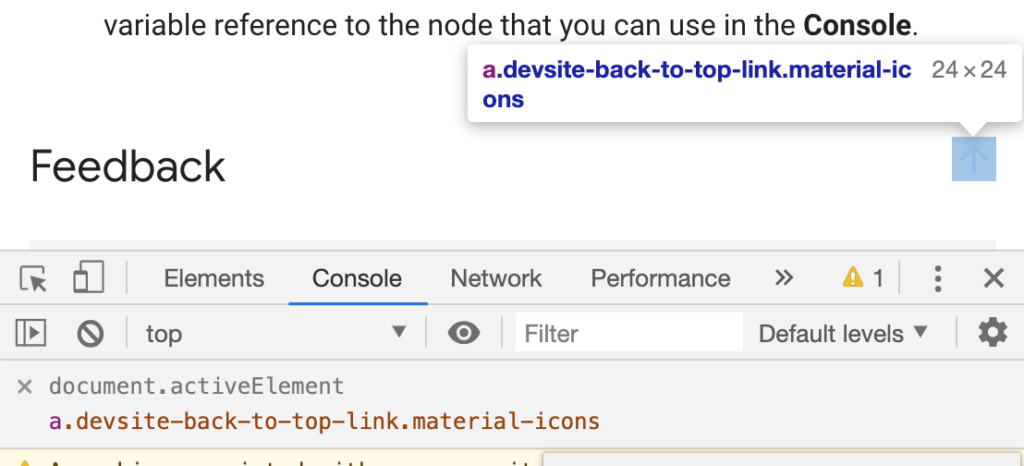
Using a Chrome “Live Expression” to show the current focused element
Kayce Basques, technical writer at Google, shares a Chrome tip for developers/testers. By creating a “Live Expression” with the value document.activeElement, you can tab around the web page and always know where the focus state is, even if there aren’t any associated focus styles.
Brief but interesting article highlighting that one billion people in the world have preventable or treatable visual impairments; 300 million of these are cataracts, which accounts for 50% of blindness worldwide. A cataract is an opacity in the lens of the eye, often caused by ageing, and can be fixed with surgery: a small incision, fragmenting the lense, emitting ultrasound to aspirate the cataract.
Article by ABC News, highlighting the plight of the 40,000 deaf-blind Americans who rely on touch but have to maintain social distancing. They use hand-over-hand signing to communicate, and finger-scan braille public signs for mobility, now prone to contagion. The community uses computers and internet to try to counter isolation and loneliness. There are fears that states have considered putting people with disabilities at the back of the line for treatment.
Article (or video) by UI designer Koos Looijesteijn, describing ‘sidenotes’ that have been in print media for centuries, and the difficulty in representing them in HTML. His solution is a <span> containing a <label> that can be clicked to expand a corresponding <small> on mobile, or that highlights the text at the side on desktop. At publish time it required JS but now appears to have been refactored to be CSS-only, using clever checkbox logic. By the author’s admission, it’s ugly, and we should campaign for a native solution instead.
Adrian Roselli writes about this attribute that describes the role of an element. It overrides what is announced to the screen reader, e.g. <input type="text" aria-roledescription="Only numbers allowed"> will read as “Only numbers allowed” instead of “input type text”. This hides meaning and the control type – a confusing experience for the user. It also doesn’t translate. There’s an open issue about the global nature of this attribute. Don’t use it!
Šime Vidas shares a helpful reminder that the <br> line break element is useful in some cases. Whilst web developers have generally moved away from <br> use – seeing line breaks as presentation, not content, and therefore using CSS instead – it should still be used when line breaks are part of the content. For example: poems or addresses.
Did you know that you can subscribe to dai11y, week11y, fortnight11y or month11y updates! Every newsletter gets the same content; it is your choice to have short, regular emails or longer, less frequent ones. Curated with ♥ by developer @ChrisBAshton.
Adrian Roselli writes about this attribute that describes the role of an element. It overrides what is announced to the screen reader, e.g. <input type="text" aria-roledescription="Only numbers allowed"> will read as “Only numbers allowed” instead of “input type text”. This hides meaning and the control type – a confusing experience for the user. It also doesn’t translate. There’s an open issue about the global nature of this attribute. Don’t use it!
Šime Vidas shares a helpful reminder that the <br> line break element is useful in some cases. Whilst web developers have generally moved away from <br> use – seeing line breaks as presentation, not content, and therefore using CSS instead – it should still be used when line breaks are part of the content. For example: poems or addresses.
Did you know that you can subscribe to dai11y, week11y, fortnight11y or month11y updates! Every newsletter gets the same content; it is your choice to have short, regular emails or longer, less frequent ones. Curated with ♥ by developer @ChrisBAshton.
Prefer longer newsletters? You can subscribe to week11y, fortnight11y or even month11y updates! Every newsletter gets the same content; it is your choice to have short, regular emails or longer, less frequent ones. Curated with ♥ by developer @ChrisBAshton.