Article by Dave Rupert, sharing his frustration and highlighting some cases where native HTML is not as accessible as it ought to be. Inputs of types number, date and search are considered problematic, as are native HTML <video>, role="tablist" for tabs and various HTML5 tags. Dave links off to articles explaining the issues with each in more detail. This is kind of a glossary and is worth a bookmark for referencing.
Prefer longer newsletters? You can subscribe to week11y, fortnight11y or even month11y updates! Every newsletter gets the same content; it is your choice to have short, regular emails or longer, less frequent ones. Curated with ♥ by developer @ChrisBAshton.
Fascinating article about the r/TranscribersOfReddit community that has over 3,000 volunteers who have transcribed almost 100,000 pieces of content on Reddit. A bot links to all image/video related content that gets posted to any partnered subreddits, and transcribers then ‘claim’ the post by commenting underneath, before manually providing a detailed transcription for that content. Everyone has a different motivation for doing it; it’s worth a read to find out more. You may remember a similar story about Facebook groups dedicated to transcribing.
Prefer longer newsletters? You can subscribe to week11y, fortnight11y or even month11y updates! Every newsletter gets the same content; it is your choice to have short, regular emails or longer, less frequent ones. Curated with ♥ by developer @ChrisBAshton.
An interesting site/app: “we transcribe conferences, to make them accessible.” It is an audio-to-text platform that transcribes speaker sessions at conferences, in real-time. Designed to be used whether at small gatherings or at large conferences.
Prefer longer newsletters? You can subscribe to week11y, fortnight11y or even month11y updates! Every newsletter gets the same content; it is your choice to have short, regular emails or longer, less frequent ones. Curated with ♥ by developer @ChrisBAshton.
Article by Adrian Roselli, asking people to stop using ‘dropdown’ in their vocabulary, as it is ambiguous. Do you actually mean a ‘select’ element, or an ARIA listbox, datalist, ARIA combobox, or autocomplete (or several other possibilities)? Adrian describes the subtle differences in each, and doesn’t preach about the use of ‘select’ (which you may have expected from the title).
Prefer longer newsletters? You can subscribe to week11y, fortnight11y or even month11y updates! Every newsletter gets the same content; it is your choice to have short, regular emails or longer, less frequent ones. Curated with ♥ by developer @ChrisBAshton.
MV Times article from last December, describing Ann Clare Le Zotte‘s new novel “Show me a Sign”, which is now available online. It is set in early 19th century Chilmark, Massachusetts – a town famous for its unusually high percentage of deaf citizens (one in 25 people, vs one in 6000 on the mainland). Everyone could communicate with one another, deaf or not, through Martha’s Vineyard Sign Language (MVSL). It sounds like an exciting read, centered around a scientist that uses Mary as a “live specimen” in a cruel experiment, tribal/colonial tensions of the time, and an insight into how Mary lives without sound.
Article by Hanna Laakso, explaining why GOV.UK has moved away from using <input type="number"> for things like credit card / passport numbers. It has big issues in NVDA and Dragon Naturally Speaking, and its native increment/decrement behaviour (triggered by UP/DOWN arrow keys or scrolling) is often unintended. Some browsers also attempt to round the number or add comma separation. GOV.UK now uses <input type="text" inputmode="numeric" pattern="[0-9]*">, which retains the numeric keyboard without compromising usability.
Real users with disabilities sum up their biggest struggles with the digital world. Robert (who has a visual impairment) struggles with date inputs where websites don’t let you enter the date manually, forcing him to navigate an often inaccessible calendar. Rhian, who is autistic, shares her frustration with auto-playing videos and poor website load speeds. Sally, who has a mobility impairment, says that increasing font sizes is hard in apps, and that zooming causes its own problems. Kasia needs someone’s assistance when online shopping, as they don’t feel comfortable sharing their bank details on inaccessible sites where it is difficult to know if they’re filling it in correctly. Several complain about CAPTCHA forms that force you to prove you’re not a robot.
Whilst web developers/designers have a duty to make their website accessible, many simply don’t – be it through lack of awareness, skills, resources or empathy. Hidde de Vries proposes that browsers bridge the gap by providing ways of forcing colour contrasts, focus states, text sizes, disabling autoplay and allowing zoom, even if a developer has explicitly disabled such features. Some browsers do some (but not all) of this already, and what does exist is not easily discoverable.
Did you know that you can subscribe to dai11y, week11y, fortnight11y or month11y updates! Every newsletter gets the same content; it is your choice to have short, regular emails or longer, less frequent ones. Curated with ♥ by developer @ChrisBAshton.
Whilst web developers/designers have a duty to make their website accessible, many simply don’t – be it through lack of awareness, skills, resources or empathy. Hidde de Vries proposes that browsers bridge the gap by providing ways of forcing colour contrasts, focus states, text sizes, disabling autoplay and allowing zoom, even if a developer has explicitly disabled such features. Some browsers do some (but not all) of this already, and what does exist is not easily discoverable.
Prefer longer newsletters? You can subscribe to week11y, fortnight11y or even month11y updates! Every newsletter gets the same content; it is your choice to have short, regular emails or longer, less frequent ones. Curated with ♥ by developer @ChrisBAshton.
Real users with disabilities sum up their biggest struggles with the digital world. Robert (who has a visual impairment) struggles with date inputs where websites don’t let you enter the date manually, forcing him to navigate an often inaccessible calendar. Rhian, who is autistic, shares her frustration with auto-playing videos and poor website load speeds. Sally, who has a mobility impairment, says that increasing font sizes is hard in apps, and that zooming causes its own problems. Kasia needs someone’s assistance when online shopping, as they don’t feel comfortable sharing their bank details on inaccessible sites where it is difficult to know if they’re filling it in correctly. Several complain about CAPTCHA forms that force you to prove you’re not a robot.
Prefer longer newsletters? You can subscribe to week11y, fortnight11y or even month11y updates! Every newsletter gets the same content; it is your choice to have short, regular emails or longer, less frequent ones. Curated with ♥ by developer @ChrisBAshton.
Article by Hanna Laakso, explaining why GOV.UK has moved away from using <input type="number"> for things like credit card / passport numbers. It has big issues in NVDA and Dragon Naturally Speaking, and its native increment/decrement behaviour (triggered by UP/DOWN arrow keys or scrolling) is often unintended. Some browsers also attempt to round the number or add comma separation. GOV.UK now uses <input type="text" inputmode="numeric" pattern="[0-9]*">, which retains the numeric keyboard without compromising usability.
Prefer longer newsletters? You can subscribe to week11y, fortnight11y or even month11y updates! Every newsletter gets the same content; it is your choice to have short, regular emails or longer, less frequent ones. Curated with ♥ by developer @ChrisBAshton.
MV Times article from last December, describing Ann Clare Le Zotte‘s new novel “Show me a Sign”, which is available online from today. It is set in early 19th century Chilmark, Massachusetts – a town famous for its unusually high percentage of deaf citizens (one in 25 people, vs one in 6000 on the mainland). Everyone could communicate with one another, deaf or not, through Martha’s Vineyard Sign Language (MVSL). It sounds like an exciting read, centered around a scientist that uses Mary as a “live specimen” in a cruel experiment, tribal/colonial tensions of the time, and an insight into how Mary lives without sound.
Prefer longer newsletters? You can subscribe to week11y, fortnight11y or even month11y updates! Every newsletter gets the same content; it is your choice to have short, regular emails or longer, less frequent ones. Curated with ♥ by developer @ChrisBAshton.
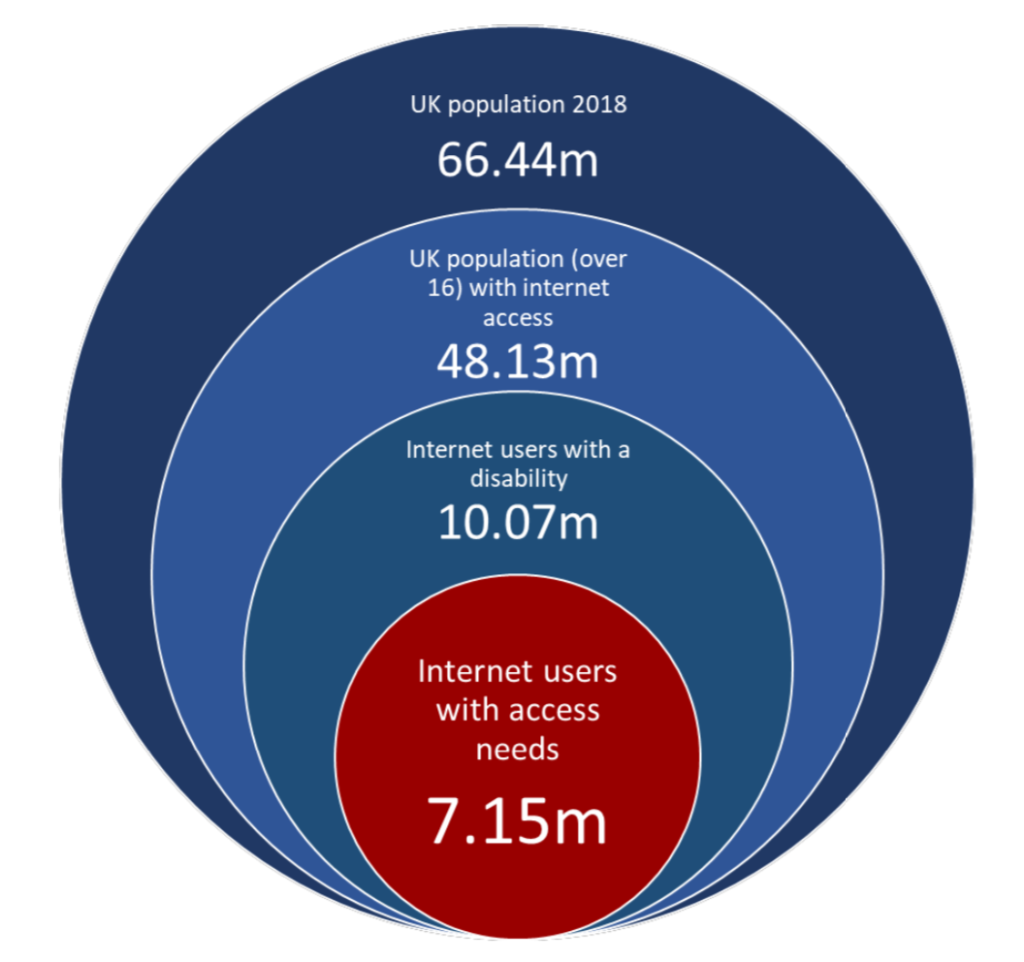
This 32 page report (ironically only available as Word/PDF documents) of last year’s survey has some highlights. There are 7.15 million internet users in the UK that have access needs (an increase of 1 million since 2016), with a spending power of £24.8 billion. Around 70% will click away from an inaccessible site, meaning businesses are losing out on £17.1 billion per year. The survey was last run in 2016 and things haven’t improved measurably since then. I’ve attached a graphic from the report that helps show the scale of the problem.
A blog post by accessibility consultant George Rhodes, with their views on public organisations’ use of “disproportionate burden” as an excuse to (temporarily) avoid full compliance with the regulations. 60 public sector bodies have claimed disproportionate burden and been asked to provide evidence via Freedom of Information requests. Many of their responses were unsatisfactory.
Background: UK public bodies have until September 2020 to ensure compliance with the Public Sector Bodies (Websites and Mobile Applications) (No. 2) Accessibility Regulations 2018. Exemptions will be made for those for whom it would be a ‘disproportionate burden’ on the grounds of organisation size, and cost of fixing vs benefit to users.
Blog post by Emma Pratt Richens, exploring the top BBC accessibility improvements of 2019. iPlayer introduced subtitle size controls, and attempts to deliver fewer animations where people have asked for “reduced motion”. Bitesize Primary improved keyboard a11y across its games. News introduced the BBC Reith font, designed to be easy to read on small screens. A developer built taba11y Chrome plugin in their spare time. Several teams built accessibility more prominently into their workflow.
If you’ve not heard of the “Seeing AI” app from Microsoft, it’s an all-encompassing app that uses your phone’s camera for many things, including reading text, scanning product barcodes for info, recognising faces, and describing the scene in front of you. I hadn’t heard of it prior to this article, which describes its expansion to 5 different languages, and describes the ways real people use it, sometimes in unexpected ways. Download it from the app store and give it a try today!
Apple have released a feature in macOS Catalina beta, which uses the webcam to follow your head movement, enabling you to move the cursor hands-free. Guilherme Rambo demonstrates it in this tweet.
A Microsoft guide to ensuring your PowerPoint is accessible. A lot of the guidance is the same as it would be for the web: use descriptive links, don’t use colour alone to convey information, use a decent size text, provide alt text for images. Some more specialist advice includes ensuring the reading order of your slide is correct (screen readers will hear content in the order it was added, rather than the position it appears in the slide), and give each slide a unique title.
A look at the United States Web Design System (USWDS) released in January, designed to improve the usability and accessibility of federal websites. It encourages focusing on user needs, following user experience guidance and using USWDS components, as per its maturity model. The system meets WCAG 2.0 AA guidelines and follows the 2% rule pioneered by GDS, supporting all major browsers and IE11. The codebase looks very similar to the GOV.UK Design System, with both using Nunjucks and BEM.
A little look at the “Who Can Use” tool, which takes a text color and background color and shows the accessibility of that combination for various vision types. For example, a #CF0000 red against a white background has AA compliance for regular vision, but AAA compliance for those with achromatomaly (partial colour blindness). What’s particularly useful is the “Simulation” next to each vision types/events, such as showing how your combination might look when viewed in direct sunlight. A worthy tool to have in your arsenal!
Did you know that you can subscribe to dai11y, week11y, fortnight11y or month11y updates! Every newsletter gets the same content; it is your choice to have short, regular emails or longer, less frequent ones. Curated with ♥ by developer @ChrisBAshton.