Stark is a suite of tools for the world’s most popular design apps. “Companies can upload their design files, which then identifies accessibility issues and suggests changes.”
It “offers checks and suggestions to make sure that visual materials meet accessibility standards for visually impaired people”. More than 500,000 people have used Stark’s integrated plug-ins for apps like Adobe XD, Figma, Sketch and Google Chrome.
Stark have now released Stark for Mac, a standalone app that works with Sketch and will soon work with Figma and Adobe XD. It allows you to detect accessibility issues at scale, rather than on a per-file basis as is the case with the plugins.
Stark has a limited free plan, after which it costs $60 per year for the current suite of tools. The private beta version of Stark for Mac is currently free, with pricing yet to be announced.
Prefer longer newsletters? You can subscribe to week11y, fortnight11y or even month11y updates! Every newsletter gets the same content; it is your choice to have short, regular emails or longer, less frequent ones. Curated with ♥ by developer @ChrisBAshton.
It will be buggy. Expectations of the web are broken, e.g. CMD + Click should open links in new tabs, but often won’t work in SPAs.
Accessibility issues: focus management, scroll management, navigation announcements, etc.
Less resilience. Rich shares a webpage he often points people to when they assume that everyone has JavaScript. It is a long flowchart of all of the reasons why JS may not load for someone. Rich also points out that these users are underrepresented in analytics, because analytics typically require JS to run.
But then he highlights the benefits:
SPAs allow you to do things you can’t do ‘natively’, e.g. transitions between pages.
Only need to load third party scripts once, whereas multi-page apps (i.e. the traditional server-rendered sites) have to at least evaluate the JS on each page load, even if the scripts themselves are already cached.
Single codebase of JS (rather than 1 for client, and 1 for server, which may be, for example, PHP).
Rich proposes a new direction for the web, and coins the term “transitional apps” (from “transitional design” in the interior design industry), which are apps that take the best of both worlds. There is a lot happening in this space, including:
…and SvelteKit, which Rich gives an impressive demo on.
Prefer longer newsletters? You can subscribe to week11y, fortnight11y or even month11y updates! Every newsletter gets the same content; it is your choice to have short, regular emails or longer, less frequent ones. Curated with ♥ by developer @ChrisBAshton.
This got shared around the work chat recently. A blog post by Álvaro Montoro that busts 10 myths about accessibility:
Accessibility is difficult – “Accessibility is not difficult. Do you know what’s difficult? Running at an Olympic level. A Web Developer can learn at least the basics of Web Accessibility within hours”.
Accessibility is expensive – “Something that they could have avoided if they had implemented accessibility at the start”.
HTML is accessible by default – “elements like <video> or <audio> have controls that are not fully keyboard-accessible and that differ considerably from browser to browser and cause frustration. ‘Mostly accessible’ looks much better.”
No ARIA > Bad ARIA – the equation should be “Good ARIA > No ARIA > Bad ARIA”. Otherwise we “perpetuate a false dichotomy. We can learn ARIA, practice ARIA, improve ARIA”.
Prefers reduced motion means no motion – “We don’t need to cancel every motion on a website. Instead, we need to think through them, check what’s appropriate and not”.
Prefer longer newsletters? You can subscribe to week11y, fortnight11y or even month11y updates! Every newsletter gets the same content; it is your choice to have short, regular emails or longer, less frequent ones. Curated with ♥ by developer @ChrisBAshton.
This article is a quick reminder on HTML list markup.
First of all, decide whether you actually need a list; sometimes it is better to format your content as paragraphs with headings instead. This way, assistive technology users can easily skip to the heading that they want to read.
If you do use a list, decide whether it should be unordered (<ul>), ordered (<ol>) or a description list (<dl>). The latter is useful for glossaries or recipes, e.g. <dl><dt>Chicken</dt><dd>A small bird that lays eggs</dd>...</dl>.
There are some really interesting accessibility options in the games in this article:
Uncharted and The Last Of Us Part II are famously accessible, and are called out here.
A Blind Legend is a game that “can be played entirely through sound and only asks for touch screen or mouse input”. It does not incorporate visuals.
Grounded has the player shrunk to the size of an insect and having to find their way home across their back yard. The developers have considered arachnophobia – the intense fear of spiders – and thus offer an Arachnophobia Safe Mode Slider, allowing players to edit in-game spiders to have no legs, no eyes, or even no textures or sounds at all, without sacrificing the enemies’ difficulty.
Hyperdot is a game “where the player avoids incoming attacks by darting around the screen”. The game can be played on any controller, including eye trackers.
As someone who has recently bought an Oculus Quest 2, this is really exciting technology that has come a long way in a very short time. It’s crucial that we address accessibility needs as this technology matures.
Thomas Logan writes about his experiment with ARIA and Web XR (“Web Extended Reality”, or VR).
He uses aframe-gui, a GUI component framework for A-Frame, which is a web framework for making 3D experiences. Here is Thomas’s demo.
Using ARIA to add the necessary role and aria-label to elements, as well as tabindex and onfocus handlers, Thomas has made an XR experience that is navigable via keyboard and by some assistive technology (AT) such as voice assisted navigation and screen readers. The full list of tested AT is in the article, which describes the usability issues encountered. For example, “Voice Control” on iOS/Safari does not detect the link or button in the demo.
Pianist João Carlos Martins lost the use of his right hand in a mugging in Bulgaria in 1995.
Industrial designer Ubiratan Bizarro invented the “Bionic Extender Gloves”, which have rods that make the fingers spring back up after they depress the piano keys, allowing the pianist to continue playing.
The first pair of these gloves for Martins cost less than $100 to make, and are made by a 3D printer.
It has meant that Martins has been able to play his favorite Bach sonatas once more.
There used to be a problem with too many lists for assistive tech users: “all I hear when reading news sites is ‘list, two items … end of list, list 4 items…’ and I don’t care about all the lists.”
This was caused by developers marking too much content up as lists, even when not appropriate.
Therefore, WebKit now applies some heuristics to these lists, to decide whether or not to expose the list semantics to the accessibility tree.
It considers whether the list has any bullet points. After all, if a sighted user doesn’t need to know it’s a list, then why should a screen reader user?
Similar principles are applied to table markup, which was regularly used for layouts in the early web.
“Many people think it’s only display: none; and visibility: hidden; but dozens, if not hundreds, of style characteristics contribute [to computing the accessibility tree].”
False positives are extremely rare. That said, developers can force the list semantics to be obeyed by applying role="list" to the <ul>/<ol>.
Eric Eggert disputes five claims that companies [such as accessiBe] make about their products:
“Accessibility can be fully automated”. Human judgement is required to determine what kind of alt text is appropriate in a given context.
“AI solutions are effortless”. For you maybe, but the effort is simply shifted to the user, i.e. they now have to use the screen reader widget on your site rather than the native screen reader they’re used to.
“It’s cheap”. These services cost $1,500 to $5,000 over a three year period of coverage. If you don’t renew, you lose those ‘benefits’, whereas if you pay an accessibility consultant to fix the problem at the source, the fix is permanent.
“WCAG conformance. AA! 100%!”. Eric cites numerous examples of websites using these widgets, and still having accessibility violations. He summarises “I cannot fathom how they claim WCAG 2.1 AA accessibility.”
colorblindaccessibilitymanifesto.com lists 10 rules developers/designers should follow to not exclude the 350 million colourblind people in the world; nearly 8% of men and 0.4% of women.
Start with “Why?” [you are making the change in the first place]
Don’t communicate only with colors
Design with shapes
Choose the right copy
Test your designs in black and white
Rethink button states
Use contrast
The smaller the item, the bigger the problems
Less fancy, more usable
More than you think [have colourblindness]
Did you know that you can subscribe to dai11y, week11y, fortnight11y or month11y updates! Every newsletter gets the same content; it is your choice to have short, regular emails or longer, less frequent ones. Curated with ♥ by developer @ChrisBAshton.
There used to be a problem with too many lists for assistive tech users: “all I hear when reading news sites is ‘list, two items … end of list, list 4 items…’ and I don’t care about all the lists.”
This was caused by developers marking too much content up as lists, even when not appropriate.
Therefore, WebKit now applies some heuristics to these lists, to decide whether or not to expose the list semantics to the accessibility tree.
It considers whether the list has any bullet points. After all, if a sighted user doesn’t need to know it’s a list, then why should a screen reader user?
Similar principles are applied to table markup, which was regularly used for layouts in the early web.
“Many people think it’s only display: none; and visibility: hidden; but dozens, if not hundreds, of style characteristics contribute [to computing the accessibility tree].”
False positives are extremely rare. That said, developers can force the list semantics to be obeyed by applying role="list" to the <ul>/<ol>.
Eric Eggert disputes five claims that companies [such as accessiBe] make about their products:
“Accessibility can be fully automated”. Human judgement is required to determine what kind of alt text is appropriate in a given context.
“AI solutions are effortless”. For you maybe, but the effort is simply shifted to the user, i.e. they now have to use the screen reader widget on your site rather than the native screen reader they’re used to.
“It’s cheap”. These services cost $1,500 to $5,000 over a three year period of coverage. If you don’t renew, you lose those ‘benefits’, whereas if you pay an accessibility consultant to fix the problem at the source, the fix is permanent.
“WCAG conformance. AA! 100%!”. Eric cites numerous examples of websites using these widgets, and still having accessibility violations. He summarises “I cannot fathom how they claim WCAG 2.1 AA accessibility.”
colorblindaccessibilitymanifesto.com lists 10 rules developers/designers should follow to not exclude the 350 million colourblind people in the world; nearly 8% of men and 0.4% of women.
Start with “Why?” [you are making the change in the first place]
Don’t communicate only with colors
Design with shapes
Choose the right copy
Test your designs in black and white
Rethink button states
Use contrast
The smaller the item, the bigger the problems
Less fancy, more usable
More than you think [have colourblindness]
Did you know that you can subscribe to dai11y, week11y, fortnight11y or month11y updates! Every newsletter gets the same content; it is your choice to have short, regular emails or longer, less frequent ones. Curated with ♥ by developer @ChrisBAshton.
colorblindaccessibilitymanifesto.com lists 10 rules developers/designers should follow to not exclude the 350 million colourblind people in the world; nearly 8% of men and 0.4% of women.
Start with “Why?” [you are making the change in the first place]
Don’t communicate only with colors
Design with shapes
Choose the right copy
Test your designs in black and white
Rethink button states
Use contrast
The smaller the item, the bigger the problems
Less fancy, more usable
More than you think [have colourblindness]
Prefer longer newsletters? You can subscribe to week11y, fortnight11y or even month11y updates! Every newsletter gets the same content; it is your choice to have short, regular emails or longer, less frequent ones. Curated with ♥ by developer @ChrisBAshton.
Eric Eggert disputes five claims that companies [such as accessiBe] make about their products:
“Accessibility can be fully automated”. Human judgement is required to determine what kind of alt text is appropriate in a given context.
“AI solutions are effortless”. For you maybe, but the effort is simply shifted to the user, i.e. they now have to use the screen reader widget on your site rather than the native screen reader they’re used to.
“It’s cheap”. These services cost $1,500 to $5,000 over a three year period of coverage. If you don’t renew, you lose those ‘benefits’, whereas if you pay an accessibility consultant to fix the problem at the source, the fix is permanent.
“WCAG conformance. AA! 100%!”. Eric cites numerous examples of websites using these widgets, and still having accessibility violations. He summarises “I cannot fathom how they claim WCAG 2.1 AA accessibility.”
Prefer longer newsletters? You can subscribe to week11y, fortnight11y or even month11y updates! Every newsletter gets the same content; it is your choice to have short, regular emails or longer, less frequent ones. Curated with ♥ by developer @ChrisBAshton.
There used to be a problem with too many lists for assistive tech users: “all I hear when reading news sites is ‘list, two items … end of list, list 4 items…’ and I don’t care about all the lists.”
This was caused by developers marking too much content up as lists, even when not appropriate.
Therefore, WebKit now applies some heuristics to these lists, to decide whether or not to expose the list semantics to the accessibility tree.
It considers whether the list has any bullet points. After all, if a sighted user doesn’t need to know it’s a list, then why should a screen reader user?
Similar principles are applied to table markup, which was regularly used for layouts in the early web.
“Many people think it’s only display: none; and visibility: hidden; but dozens, if not hundreds, of style characteristics contribute [to computing the accessibility tree].”
False positives are extremely rare. That said, developers can force the list semantics to be obeyed by applying role="list" to the <ul>/<ol>.
Prefer longer newsletters? You can subscribe to week11y, fortnight11y or even month11y updates! Every newsletter gets the same content; it is your choice to have short, regular emails or longer, less frequent ones. Curated with ♥ by developer @ChrisBAshton.
This article is a quick reminder on HTML list markup.
First of all, decide whether you actually need a list; sometimes it is better to format your content as paragraphs with headings instead. This way, assistive technology users can easily skip to the heading that they want to read.
If you do use a list, decide whether it should be unordered (<ul>), ordered (<ol>) or a description list (<dl>). The latter is useful for glossaries or recipes, e.g. <dl><dt>Chicken</dt><dd>A small bird that lays eggs</dd>...</dl>.
There are some really interesting accessibility options in the games in this article:
Uncharted and The Last Of Us Part II are famously accessible, and are called out here.
A Blind Legend is a game that “can be played entirely through sound and only asks for touch screen or mouse input”. It does not incorporate visuals.
Grounded has the player shrunk to the size of an insect and having to find their way home across their back yard. The developers have considered arachnophobia – the intense fear of spiders – and thus offer an Arachnophobia Safe Mode Slider, allowing players to edit in-game spiders to have no legs, no eyes, or even no textures or sounds at all, without sacrificing the enemies’ difficulty.
Hyperdot is a game “where the player avoids incoming attacks by darting around the screen”. The game can be played on any controller, including eye trackers.
As someone who has recently bought an Oculus Quest 2, this is really exciting technology that has come a long way in a very short time. It’s crucial that we address accessibility needs as this technology matures.
Thomas Logan writes about his experiment with ARIA and Web XR (“Web Extended Reality”, or VR).
He uses aframe-gui, a GUI component framework for A-Frame, which is a web framework for making 3D experiences. Here is Thomas’s demo.
Using ARIA to add the necessary role and aria-label to elements, as well as tabindex and onfocus handlers, Thomas has made an XR experience that is navigable via keyboard and by some assistive technology (AT) such as voice assisted navigation and screen readers. The full list of tested AT is in the article, which describes the usability issues encountered. For example, “Voice Control” on iOS/Safari does not detect the link or button in the demo.
Pianist João Carlos Martins lost the use of his right hand in a mugging in Bulgaria in 1995.
Industrial designer Ubiratan Bizarro invented the “Bionic Extender Gloves”, which have rods that make the fingers spring back up after they depress the piano keys, allowing the pianist to continue playing.
The first pair of these gloves for Martins cost less than $100 to make, and are made by a 3D printer.
It has meant that Martins has been able to play his favorite Bach sonatas once more.
Did you know that you can subscribe to dai11y, week11y, fortnight11y or month11y updates! Every newsletter gets the same content; it is your choice to have short, regular emails or longer, less frequent ones. Curated with ♥ by developer @ChrisBAshton.
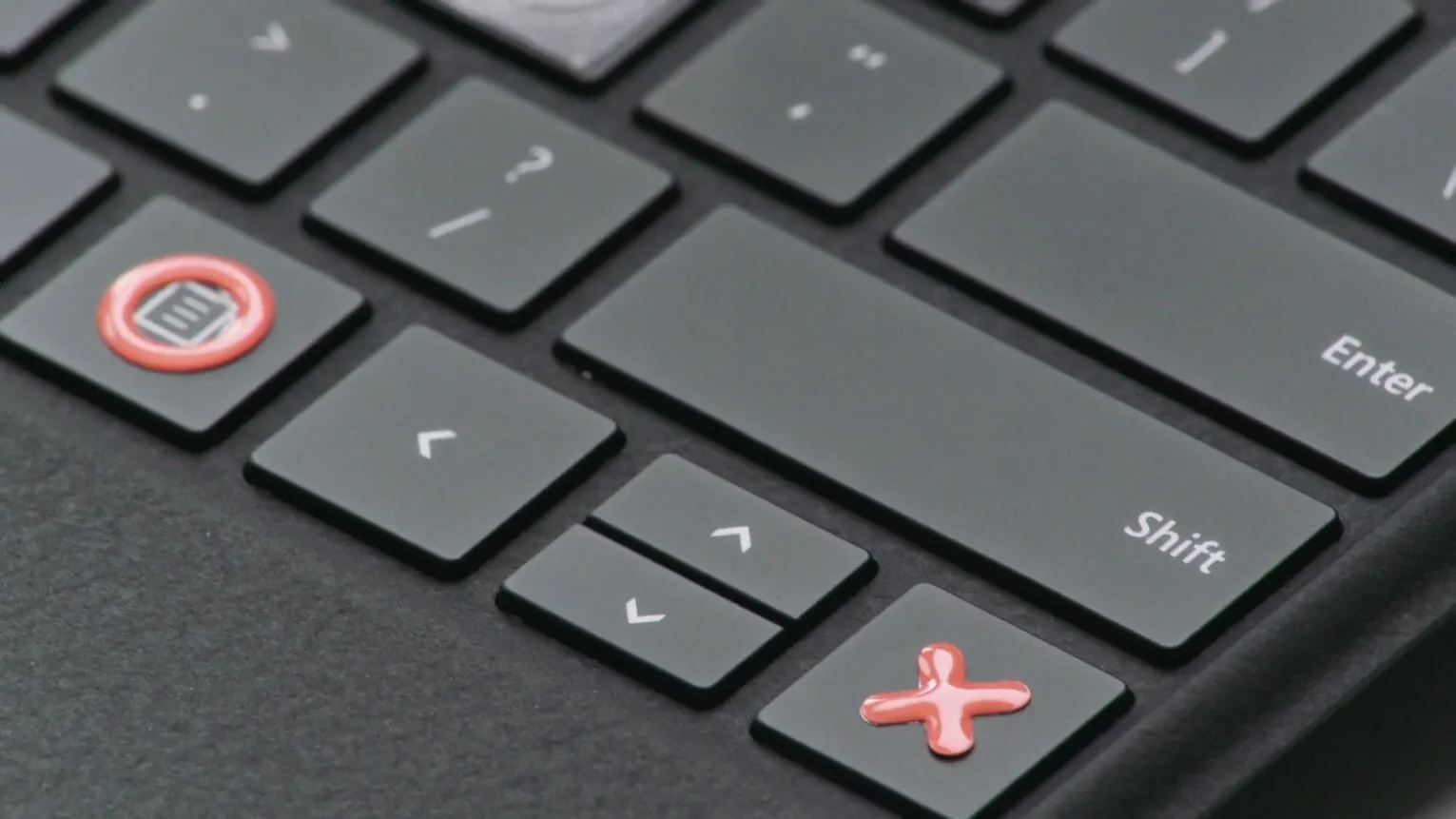
Microsoft is creating a “Surface Adaptive Kit” for its range of laptops/tablets, to better accommodate people with disabilities.
The kit includes “keycap labels, bump labels, port indicators and device openers”.
For example, a device opener includes a pull tab and ring, to make it easier to open the laptop lid.
There’s no pricing information yet, but it is expected to launch this year.
Prefer longer newsletters? You can subscribe to week11y, fortnight11y or even month11y updates! Every newsletter gets the same content; it is your choice to have short, regular emails or longer, less frequent ones. Curated with ♥ by developer @ChrisBAshton.