Category: dai11y

Accessibility themed newsletter: get your daily dose of a11y.

  • dai11y 05/12/2019

    Your daily frequent11y newsletter, brought to you by @ChrisBAshton:

    18 WAI-ARIA attributes that every web developer should know

    • Use aria-label when you can’t use generic <label>, and aria-describedby for supplementary info, such as to associate error messages with their corresponding inputs. Use role="heading" and aria-level="2" instead of <h2> if you can’t use the element (for SEO reasons, etc). Whenever there is a visible status message on the page, it must be announced to users, e.g. with role="status" or role="alert". Use role="search" for landmarking a region responsible for search – there is no HTML5 element for it.
    • Aside: this article links to the incredibly useful aria practices document, which shows recommended implementations for common components like breadcrumbs and carousels.

    Prefer longer newsletters? You can subscribe to week11y, fortnight11y or even month11y updates! Every newsletter gets the same content; it is your choice to have short, regular emails or longer, less frequent ones. Curated with ♥ by developer @ChrisBAshton.
  • dai11y 04/12/2019

    Your daily frequent11y newsletter, brought to you by @ChrisBAshton:

    Walking On Egg Shells: Why Bosses Are Scared To Talk About Neurodiversity

    • Article by psychologist Dr Nancy Doyle, highlighting that companies are increasingly attempting to improve their inclusivity, but are nervous about using the wrong language. “People with disabilities” vs “disabled people” represent two different models – the first being ‘people-first’ (we are people, not conditions) and the latter being the ‘social model’ (we are disabled by a non-inclusive society). Nancy advises following a consensus where there is one: for example, the term “autistic person” is commonly used as they see it as their identity, not something they have. Where there there isn’t a consensus, we should use multiple terms interchangeably, ideally with a brief explanatory footnote at the end of written communication so that people can see that you have thought about your choices.

    Prefer longer newsletters? You can subscribe to week11y, fortnight11y or even month11y updates! Every newsletter gets the same content; it is your choice to have short, regular emails or longer, less frequent ones. Curated with ♥ by developer @ChrisBAshton.

  • dai11y 03/12/2019

    Today is the International Day of People with Disabilities. This is an occasion “to educate the public on issues of concern, to mobilize political will and resources to address global problems, and to celebrate and reinforce achievements of humanity.” It’s also a good opportunity to remind teams in the UK public sector of their responsibility to make sites conform to WCAG 2.1 by September 2020.

    This article about the most common WCAG violations seems an appropriate choice today:

    We Analyzed 10,000,000 Pages and Here’s Where Most Fail with ADA and WCAG 2.1 Compliance

    • Article by accessiBe, analysing mostly small US websites. They used automated tooling with AI to avoid false positives, e.g. avoid failing a non-compliant form if it’s never actually in view. 98% of sites failed WCAG 2.1 AA compliance with their menus alone (there are quite stringent requirements around using ESC and arrow keys to navigate the menu, which requires JavaScript rather than just good HTML markup). The next big fail was popups (89%), where most have no accessibility built in whatsoever, breaking the experience for keyboard users. 83% failed on buttons, mostly for not using <button> or role="button" markup. 76% failed on icons (often social media icons with no off-screen text). 71% failed on forms; most that passed were from ready-made systems such as Shopify.

    Prefer longer newsletters? You can subscribe to week11y, fortnight11y or even month11y updates! Every newsletter gets the same content; it is your choice to have short, regular emails or longer, less frequent ones. Curated with ♥ by developer @ChrisBAshton.

  • dai11y 02/11/2019

    Your daily frequent11y newsletter, brought to you by @ChrisBAshton:

    Accessibility drives aesthetics

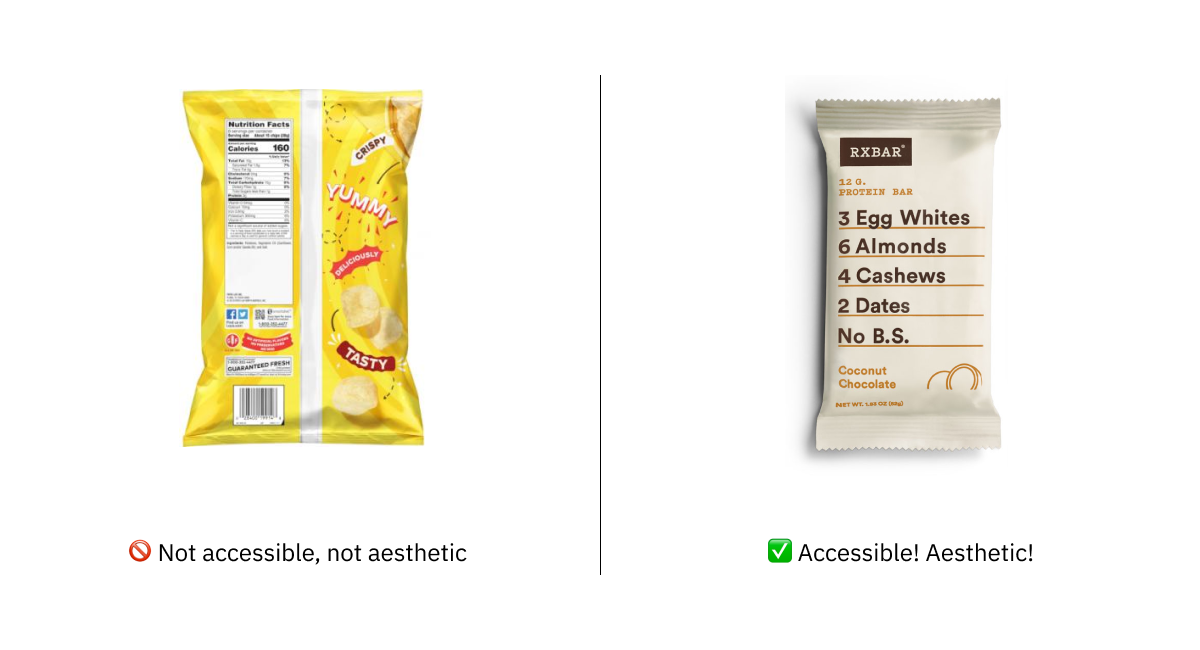
    • A recent article by UX designer, Alex Chen. It debunks the myth that accessible designs have to be ugly designs, giving real-world examples of websites (GOV.UK gets a mention here) and products (RX protein bar packaging) that are both accessible and aesthetically pleasing. That aside, Alex asserts that the two are not of equal importance; an interface change may not look quite as visually pleasing to one person, but another person is now able to use it. Some people concentrate their efforts on the ‘normal’ use case, neglecting designing the ‘edge cases’ for disabled people, but that is an ableist practice; “edge cases [should] refer to scenarios, not humans”. There’s a final point about disabilities disproportionately affecting people of a certain race or class, and that we have an opportunity to start to level the playing field for all.

    Prefer longer newsletters? You can subscribe to week11y, fortnight11y or even month11y updates! Every newsletter gets the same content; it is your choice to have short, regular emails or longer, less frequent ones. Curated with ♥ by developer @ChrisBAshton.

  • dai11y 29/11/2019

    Your daily frequent11y newsletter, brought to you by @ChrisBAshton:

    Creating Online Environments That Work Well For Older Users

    • An opinion piece by Barry Rueger, who for context is “well past sixty”. He makes several suggestions that are widely recognised as universally good practices, such as improving website load speed and ensuring good grammar and spelling. Others are more subjective: that older people prefer text and ignore videos in search results, or that they hold onto old, slow machines for longer. Barry makes the case for black text on white backgrounds; a controversial subject as several user groups find this harder to read (there are some comments below the article to that effect). Finally, an interesting point about the success of Amazon being down to its website’s consistency; “we know the site, and we know that we can do our shopping quickly and painlessly”. He suggests resisting the urge to reinvent your website unnecessarily.

    Prefer longer newsletters? You can subscribe to week11y, fortnight11y or even month11y updates! Every newsletter gets the same content; it is your choice to have short, regular emails or longer, less frequent ones. Curated with ♥ by developer @ChrisBAshton.

  • dai11y 28/11/2019

    Your daily frequent11y newsletter, brought to you by @ChrisBAshton:

    If it has audio, now it can have captions

    • Google have created functionality for the Pixel 4 phone, which they’ve dubbed Live Caption. Like the auto caption feature on YouTube videos, this overlays text on your phone screen – when enabled – showing Google’s interpretation of the audio. The text overlay can be moved independently as demonstrated in this gif, and the captioning works independently of the audio source, so you can watch any video or audio in your browser or apps and be able to get captions. It works entirely locally, so doesn’t use any cell data and stays private on your phone. Google are hoping to roll this out to other Android manufacturers “in the coming year”.

    Prefer longer newsletters? You can subscribe to week11y, fortnight11y or even month11y updates! Every newsletter gets the same content; it is your choice to have short, regular emails or longer, less frequent ones. Curated with ♥ by developer @ChrisBAshton.

  • dai11y 27/11/2019

    Your daily frequent11y newsletter, brought to you by @ChrisBAshton:

    When Things Go Wrong for Blind Users on Facebook, They Go Really Wrong

    • An article highlighting the regularity of bugs and missing features encountered by screen reader users on the Facebook apps and site, with a strong message that there is an under-investment in accessibility development on Facebook and Instagram. A feature for adding colourful backgrounds to posts meant all posts were read out as “Awesome Text Status” for a week. Facebook’s attempt at automating alt text has met a muted response; “image may contain child” doesn’t allow screen reader users to participate. There are options to provide alt text on uploaded images, and forms for flagging accessibility issues, but both are criticised as being too hard to find. Some users have created Facebook groups to share images of text they want transcribing by sighted volunteers. There’s something to be said about the ‘move fast and break things’ ethos and what that means for disabled users.

    Prefer longer newsletters? You can subscribe to week11y, fortnight11y or even month11y updates! Every newsletter gets the same content; it is your choice to have short, regular emails or longer, less frequent ones. Curated with ♥ by developer @ChrisBAshton.

  • dai11y 26/11/2019

    Your daily frequent11y newsletter, brought to you by @ChrisBAshton:

    Playing with state

    • Article by Sarah Higley, exploring how best to denote the state of a Play/Pause video button for screen reader users. Most ‘toggle buttons’ for a binary state should have an aria-pressed attribute with value “on” or “off”; screen readers communicate this ‘state change’ more quickly than a change in property (such as aria-label). Sarah argues that the play/pause button, however, is the exception to the rule and should only change the aria-label (from “Play” to “Pause”), as changes in state don’t make sense in this context (“play button off”). Most importantly, avoid changing both or you’ll confuse your users (“play button, on” vs “pause button, off”).

    Prefer longer newsletters? You can subscribe to week11y, fortnight11y or even month11y updates! Every newsletter gets the same content; it is your choice to have short, regular emails or longer, less frequent ones. Curated with ♥ by developer @ChrisBAshton.

  • dai11y 25/11/2019

    Your daily frequent11y newsletter, brought to you by @ChrisBAshton:

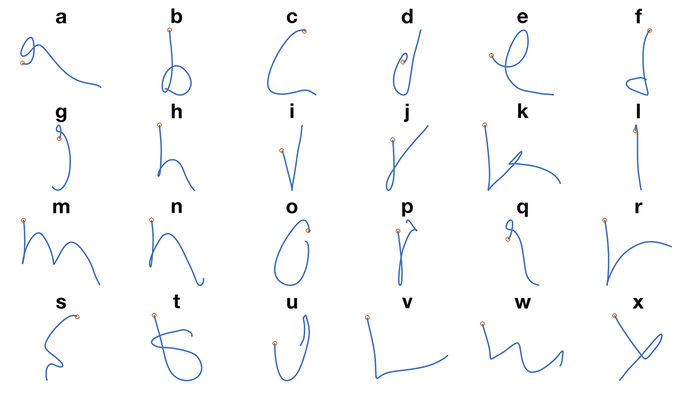
    Letters of the alphabet next to their representations in the neural network

    AI allows paralyzed person to ‘handwrite’ with his mind

    • People who are ‘locked in’ with severe paralysis, unable to communicate physically, are slowly being able to communicate via technology. “Electrodes implanted in a part of the brain involved in motion” have enabled some paralysed patients to move a cursor and select onscreen letters using just their thoughts, at a rate of 39 characters per minute. Researchers in Chicago have since taken this further; a volunteer imagined moving their arm to hand write each letter of the alphabet. Their brain activity helped to train a neural network to interpret the commands with 95% accuracy, allowing them to write at a faster 66 characters per minute. This speed is expected to improve and is not far off the speed of natural handwriting.

    Prefer longer newsletters? You can subscribe to week11y, fortnight11y or even month11y updates! Every newsletter gets the same content; it is your choice to have short, regular emails or longer, less frequent ones. Curated with ♥ by developer @ChrisBAshton.

  • dai11y 22/11/2019

    Your daily frequent11y newsletter, brought to you by @ChrisBAshton:

    How to create content that works well with screen readers

    • GOV.UK blog post by Léonie Watson, 2017. Screen readers read things in different ways: some will read out all punctuation, whereas others omit common punctuation and insert human-like pauses instead. Some words require different pronunciations depending on context (tying a “bow” vs taking a “bow”); screen readers vary in their effectiveness at handling these. Acronyms such as DLA (Disability Living Allowance) are sometimes read out like a word, being pronounced as “dlah”. You could work around the issue by inserting full stops or spaces, or off screen text with the preferred phonetics (e.g. “Dee El Eh”) but these “fixes” cause issues for other users. It is better to use correct punctuation, spelling and grammar, and standard conventions for abbreviations. Screen reader users are used to making allowances for the quirks of their screen reading software.
    • Aside: we recently had a bug report that “GOV.UK” was being read out as “Governor UK” in JAWS. We’d seen it in VoiceOver before, though that was fixed as of iOS 12.2. There’s not much we can do except report it to the screen reader maintainers.

    Prefer longer newsletters? You can subscribe to week11y, fortnight11y or even month11y updates! Every newsletter gets the same content; it is your choice to have short, regular emails or longer, less frequent ones. Curated with ♥ by developer @ChrisBAshton.