Category: dai11y

Accessibility themed newsletter: get your daily dose of a11y.

  • dai11y 03/11/2020

    Your daily frequent11y newsletter, brought to you by @ChrisBAshton:

    ARIA in CSS

    • Jeremy Keith writes about a technique (prompted by Sara Soueidan) that ‘forces’ you to create accessible experiences. You can use ARIA attributes as CSS hooks to ensure your component only looks/functions properly if said attributes are used in the HTML.
    • Consider this CSS: aria-hidden['true'] { display: none }. It ensures you’re properly hiding content from both sighted and screen-reader users; the aria-hidden hides from the screen readers, and the display: none hides from sighted users*.
    • *Jeremy seems to imply that display: none doesn’t hide content from screen reader users, which would indeed make this approach really clever. But display: none does hide from screen readers, so I think there’s been a misunderstanding somewhere. However, I still think the ARIA-in-CSS approach is more semantic, and could be marginally beneficial…
    • Imagine if your CSS fails to load for some reason. With ARIA-in-CSS, at least screen reader users will still ignore the content. If you’d used a class instead (.hide { display: none }), then a CSS load failure would be a broken experience for everybody.

    Prefer longer newsletters? You can subscribe to week11y, fortnight11y or even month11y updates! Every newsletter gets the same content; it is your choice to have short, regular emails or longer, less frequent ones. Curated with ♥ by developer @ChrisBAshton.
  • dai11y 02/11/2020

    Your daily frequent11y newsletter, brought to you by @ChrisBAshton:

    How we recruited people with low/no digital skills on Carer’s Allowance

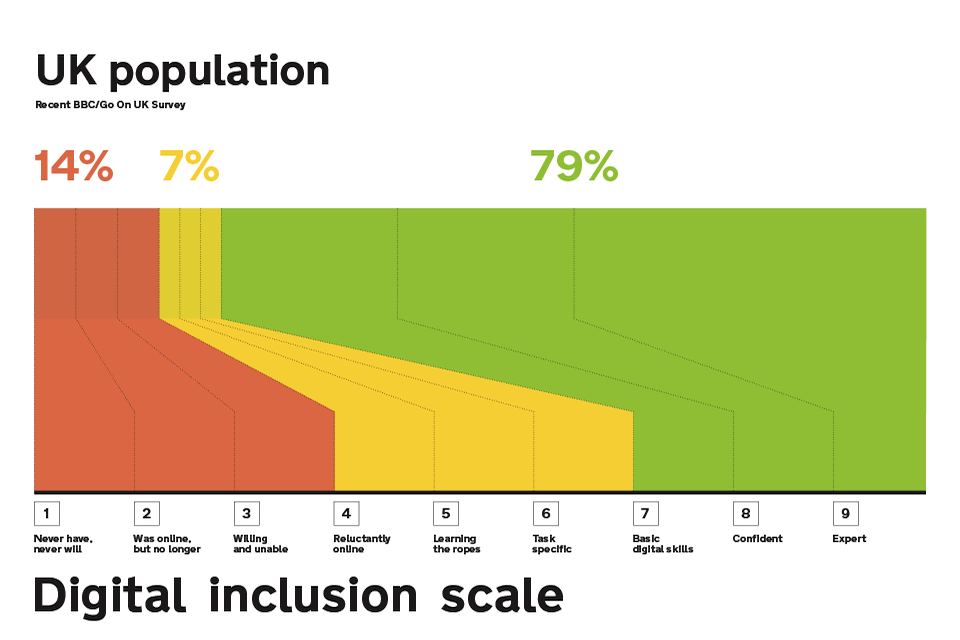
    • A GOV.UK blog from 2015. They wanted to find people on the lowest end of the digital inclusion scale for user research, to ensure a service they were building could be used by anybody. Asking people “How would you rate your computer skills?” wasn’t a reliable indicator of digital literacy as people tend to underestimate their skills and subsequently complete tasks with ease. Making people score themselves against explicit criteria, e.g. “How comfortable are you finding stuff using a search engine such as Google”, was a much better way of finding participants on the lower end of the scale.

    Prefer longer newsletters? You can subscribe to week11y, fortnight11y or even month11y updates! Every newsletter gets the same content; it is your choice to have short, regular emails or longer, less frequent ones. Curated with ♥ by developer @ChrisBAshton.

  • dai11y 30/10/2020

    Your daily frequent11y newsletter, brought to you by @ChrisBAshton:

    Games are being remastered with little thought to accessibility

    • This article came out in June in response to a slew of remastered games being released around May. Many of these games from circa 2010 lacked accessibility features at the time, and haven’t been given any accessibility love in the remaster, lacking basic things like controls mapping. The author shows lots of screenshots and provides a quick overview of games including Mafia 2 and Minecraft Dungeons. Worth a read to remind ourselves how generally terrible in-game subtitles are.

    Prefer longer newsletters? You can subscribe to week11y, fortnight11y or even month11y updates! Every newsletter gets the same content; it is your choice to have short, regular emails or longer, less frequent ones. Curated with ♥ by developer @ChrisBAshton.

  • dai11y 29/10/2020

    Your daily frequent11y newsletter, brought to you by @ChrisBAshton:

    :focus-visible Is Here

    • Matthias Ott writes about the situation where clicking on an element activates its :focus styles – something that can be perceived as ugly. With this new property, you can style elements if they receive keyboard focus, while avoiding styling if they receive focus via mouse click. Example: :focus:not(:focus-visible) { outline: 0 } paired with :focus-visible { outline: 3px solid blue }.

    Prefer longer newsletters? You can subscribe to week11y, fortnight11y or even month11y updates! Every newsletter gets the same content; it is your choice to have short, regular emails or longer, less frequent ones. Curated with ♥ by developer @ChrisBAshton.

  • dai11y 28/10/2020

    frequent11y is 1 year old today! 🎉 Since the first issue of dai11y on 28th October 2019, I’ve published 211 posts covering design, technology, science and ethics in the world of accessibility. I’ve been really enjoying reading so many articles and sharing them with you, and I’ve really appreciated the nice comments and encouragement from you. Please continue to share the newsletter with your friends and colleagues.

    Looking to the future – would you like me to cover any topics I haven’t covered yet? Is there a way I can improve the format? Let me know your comments by emailing me at chris@ashton.codes or reaching out to me on Twitter. Thanks in advance! Without further ado, let’s get on with today’s a11y news…


    Intro to Web Accessibility (see video)

    • What could be a more appropriate 1-year anniversary post than this excellent presentation by Michele A. Williams? In just 16 minutes she explains accessibility in great detail, starting with no assumed knowledge, and bringing the audience up to a good level of understanding about WCAG, WAI, HTML standards, Assistive Technology and team responsibilities. I learned something too – that JAWS stands for Job Access With Speech. A highly recommended watch for anyone new to accessibility!

    Prefer longer newsletters? You can subscribe to week11y, fortnight11y or even month11y updates! Every newsletter gets the same content; it is your choice to have short, regular emails or longer, less frequent ones. Curated with ♥ by developer @ChrisBAshton.

  • dai11y 27/10/2020

    Your daily frequent11y newsletter, brought to you by @ChrisBAshton:

    Google Slides – Present slides with captions

    • When you present Google Slides, you can turn on automatic captions to display your words in real time as you speak them (this only works with Chrome devices set to U.S. English). After you click “Present”, click the “CC” button or use CTRL + SHIFT + C (use CMD instead of CTRL on Mac). As you speak, captions appear at the bottom of the screen (but they won’t include punctuation). To change text position or size, click the drop-down menu Down arrow next to the “CC” button.

    Prefer longer newsletters? You can subscribe to week11y, fortnight11y or even month11y updates! Every newsletter gets the same content; it is your choice to have short, regular emails or longer, less frequent ones. Curated with ♥ by developer @ChrisBAshton.

  • dai11y 26/10/2020

    Your daily frequent11y newsletter, brought to you by @ChrisBAshton:

    Cursor Pro Mouse Highlighter

    • This popped up in my inbox and it looks like a useful tool for people with mild/moderate visual impairments. Through a global toggle in your Mac’s native menu bar, it can be turned on to provide a highlight ‘orb’ around your cursor so that it is easier to keep track of, and a built-in magnifier such that if you hold a particular key while hovered over something, you zoom in slightly. It’s a paid app ($7.99), so a free alternative would be to go to Settings -> Accessibility -> Display -> Cursor and increase the ‘Cursor Size’, though this doesn’t have the highlight orb or zoom functionality.

    Prefer longer newsletters? You can subscribe to week11y, fortnight11y or even month11y updates! Every newsletter gets the same content; it is your choice to have short, regular emails or longer, less frequent ones. Curated with ♥ by developer @ChrisBAshton.

  • dai11y 23/10/2020

    Your daily frequent11y newsletter, brought to you by @ChrisBAshton:

    The most useful accessibility testing tools and techniques

    • Artem Sapegin describes how he tests a11y as a frontend developer. FastPass mode in the Accessibility Insights browser extension highlights the two most common issues to fix. He also uses axe. For contrast checking, he uses Chrome DevTools’ built-in contrast checker and Spectrum. He manually tests navigating the site with a keyboard (focus states etc), using a screen reader, and attempting to zoom in 200%. Finally, he checks the site in ‘browser reading mode’ and in dark mode.

    Prefer longer newsletters? You can subscribe to week11y, fortnight11y or even month11y updates! Every newsletter gets the same content; it is your choice to have short, regular emails or longer, less frequent ones. Curated with ♥ by developer @ChrisBAshton.

  • dai11y 22/10/2020

    Your daily frequent11y newsletter, brought to you by @ChrisBAshton:

    The new normal — its something of a strain

    • David Banes writes some tips on looking after your eyes now that many of us work from home and don’t have an office-like environment to work in. Some are obvious but need stating: take eye breaks, limit screen time where possible, remember to blink, etc. Try to reduce glare on your screen by turning lights behind you off, but aim for a softly lit environment. Try to keep your screen at arm’s length from you, with the top of the screen roughly at eye level. Finally, consider installing f.lux (for desktop and mobile) – software that adds a tint to your screen, getting gradually darker as the evening draws in, reducing blue light. It helps reduce eye strain and can also have a positive impact on your sleep.

    Prefer longer newsletters? You can subscribe to week11y, fortnight11y or even month11y updates! Every newsletter gets the same content; it is your choice to have short, regular emails or longer, less frequent ones. Curated with ♥ by developer @ChrisBAshton.

  • dai11y 21/10/2020

    Your daily frequent11y newsletter, brought to you by @ChrisBAshton:

    Alternative Text for CSS Generated Content

    • An Adrian Roselli post about the new “CSS generated content alternative text” syntax, which allows you to specify alt text for CSS background images. For example: .new::before { content: url("./star.png") / "New!"; }. Browser support is very patchy and this should not be relied on yet, but it is a promising step as currently background images are not accessible to screen readers nor to sighted users using Windows High Contrast mode. It’s worth noting that the alt text won’t display if the image fails to load, so it’s still generally best to use a normal <img>.

    Prefer longer newsletters? You can subscribe to week11y, fortnight11y or even month11y updates! Every newsletter gets the same content; it is your choice to have short, regular emails or longer, less frequent ones. Curated with ♥ by developer @ChrisBAshton.