Category: dai11y

Accessibility themed newsletter: get your daily dose of a11y.

  • dai11y 17/04/2020

    Your daily frequent11y newsletter, brought to you by @ChrisBAshton:

    XR Accessibility User Requirements

    • W3 have released a working draft for accessibility user requirements for XR (virtual/augmented reality). XR currently requires that the user be in a physical position, with high degree of precision, timing and simultaneous action. The draft suggests users should be allowed to navigate an XR environment and interact with objects in it using just their voice, keyboard, Switch, gesture or eye tracking. They should be able to switch between input devices without any tracking issues. Screen magnification users need to be aware of critical messaging in their environments, and should be able to route these to ‘second screens’. Blind users should be able to get detail about items closest to them, and must be allowed to query items and make selections.

    Prefer longer newsletters? You can subscribe to week11y, fortnight11y or even month11y updates! Every newsletter gets the same content; it is your choice to have short, regular emails or longer, less frequent ones. Curated with ♥ by developer @ChrisBAshton.
  • dai11y 16/04/2020

    Your daily frequent11y newsletter, brought to you by @ChrisBAshton:

    Models of Disability: Types and Definitions

    • A useful reference to bookmark. The medical model of disability is “a problem of the person… [requiring ‘fixing’ with] a cure or an adjustment/behavioural change”. The social model sees disability as a socially created problem, requiring individual, community and large-scale change for full integration in society. Whilst there are the main two, other distinct models include the minority, expert, tragedy, religious and economic models. There are a number of others too which are subtle variations of the distinct ones.

    Prefer longer newsletters? You can subscribe to week11y, fortnight11y or even month11y updates! Every newsletter gets the same content; it is your choice to have short, regular emails or longer, less frequent ones. Curated with ♥ by developer @ChrisBAshton.

  • dai11y 15/04/2020

    Your daily frequent11y newsletter, brought to you by @ChrisBAshton:

    Styling yourself when you are blind

    • Nas Campanella, who is blind, describes how she used a designer to create her wedding dress, feeling dozens of fabrics before arriving at one with flowers, lace and beads. Journalist Catherine Mahony uses stylists, maintaining a written book of tactile things so she can identify what’s in her wardrobe. She says she used to think she couldn’t have a fashion style when blind, but now thinks about other areas of life where she has a style – music, food, books – and talks to stylists about getting these into what she wears. Online shopping is difficult due to lack of descriptions, and Nas always asks a sighted friend to double-check items before she purchases.

    Prefer longer newsletters? You can subscribe to week11y, fortnight11y or even month11y updates! Every newsletter gets the same content; it is your choice to have short, regular emails or longer, less frequent ones. Curated with ♥ by developer @ChrisBAshton.

  • dai11y 14/04/2020

    Your daily frequent11y newsletter, brought to you by @ChrisBAshton:

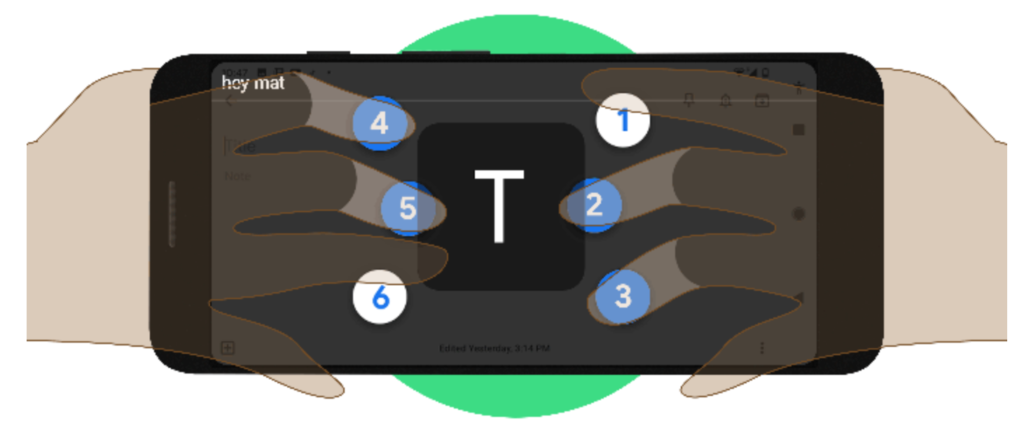
    Braille keyboard for Android

    Google develops virtual braille keyboard for Android, rolling out now

    • Currently, people plug in physical braille keyboards when they want to type, which can be inconvenient on mobile. Google have developed a virtual TalkBack keyboard integrated into Android, which you hold in landscape orientation, supporting both grade 1 and grade 2 braille.

    Prefer longer newsletters? You can subscribe to week11y, fortnight11y or even month11y updates! Every newsletter gets the same content; it is your choice to have short, regular emails or longer, less frequent ones. Curated with ♥ by developer @ChrisBAshton.

  • dai11y 13/04/2020

    Your daily frequent11y newsletter, brought to you by @ChrisBAshton:

    The WebAIM Million – An annual accessibility analysis of the top 1,000,000 home pages

    • A discouraging report on the accessibility of the top 1 million homepages. 98.1% failed at least one WCAG 2 criterion. Most commonly, this was low contrast text (86.3% of all homepages), missing alt text (66% – over half of these were linked images), empty links (59.9%), or missing form input labels (53.8%). All of these (with the exception of alt text) are worse than they were last year. It’s also interesting to note that accessibility varies by site category, language and TLD (law/politics-based English sites on .gov domains tend to be better, news & adult based sites in Russian/Chinese tend to be worse).

    Prefer longer newsletters? You can subscribe to week11y, fortnight11y or even month11y updates! Every newsletter gets the same content; it is your choice to have short, regular emails or longer, less frequent ones. Curated with ♥ by developer @ChrisBAshton.

  • dai11y 10/04/2020

    Your daily frequent11y newsletter, brought to you by @ChrisBAshton:

    How accessible is the HTML video player?

    • Scott Vinkle concludes that the native HTML video player is not particularly accessible, citing a number of issues in certain browser / AT combinations. For example, content ‘behind’ full screen video can still be navigable when it shouldn’t be; controls aren’t always announced when using the tab key; continuous announcements about the current lapsed value distract from the video content. Scott uses Plyr instead, and acknowledges that native YouTube/Vimeo players aren’t suitable for him as he needs to support multiple platforms.

    Prefer longer newsletters? You can subscribe to week11y, fortnight11y or even month11y updates! Every newsletter gets the same content; it is your choice to have short, regular emails or longer, less frequent ones. Curated with ♥ by developer @ChrisBAshton.

  • dai11y 09/04/2020

    Your daily frequent11y newsletter, brought to you by @ChrisBAshton:

    As a disabled person, it’s hard to watch accessibility only improve now that able-bodied are affected

    Prefer longer newsletters? You can subscribe to week11y, fortnight11y or even month11y updates! Every newsletter gets the same content; it is your choice to have short, regular emails or longer, less frequent ones. Curated with ♥ by developer @ChrisBAshton.

  • dai11y 07/04/2020

    Your daily frequent11y newsletter, brought to you by @ChrisBAshton:

    CSS Can Influence Screenreaders

    • Ben Myers explains that some CSS may have unintended side-effects on assistive technologies. <button style="text-transform: uppercase">Add</button>, for example, is read out as the acronym “A.D.D.” on VoiceOver. The line between presentation and content is increasingly blurred with ::before/::after pseudo elements, the output of which is compiled into the same accessibility tree consumed by screen readers. It’s a confusing world.

    Prefer longer newsletters? You can subscribe to week11y, fortnight11y or even month11y updates! Every newsletter gets the same content; it is your choice to have short, regular emails or longer, less frequent ones. Curated with ♥ by developer @ChrisBAshton.

  • dai11y 06/04/2020

    Your daily frequent11y newsletter, brought to you by @ChrisBAshton:

    Accessibility Maze

    • A game developed by The Chang School, Ryerson University (Ontario). It simulates various challenges which are only overcome by good accessible design, providing good metaphors that encourage things like alt text. I don’t want to give too much away as it would ruin the game – it’s extremely well made and only takes around ten minutes to complete, and there’s a handy accessibility booklet to download as a ‘prize’ at the end. Give it a play!

    Prefer longer newsletters? You can subscribe to week11y, fortnight11y or even month11y updates! Every newsletter gets the same content; it is your choice to have short, regular emails or longer, less frequent ones. Curated with ♥ by developer @ChrisBAshton.

  • dai11y 03/04/2020

    Your daily frequent11y newsletter, brought to you by @ChrisBAshton:

    Unexpected accessibility tips

    • An article in broken English, but don’t let that put you off. Chris Cid shares tips for testing your app: use it on your train commute to work (one-handed usage, motion sickness, etc). Test it on people who are in a hurry (grab someone outside a WC!) to simulate lots of distractions, ADHD. Hold your mobile with straight arms, use keyboard only, and wear thick gloves when using a mouse, to test various motor a11y issues. Test your UI colour contrast with a cheap projector in a bright room. Finally, take off your glasses and see how well you can scan for information.

    Prefer longer newsletters? You can subscribe to week11y, fortnight11y or even month11y updates! Every newsletter gets the same content; it is your choice to have short, regular emails or longer, less frequent ones. Curated with ♥ by developer @ChrisBAshton.